Creating a document is often seen as the most challenging step, but the real difficulty lies in tracking its progress after it leaves your hands.
Document tracking addresses this critical need, helping teams understand how their materials are used, shared, and acted upon after distribution.
A document can be perfectly written, correctly filed, and completely ignored. Without a way to monitor its journey, you’d never know.
Today, I’m covering the features that make doc tracking work, how it differs from tools you’re already using, and why the gap it fills is bigger than most teams realize.
What is Document (Doc) Tracking?
Document tracking is the active monitoring of a document’s status, location, and interaction history from the moment it’s created to the moment it reaches its final destination.
It’s not the same as saving a file to a shared folder. Storage tells you where something lives. Tracking tells you what has happened to it.
Every action taken on a document like opening it, forwarding it, or downloading it gets recorded as a timestamped metadata event tied to a specific user.
Those events stack into a log. That log is what makes real-time status possible.
The definition shifts slightly depending on context.
Inside a business, tracking usually means monitoring a document through approval stages. When a document goes out to a client or partner, it means watching how they interact with it.
The context changes. The underlying logic doesn’t. You always get a record of who touched what and when.
What Does a Document Tracking System Actually Monitor?
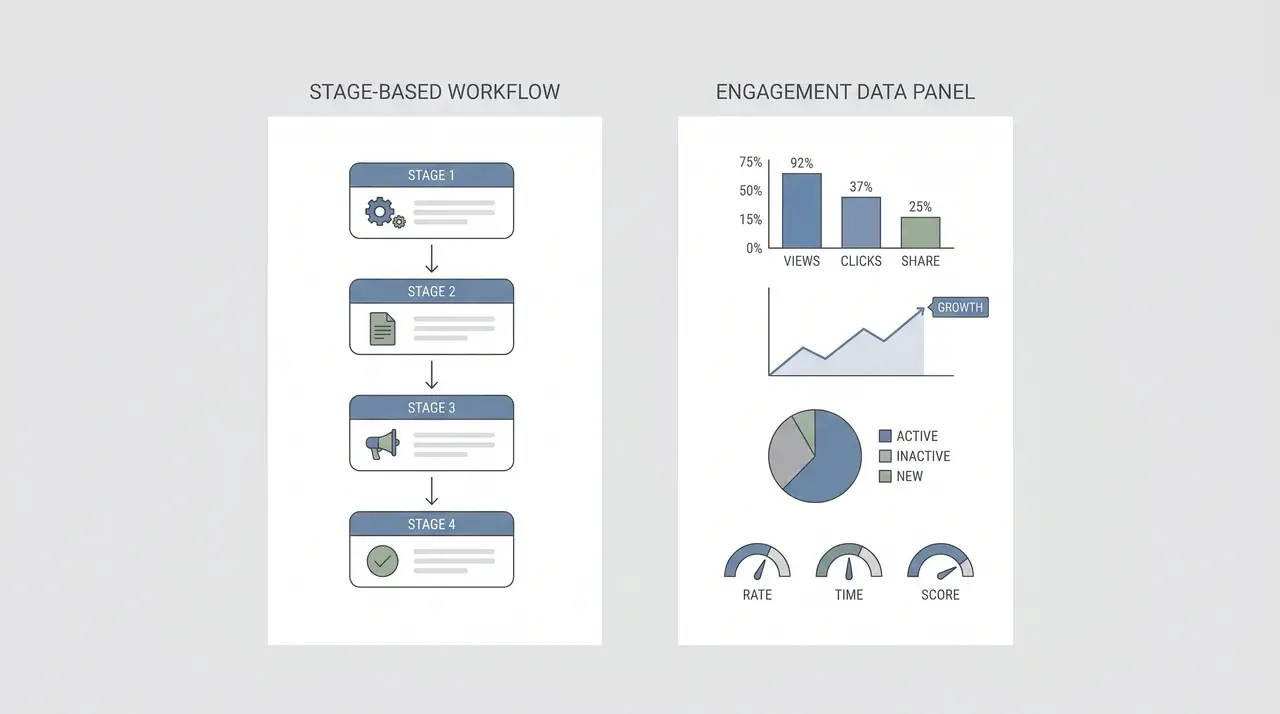
A document tracking system captures a structured event log of every action taken on a document: who opened it, when, for how long, and what happened afterward.
Here’s what the system is actually recording.
Internal Workflow Tracking
Inside an organization, tracking is stage-based. The system logs where a document sits in its lifecycle: draft, under review, approved, or archived, and who moved it there.
Every status change gets a timestamp. Every person who accessed or edited the document leaves a record.
If a document stalls at the review stage for four days, the log shows it. You’re not chasing people for updates. You’re reading a trail.
External Document Tracking
When a document goes outside your organization, the focus shifts from stages to engagement. Instead of tracking where the document sits in a workflow, you get data on what the recipient actually did with it.
The system records when the document was opened, how long the recipient spent on it, which pages they viewed, and whether they forwarded or downloaded it.
There’s one limitation worth knowing. Once someone downloads the file and shares it outside the platform, tracking stops. You lose the thread. That’s not a flaw in any one tool; it’s a structural reality of how file-based sharing works.
Key Features of a Document Tracking System
Not every document tracking tool is built the same, but the features below appear across purpose-built platforms. Knowing them helps you understand what you’re actually evaluating.
1. Audit Trail
Every action taken on a document — creation, access, edit, forwarding, download — is logged with a timestamp and the identity of the person who performed it.
This is the core of what separates tracking from simple file storage. Storage tells you a file exists. An audit trail tells you everything that happened to it.
2. Access Control
You decide who can view, edit, or share a document. This isn’t just a security measure.
It also keeps the audit trail clean. Every logged action maps to an authorized user, so the record is reliable when you need it — during a dispute, an audit, or a compliance review.
3. Version Control
The system maintains a history of document edits: who made them and when. If a document is revised after it’s been sent, you can trace exactly what changed.
You can also revert to a previous version if needed. That matters more than it sounds when contracts or compliance documents are involved.
4. Notifications and Alerts
When a document is opened, edited, or reaches a new approval stage, the system sends automatic alerts. You stop asking “did you see this?” because you already know.
For time-sensitive documents such as contracts pending signature, or proposals waiting on a decision, this closes the gap between sending and following up.
What Document Tracking is Not?
Document tracking is often confused with file storage or version control. They’re related, but they answer different questions.
| Category | Purpose / Question Answered | Key Details Captured |
|---|---|---|
| File Storage | Where is this document? | Location, folder, server, or cloud path where the document resides. |
| Document Tracking | What has happened to it? | Movements, edits, access events, and interactions with the document. |
| Version Control | What changed, and who changed it? | Specific edits, timestamps, author of changes, and previous versions. |
| Document Tracking (access focus) | Who accessed it, and what did they do with it afterward? | User activity logs, downloads, shares, comments, or deletions. |
The difference matters more than it sounds. A team can have a perfectly organized file system and solid version history, and still have no idea whether a contract was opened, whether a proposal was read before a meeting, or whether a compliance document was actually received.
That gap lives in the distribution phase. It’s the window between a document leaving your system and someone acting on it. Storage and version control don’t cover that window. Document tracking does.
Why Document Tracking Matters for Business Workflows

Most workflow gaps don’t happen while a document is being built. They happen after it’s sent, when it’s sitting in someone’s inbox, and you have no signal on what’s happening with it.
What that looks like in practice depends on your role. A few concrete examples:
- A sales team sends a proposal: Tracking shows the prospect opened it twice but never reached the pricing page. That’s a signal to follow up differently; not with “just checking in,” but with a direct question about pricing.
- A legal team shares a contract for review: Tracking confirms it was opened, and logs the timestamp. That’s useful the moment a deadline is disputed.
- An HR team distributes a policy document: Tracking logs receipt and confirms each employee accessed it, which matters when compliance is audited and “I never got that” isn’t an acceptable answer.
The common thread isn’t the tool. It’s the gap that exists when one isn’t there. Once a document leaves your system, you’re usually operating on assumptions.
A sales rep who sees a proposal opened three times in two days follows up differently than one who’s heard nothing.
A compliance manager with a timestamped access log handles an audit differently than one relying on email threads.
That’s the practical difference tracking makes.
Conclusion
Sending a document and knowing it was acted on are two different things. Most teams treat them as the same, and that’s where things quietly break down.
Document tracking closes that gap. It tells you what happened after you hit send, who engaged, when, and where the trail went cold.
If you’ve ever followed up on something only to hear “I never got that,” you already know the problem. Now you know what solves it.
Frequently Asked Questions
What is the difference between document tracking and document management?
Document management covers how documents are stored, organized, and version-controlled within a system. Document tracking is specifically about monitoring what happens during and after distribution; who received it, whether it was opened, and what actions followed.
Can document tracking work for documents shared outside your organization?
Yes, with a caveat. External tracking typically works through a link-based mechanism: instead of attaching a file, the sender shares a tracked link. The system logs when the link is opened, how long the recipient engages, and whether they forward it, as long as the document remains accessible through that original link. Once someone downloads the file and shares it outside the platform, the trail ends.
What kinds of documents are typically tracked?
Contracts, proposals, onboarding forms, compliance documents, and client-facing reports are the most common. Any document that needs to confirm receipt, measure engagement, or maintain an audit trail is a strong candidate, particularly where there are legal or regulatory stakes.
Does document tracking require special software?
Yes, in most cases. Basic email delivery receipts confirm a message was received, not that an attachment was opened or read. Purpose-built document tracking platforms capture event-level data like open time, duration, page views, etc. that standard file-sharing tools don’t provide.