You’ve probably seen the hype around AI note-taking devices and wondered if they actually work.
A lot of people assume tools like Plaud will replace note-taking completely or deliver perfect summaries every time, but that’s rarely how it plays out in real use.
This plaud AI review goes deeper than a simple feature list. I’ll walk you through how it behaves in real situations, where it helps, and where it breaks down.
The gap between “it sounds impressive” and “it works for you” is usually where the confusion sits. Let’s start with the one thing you actually care about: should you even buy it?
Plaud AI Review Verdict: Quick Summary
A quick, practical breakdown to help you decide if Plaud fits your workflow.
Who Should Buy Plaud
Plaud makes sense if your work involves a lot of structured conversations.
That usually looks like:
- Regular meetings with clear turn-taking
- Lectures or classes with one main speaker
- Interviews where you mostly listen and ask questions
In those situations, the device has a real advantage. The audio tends to be cleaner than a typical phone mic, and that directly improves transcription. When the transcript is stable, the summaries are usually usable with only light cleanup.
It also works well if your goal is speed rather than perfection. You want rough notes fast and then refine them later.
Who Should Skip It
Plaud struggles when conversations get messy.
You should skip it if:
- Meetings are chaotic or people talk over each other
- You rely on exact wording for legal or critical work
- You expect summaries to fully understand context
The key issue is simple: once the audio gets messy, the transcript drops in quality, and when that happens, the AI summary doesn’t fix it. It just builds on flawed input.
If your work has zero tolerance for mistakes, this tool will probably feel unreliable.
Plaud AI Pros and Cons
| Pros | Cons |
|---|---|
| Clean audio in quiet environments | Struggles with overlapping speech |
| Accurate transcripts with minimal edits | Errors increase with noise and fast speech |
| Structured summaries save time | Summaries depend fully on transcript quality |
| Easy action point extraction | Not reliable for critical or legal accuracy |
| More consistent than phone apps | Doesn’t truly “understand” context |
Where Plaud Performs Well
Plaud shines when the environment is controlled.
In a quiet room with one main speaker, the microphone captures clean audio, which makes it easier for the transcription system to separate words and speakers. When that part works well, the AI summary becomes genuinely useful.
You’ll notice:
- Clear transcripts with minimal corrections
- Structured summaries that save time
- Action points that are easy to extract
There’s also a consistency benefit. Unlike phone apps, the hardware is built specifically for recording, so you’re less likely to get random drops in audio quality.
Where Plaud Falls Short
Problems show up when reality gets messy.
If two people talk at the same time, the device can’t fully separate their voices. The audio overlaps, the system starts guessing, and those guesses show up as wrong words or merged sentences.
Accents and fast speech add another layer. Even if overall accuracy is high, small errors begin to stack up, and when they stack up, meaning can shift in subtle ways.
Another weak point is expectations. Many people assume “AI summary” means understanding. It doesn’t. It’s pattern-based compression of whatever text it receives. If the input is off, the output follows.
Plaud Note vs. NotePin vs. Pro: Which Version Makes Sense?
A simple breakdown of each Plaud version to help you pick the one that fits how and where you record.
Key Hardware Differences
The biggest difference is how you carry or wear the device.
Plaud Note is card-sized and usually sits on your phone or on the table. It works best in stable setups like meetings or lectures.
NotePin is wearable. You can clip it or wear it, which makes it better for movement or more casual recording.
The Pro versions focus more on refinement than reinvention. You may get better battery life or improved processing, but the core behavior stays largely the same.
The real trade-off is positioning. A device placed well captures better audio. A wearable gives flexibility, but it may also pick up more background noise depending on where you are.
Feature and Use-Case Differences
The core features are similar across versions. They all record, transcribe, and summarize.
What changes is how naturally they fit into your routine.
If you mostly sit in meetings, the standard Note is usually enough. If you move around often or record on the go, the wearable version makes more sense.
There isn’t a single “best” version on its own. It depends on how controlled your environment is. The more controlled it is, the less you need flexibility.
Here’s a quick comparison to make things clearer:
| Version | Form Factor | Best For | Limitation |
|---|---|---|---|
| Plaud Note | Card-sized (kept on phone/table) | Meetings, lectures, stable setups | Less flexible for movement |
| NotePin | Wearable (clip/on-body) | On-the-go recording, casual use | Can pick up more background noise |
| Pro Versions | Refined versions of above | Frequent users needing better battery/performance | No major change in core functionality |
How Plaud AI Actually Works (and Why that Matters)
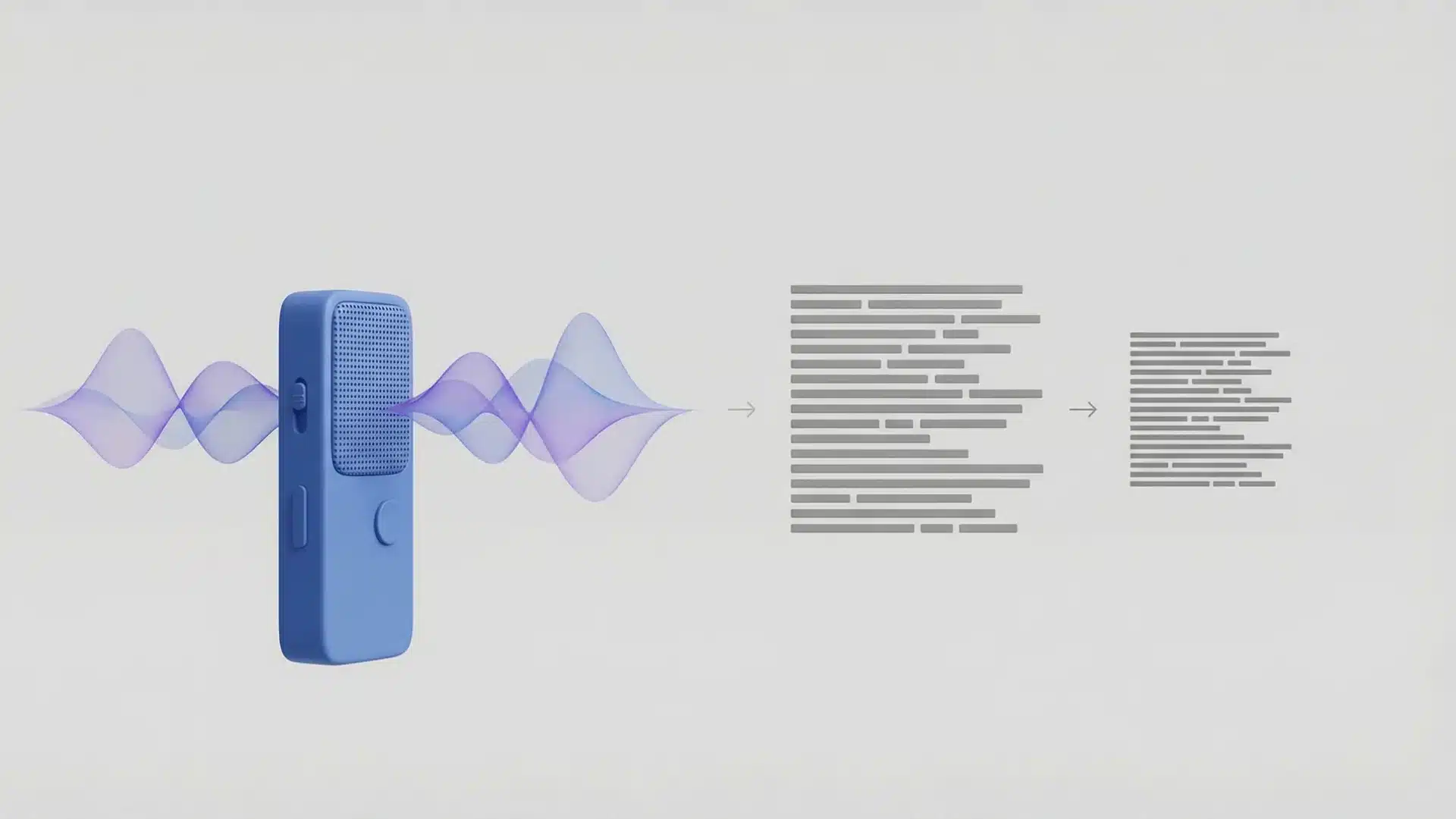
A clear look at how Plaud processes audio into notes, and why each step affects the final result.
Dual Recording Modes Explained
Plaud uses two main ways to capture audio.
One mode records ambient sound through microphones. This is what you use in meetings or classrooms, and it depends on distance, direction, and overall noise levels.
The second mode uses vibration to capture phone calls. Instead of recording through the air, it picks up vibrations from the device itself.
Each mode has limits. Ambient recording weakens with distance and background noise. Vibration recording depends on how clearly the phone transmits those signals in the first place.
From Audio Signal to Transcript
The process happens in stages.
First, the device captures raw audio. These are just sound waves converted into digital signals.
Next, the transcription system converts that signal into text. It tries to separate words, identify speakers, and build complete sentences.
This is where most errors happen. If the audio is unclear, the system fills gaps with educated guesses.
Finally, the AI model takes that text and creates summaries, bullet points, or action items.
At this point, it’s no longer listening to audio. It’s working only with text.
Why Transcript Errors Affect AI Summaries
This is the part most people overlook. The summary is not smarter than the transcript; it depends on it completely.
If a sentence is slightly wrong, the summary can still make sense. But if multiple small errors stack up, the meaning starts to shift.
For example, overlapping speech can turn two separate ideas into one broken sentence. The AI then summarizes that as a single point, even if it’s incorrect.
So the real chain looks like this: audio quality → transcript accuracy → summary quality
If the first step weakens, everything after it becomes less reliable.
Real-World Performance in Meetings, Calls, and Classrooms
This is where Plaud starts to show its real behavior across different situations.
In quiet, structured meetings, it works reliably.
- Transcripts stay close to what was said
- Summaries are usually usable with small edits
- Action points are easy to pull out
You may still see minor errors, but they rarely affect the overall meaning. In these settings, it genuinely saves time.
In group discussions, things get less reliable.
- Sentences get mixed
- Speaker labels go missing
- Phrasing becomes inconsistent
The summary may still look clean, but it can miss or combine important points. This is where you need to review instead of trusting it directly.
Phone calls behave a bit differently. Since Plaud uses vibration capture instead of air-based recording, it avoids some background noise. That can make it more consistent than speakerphone recording in many cases.
But accuracy still depends on signal quality. If the input is weak or distorted, the transcript reflects that. It’s more stable, not perfect.
Subscription Costs and Long-Term Value
The free plan gives you just enough to try the device properly.
You can record short sessions and see how transcription and summaries behave. For occasional use, it holds up fine. But once usage becomes regular, the limits show up quickly.
That’s where the gap appears between “it works” and “it fits your workflow.”
The paid plan becomes relevant the moment you start depending on it.
Light users usually stay within limits. Moderate users hit caps every week. Heavy users run out fast and can’t rely on the free plan at all.
The cost scales with how much you use it.
At that point, the value becomes personal. If it saves you hours every week, it feels worth it. If you only use it occasionally, the subscription can feel unnecessary.
Plaud vs. Other Note-Taking Options: Does Hardware Really Help?
| Option | Strength | Limitation | Best For |
|---|---|---|---|
| Smartphone Apps | Easy to use, always available | Inconsistent audio quality | Casual use, quick recordings |
| Traditional Recorders | Very clean audio | No transcription or summaries | High-quality raw recordings |
| Other AI Note Takers | Simple, software-based workflow | Depends heavily on device and environment | Convenience-first users |
| Plaud | Balanced audio + AI processing | Still affected by environment | Structured meetings, regular use |
Plaud sits between raw recording quality and automated note-taking. It doesn’t fully replace either side, but it combines both in a way that works well in the right conditions.
If consistency and time-saving matter more than perfect accuracy, the hardware starts to make sense.
Wrapping Up
This plaud AI review comes down to one simple idea: the device is only as good as the environment you use it in. When audio is clean and structured, it performs well and genuinely saves time. When conversations get messy, its limits show quickly.
The biggest mistake is expecting it to understand context like a human would. It doesn’t. It processes signals and patterns. Once you see it that way, its behavior makes more sense.
If your workflow fits its strengths, it can be a helpful tool. If not, it will feel inconsistent. Read more blogs on the site to find tools and setups that fit your workflow better.
Frequently Asked Questions
Is Plaud AI worth it?
It’s worth it if your conversations are structured and repeat often. It saves time in note-taking but isn’t ideal for chaotic discussions or critical accuracy needs.
Can Plaud work without a subscription?
Yes, but only for limited use. The free plan has strict caps. Regular or professional use usually requires a paid plan to stay practical.
How accurate is Plaud transcription?
Accuracy is high in clean environments. It drops with noise, accents, and overlapping speech. The conditions matter more than the percentage claims.
Is Plaud legal to use in meetings?
It depends on local laws and consent rules. In many places, you need permission before recording conversations. Always check the requirements before using it.