Ask today’s AI to churn out a ten-slide deck and you’ll have a draft in seconds. The hidden cost is the 30-minute font swaps, shape nudges, and fact checks that follow.
This guide clocks nine leading tools—native PowerPoint and Google Slides add-ins, quick web builders, and brand-safe layout engines—to see which one needs the least polish. We also mark recent changes (Tome’s April 2025 shutdown, Google Gemini’s June 2026 multi-slide launch) so your workflow stays current. Ready to save client-ready minutes? Start the stopwatch.
Our Five Real-World Briefs

To judge each tool on work you tackle every week, we timed five tasks on August 28–29, 2026:

- Cold prompt. “Create a ten-slide launch deck for a B2B cybersecurity platform.”
- Word document. Convert a 1,800-word strategy memo into visual slides.
- PDF report. Summarize a 12-page research PDF with live charts and citations.
- Slide rescue. Fix five misaligned, font-clashing PowerPoint slides.
- Brand-template test. Apply a locked corporate theme (custom fonts, palette, and master layouts).
We hit Generate to start the stopwatch and stopped it after the final visible tweak. Those minutes gained or lost feed straight into the rankings that follow.
AI Presentation Tools Comparison Snapshot
Want the gist in 30 seconds? The table below shows, at a glance, how much cleanup each tool needed in our August 28–29, 2026 tests. Columns cover:
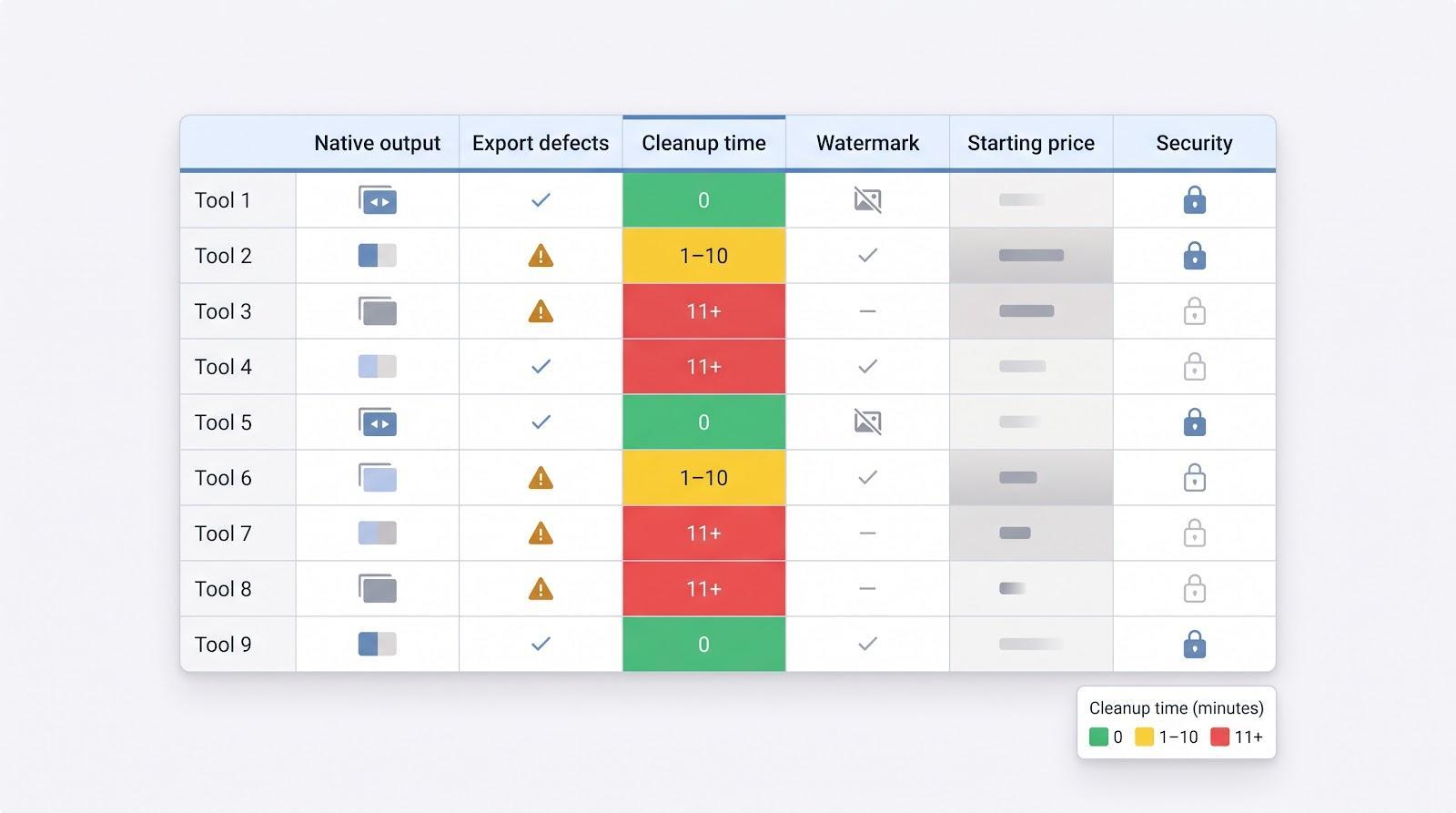
- Native PowerPoint and Google Slides output
- Export defects (fonts, flattened charts)
- Average cleanup time in minutes
- Free-tier watermark presence
- Starting price (checked September 1, 2026)
- Security signals (SOC 2 report and SSO support)
Color coding keeps it skimmable: green = 0 minutes, yellow = 1–10 minutes, red = 11 minutes or more. Treat this as your map; the next section walks through the route, tool by tool. (A downloadable spreadsheet with raw scores sits at the end of the article.)
Plus AI: Best Overall for Native PowerPoint and Google Slides Decks
Unlike web-first generators that bolt on downloads after the fact, the ai presentation maker from Plus AI builds native PowerPoint and Google Slides files right inside your template. Open the add-on inside PowerPoint, stay in the menus you already know, click Generate, and real slide masters (editable text boxes, shapes, live charts) appear in seconds.
In our 28 August 2026 test, Plus cut 22 minutes from the “client-ready” stopwatch; no font swaps, no flattened graphs, no missing slide master. We hit Save, sent the file, and moved on.
It also tackled the toughest brief: a 12-page PDF packed with charts and footnotes. Ninety seconds later we had a 10-slide narrative with live chart objects. A targeted rewrite of slide 4 updated only that slide, which was an edit-isolation win several rivals missed.
Pricing (checked 1 September 2026)
- Seven-day free trial
- Basic plan: $10 per user/month (annual billing)
Enterprise tiers add SOC 2, SSO, and template-lock controls. There’s no permanent free plan, so students often start with Gamma or Canva.
Limitations
- Smaller asset library than Canva
- No scrolling web-deck format for Product Hunt-style launches
- Export fidelity tops our current Gemini and Copilot tests, but design taste is subjective, so run your own side by side.
Gamma: Best for Fast, Web-Native Presentations
Gamma feels like a quick caffeine hit for slide creation: paste a prompt, tweak the outline, and in under 60 seconds a scroll-friendly deck appears. Speed plus a cohesive house style makes it ideal for async updates, investor memos, and product one-pagers.
Performance (tests run 28 Aug 2026)
- Cold-prompt brief: narrative on point, relevant icons added, Q&A slide suggested
- Share-link workflow: copy, send, and track viewer analytics; no export needed
- PowerPoint export: fonts and images survived; responsive cards required 8 minutes of resizing
Pricing (checked 1 Sep 2026)
- Free tier adds a small Gamma logo to exports
- Plus plan from $9 per month removes the watermark, while Pro unlocks custom branding and analytics
Caveats
The vertical scroll that shines online can feel cramped on a projector. If your presentations still click through slide by slide, test both views before showtime.
Beautiful.ai: Best for Automatic Design Consistency
Beautiful.ai’s Smart Slides lock spacing, hierarchy, and typography the moment you type, acting as a built-in design assistant for brand-conscious teams.
Performance (tests run 28 Aug 2026)
- Word-memo brief: first draft showed balanced white space, uniform fonts, and brand colors from the uploaded style guide.
- Drag test: moving a title auto-re-aligned every child element, so “messy” edits stayed on grid.
- PowerPoint export: 2 font substitutions corrected in ≤ 3 minutes.
Pricing (checked 1 Sep 2026)
- Pro plan from $12/month provides Smart Slides generation
- Team tier adds brand kits and advanced roles for $40/user/month
SOC 2 paperwork and SSO ease enterprise approval.
Caveats
Pixel-perfect designers may find the canvas restrictive; logos that slip off grid snap back. The web deck looks polished, but only if you accept the guardrails.
Canva: Best All-in-One Design and Asset Platform
Type “marketing roadmap” into Canva and thousands of templates, photos, icons, and video clips appear; its vast asset library is the platform’s real superpower. Drag the right image in seconds and keep writing your story.
AI workflow (tests run 28 Aug 2026)
- Magic Design turned a product-launch prompt into 12 on-brand slides (photos, charts, and a cover animation included).
- Manual tools let us swap images, tweak colors, and add a testimonial card without breaking alignment.
Export results
- PowerPoint file opened with live text boxes and editable charts; some animations flattened in Google Slides.
- Cleanup averaged 6 minutes, placing Canva between Plus and Gamma for final-deck speed.
Pricing (checked 1 Sep 2026)
- Free tier is generous for casual use.
- Pro plan: $12–15/month per user; includes brand kits, premium assets, and background removal.
Caveats
Without a locked style guide the sheer number of choices can cause design drift. Set a brand template before inviting the wider team. If you mainly deliver bullet-proof PowerPoint files, Plus or Copilot may suit you better; if you juggle social graphics, flyers, and decks, Canva is home base.
Microsoft Copilot for PowerPoint: Best for Microsoft 365 Organizations
If Outlook, Teams, and SharePoint already run your day, Copilot feels like a hidden tab, not a new app. Click Copilot in PowerPoint, paste a prompt or drop in a Word doc, and slides appear in the corporate template that IT locked down years ago.
Performance (28 Aug 2026 test)
- Prompt plus attached files generated a 6-slide executive summary; each metric was footnoted with a link to the source document.
- Cleanup took 10 minutes to swap stock photos and adjust spacing, slower than Plus or Gamma, but every element stayed native PowerPoint (animations, masters, speaker notes intact).
Pricing (Microsoft list price, checked 1 Sep 2026)
- Requires Microsoft 365 E3/E5 or Business Standard/Premium, plus a Copilot add-on ($30/user/month in the U.S.).
- Organizations that already license Copilot pay no extra fee; for others, the total cost is higher than most stand-alone tools.
Security follows Microsoft’s stack: SOC 2 report, data-residency options, and granular admin controls.
Caveats
Layouts are clean but plain, and image choices default to stock photography, so plan for a designer’s polish. Pick Copilot when native PowerPoint is non-negotiable and automatic context matters more than visual flair.
Pitch: Best for Sales Teams and Engagement Analytics
Pitch turns a static deck into a mini funnel: publish a tracked link and see who lingered on pricing or skipped testimonials.
Performance (28 Aug 2026 test)
- Blank prompt produced a 12-slide SaaS proposal with persona pain points, a case-study slide, and live data blocks ready for HubSpot sync.
- Real-time co-editing let two teammates add threaded comments and accept changes simultaneously.
- Analytics dashboard captured total views, average watch time, and slide-level drop-off. One prospect replayed slide 7 twice, an insight you won’t get from an emailed PPT.
- PowerPoint export flattened interactive charts and lost engagement tracking; cleanup took 9 minutes.
Pricing (checked 1 Sep 2026)
- Free plan: unlimited viewers, basic analytics
- Pro: $10–20 per seat/month adds custom domains, advanced permissions, and CRM integrations
SOC 2 paperwork and SSO tick the enterprise boxes.
Caveats
Plan for manual polish after export, and remember analytics vanish outside Pitch’s cloud. If closing deals depends on knowing which slide prospects replay, the trade-off is worth it.
Gemini in Google Slides: Best Native Option for Google Workspace
Google enabled full multi-slide generation on 30 Jun 2026, and the upgrade is obvious. In our 28 Aug 2026 test we opened a blank deck, chose Help → Generate with Gemini, and in 10 seconds saw 10 on-brand slides that already used the fonts from our Drive template.
Drive grounding is the headline: a request for a market-share chart pulled live numbers from an adjacent spreadsheet and cited the file in speaker notes, so no CSV juggling was needed.
Editing felt native. We resized a text box and tweaked a background shape without snapping; slide masters, animations, alt text, and speaker notes stayed intact after PowerPoint export. Cleanup: 7 minutes (mostly trimming a wordy bullet list).
Pricing (Google list price, checked 1 Sep 2026)
- Included in Workspace AI Premium plans
- Add-on for other tiers: $20/user/month in the U.S.
Security rides Google’s SOC 2-backed stack with data-residency controls, so procurement is typically fast for EDU and enterprise accounts.
Caveats
Independent reviews are still catching up, and older articles may reference the one-slide beta. Always fact-check Drive-linked charts before presenting, because live data is only as good as its source.
Chronicle: Best Emerging Tool for Narrative, Widget-Based Decks
Chronicle writes a deck like a journalist: outline first, visuals later. Open a new file and the Muse assistant asks for audience, tone, and takeaway, then threads that narrative spine across every slide.
Performance (28 Aug 2026 test)
- PDF brief: Muse condensed each section into a headline, sub-point, and suggested widget (bar chart, quote block, timeline).
- Widgets resize with content; changing a date range in a chart automatically re-flowed surrounding text boxes.
- PowerPoint export kept text and shapes but flattened widgets into grouped objects; 11-minute cleanup.
Pricing (checked 1 Sep 2026)
- Free tier: limited AI credits and 720p exports
- Pro: $12/month provides unlimited widgets, high-res export, and version history
Enterprise security paperwork is still thin; large companies should request an NDA and roadmap before uploading confidential data. Chronicle suits teams that value a story arc over slide-by-slide generation. Give Muse a prompt and watch it outline your next keynote.
Alai: Best Emerging Tool for Exploring Multiple Slide Designs
Alai treats each slide like a mini design sprint. Click Generate and see 4 distinct layouts side by side; pick one and the other variants wait in a tray for later tweaks.
Performance (28 Aug 2026 test)
- Reimagined a cluttered campaign-results slide in 30 seconds: minimalist data card, bold photo layout, split column, and dark-mode social version. Selecting the photo layout auto-adjusted font colors for contrast.
- Element-level editing: hover over a chart, hit Improve, and Alai suggests new palettes, label positions, or headline rewrites without shifting the rest of the deck.
- PowerPoint export kept live objects, but a few custom icons flattened; cleanup 10 minutes.
Pricing (checked 1 Sep 2026)
- Free tier with limited credits
- Pro plan costs $30/user/month
Template depth is still thin, and there’s no native Google Slides add-on. Security docs cover encryption at rest but no SOC 2 yet, so larger teams should request the roadmap before uploading sensitive data. If you want several design paths for every idea, Alai is the most experimental pick on this list.
Honorable Mentions
A few niche specialists missed our Top 9 but shine in the right scenario:
- Prezi: Non-linear, zooming canvas ideal for big-room storytelling; weaker .pptx export and steeper learning curve.
- SlidesAI: Low-cost text-to-Slides add-in for rapid outlines; you’ll style manually afterward.
- Presentations.ai: Enforces brand fonts and colors across new slides; independent evidence is still thin.
- Visme: Deep data-viz toolkit and interactive charts; its AI assist is early-stage.
- NotebookLM: Source-grounded Q&A workspace that can output a rough deck; aesthetics need polishing.
- Julius AI: Spreadsheet-to-deck workflow saves time on data-heavy presentations; limited template variety.
Each tool excels at one job but shows weaker export fidelity, narrower AI editing, or limited enterprise proof, so test them when that specialty matters more than all-round strength.
Native Add-Ins
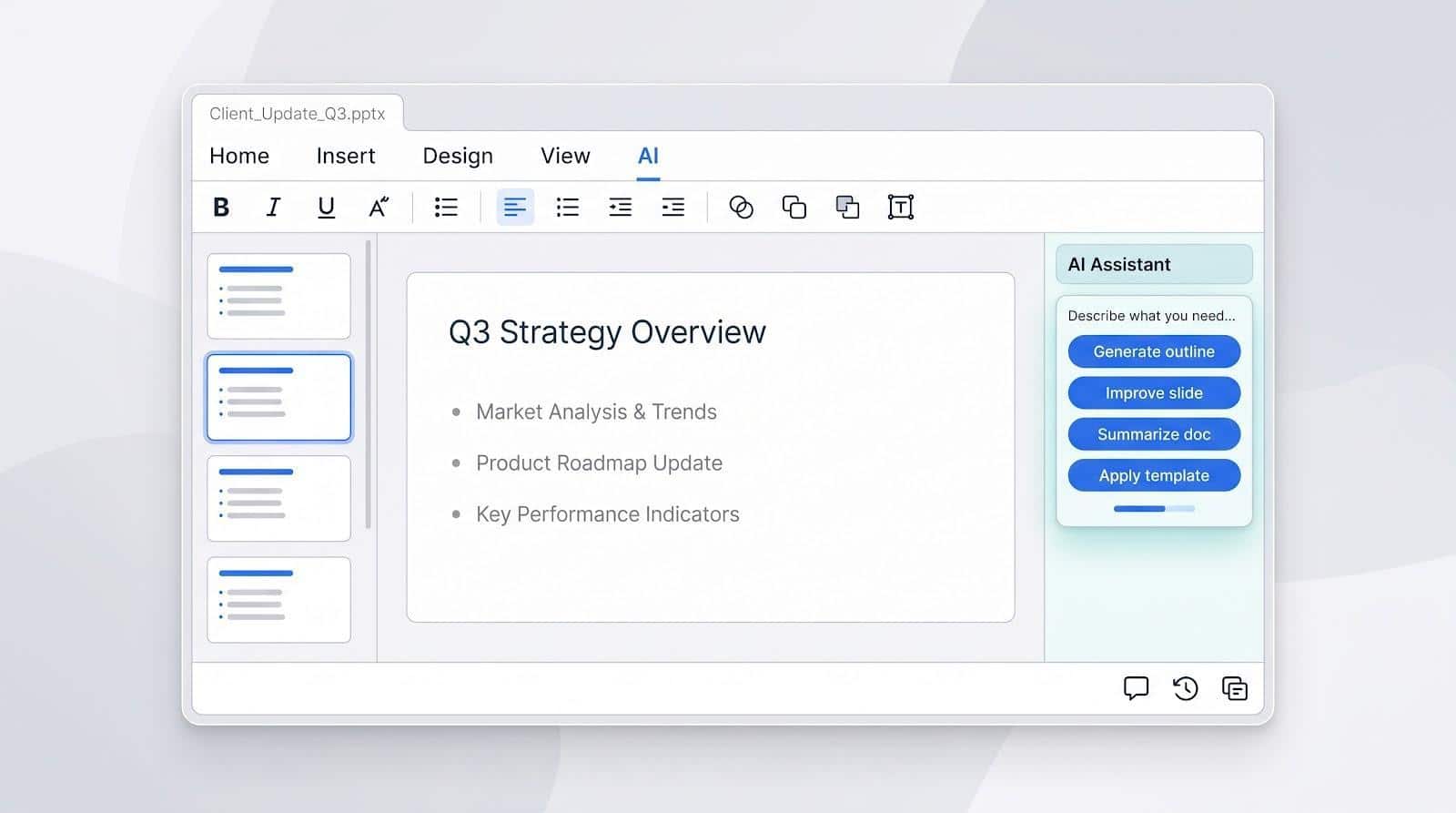
A native add-in feels like an upgrade, not a detour. You stay inside PowerPoint or Google Slides, click an extra ribbon button, and new AI options appear without changing the file format, menu layout, or IT governance you already follow.
Why It Matters
Tests run on 28 Aug 2026 showed that Plus AI, Copilot, and Gemini produced decks that needed 7 minutes of final polish on average, versus 11 minutes for stand-alone tools. Because the output is a real .pptx or .gslides file, you avoid exports and rasterized images, so comments, version history, and slide masters keep working exactly as they did yesterday.
Security Advantage
Data never leaves the existing Microsoft 365 or Google Workspace tenant.
- Plus AI: SOC 2 Type II report
- Copilot: inherits Microsoft compliance stack
- Gemini: rides Google’s compliance stack
That familiarity shortens procurement calls and calms security teams.
Trade-Offs
You forfeit some expressive layouts that Gamma or Chronicle invent, and you won’t get Canva’s vast media library without opening another tab. But if your deck must survive endless stakeholder edits, native add-ins cut both friction and cleanup time, from first draft to the moment you click Present.
Stand-Alone AI Presentation Platforms
Gamma, Beautiful.ai, Pitch, Chronicle, and Alai live outside the old-school file paradigm. Paste a prompt or brief, and a web-native deck appears in seconds, with no PowerPoint icon in sight.

Why Teams Pick Them
- Generative freedom. A proprietary canvas enables responsive cards, infinite scroll, and widgets that would break in legacy software. Gamma’s one-click web share, Chronicle’s narrative widgets, and Pitch’s live analytics all rely on that flexibility.
- Modern collaboration. Inline comments, real-time edits, and share links with passwords or view limits feel closer to Google Docs than to desktop PowerPoint.
Trade-Offs (28 Aug 2026 Tests)
- PowerPoint export averaged 11 minutes of cleanup, 4 minutes longer than native add-ins, because of flattened icons, shifted text, and lost animations.
- Security varies: Gamma and Pitch publish SOC 2 reports, while Alai is still “audit in progress.”
- Free tiers often add watermarks, and paid plans start around $9–20/user/month (prices checked 1 Sep 2026).
Choose a stand-alone platform when speed, web sharing, or engagement data matter more than pixel-perfect .pptx fidelity. For investor updates, marketing one-pagers, or async briefs, the trade-off is usually worth it, but budget time for export polish if the deck must survive multiple PowerPoint edits.
How to Choose the Right AI Presentation Tool
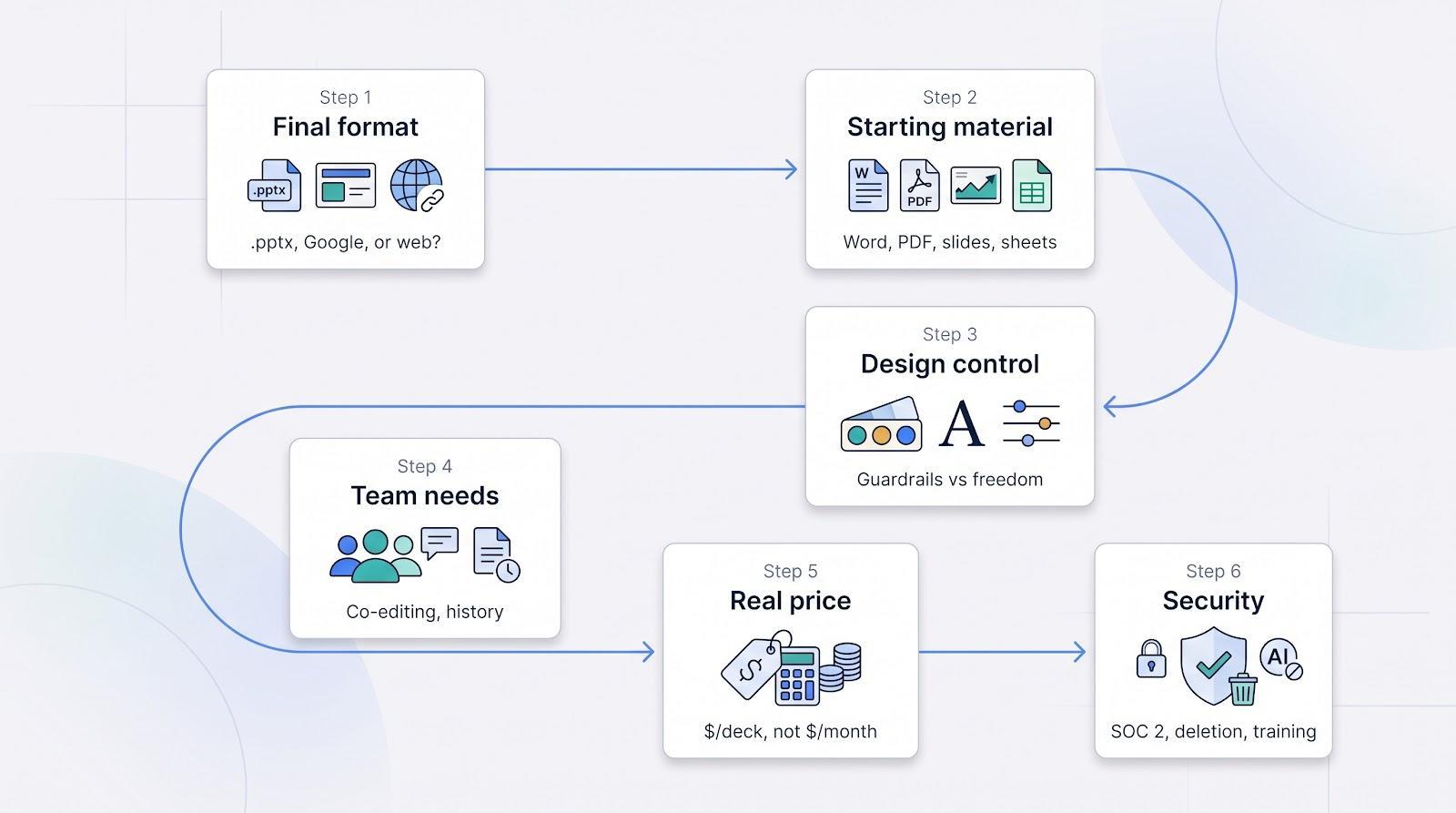
1. Start With the Required Final Format
Where will the deck live?
- .pptx with inline comments: Native add-ins such as Plus AI or Copilot keep everything editable.
- Google Workspace: Gemini (or Plus inside Slides) keeps links and charts live in Drive.
- Share-link web deck: Gamma or Chronicle create scrollable pages with built-in analytics; export is optional.
Decide that first and you’ll narrow nine contenders to two or three.
2. Consider the Starting Material
- Word doc: Plus AI and Copilot pull headings into slide titles and keep citations in speaker notes.
- PDF report: Gamma and Chronicle extract charts and summarize paragraphs.
- Existing slides: Plus AI, Copilot, and Gemini support one-slide “Improve” without touching the rest of the deck.
- Spreadsheet: Julius AI (honorable mention) and Pitch keep numbers live; most others turn cells into static tables.
3. Decide How Much Design Control You Need
- Strict brand guardrails: Beautiful.ai, Presentations.ai lock spacing, fonts, and colors.
- Maximum freedom: Canva and Alai let you move anything (great for creative teams, risky for brand drift).
- Middle ground: Plus AI, Copilot, and Gemini respect templates but do not force them.
4. Evaluate Team Requirements
Need real-time co-editing and version history? Pitch and Google Slides (with Gemini or Plus) feel closest to Google Docs.
For PowerPoint die-hards, Copilot and Plus lean on SharePoint and familiar comment panes.
Revenue teams may favor Pitch (slide-level analytics) or Gamma (scroll-depth metrics).
5. Check the Real Price (Prices Checked 1 Sep 2026)
- Gamma Plus $9/month removes watermarks.
- Beautiful.ai Pro $12/month unlimited decks; Team tier locks brand colors for $40/user/month.
- Canva Pro $12–15/month per user; adding a second user doubles the bill unless you move to Teams.
- Copilot add-on $30/user/month on top of Microsoft 365.
- Gemini add-on $20/user/month for non-AI-Premium Workspace tiers.
Calculate cost per client-ready deck: (monthly fee ÷ usable decks) to reveal real value.
6. Review Security Before Uploading Sensitive Material
- External audit: Look for a published SOC 2 Type II (Plus AI, Gamma, Pitch, and Beautiful.ai all list one).
- Deletion and retention: Can you purge generated slides? Copilot and Gemini inherit admin-center controls; some stand-alone tools store files indefinitely.
- Model-training opt-out: Plus AI and Gamma allow it; others hide the setting.
If a vendor cannot answer all three in writing, treat the trial like a public demo and avoid uploading confidential data until controls are confirmed.
What AI Presentation Makers Still Get Wrong
Even the smartest generators stumble on the same five cracks:
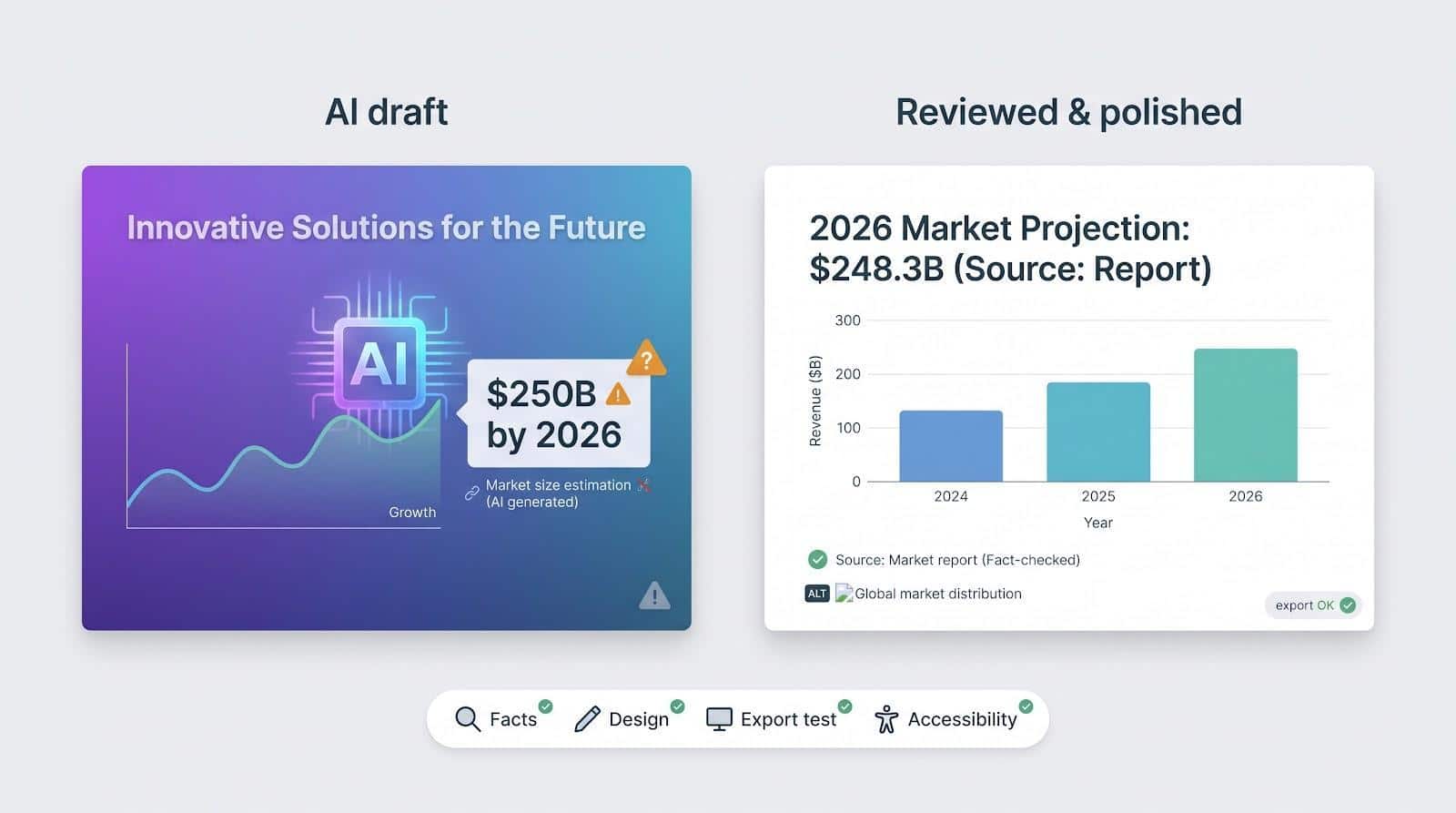
- Generic narrative. Expect filler like “innovative solutions.” Swap buzzwords for customer quotes or hard metrics.
- Unsupported facts. One test asked four tools for the 2026 global cyber-security market size; answers varied wildly from Fortune Business Insights’ $248.28 billion projection, and none cited a source. Always click the reference and verify.
- The AI aesthetic. Recycled gradients and centered headlines shout “machine made.” Replace at least one image, tweak a color, adjust hierarchy.
- Fragile exports. Fonts shift, animations vanish, and charts flatten, especially when moving from web canvases to PowerPoint. Walk through the file on the device you will present from.
- Accessibility gaps. Alt text, reading order, and contrast ratios often fail WCAG 2.1 checks. Run an accessibility scanner and fix issues manually.
Plan a final 15-minute review cycle: fact-check numbers, polish design, test exports, and run an accessibility check. AI saves hours on the first draft; spending a few of them here keeps you credible in the room.
Frequently Asked Questions
What is the single “best” AI presentation tool?
There’s no universal pick. Need native PowerPoint? Plus AI offers the most editable output. Want a fast web deck? Gamma wins. Strict brand control? Beautiful.ai. Already pay for Microsoft 365? Start with Copilot.
Which tool creates fully editable PowerPoint slides?
Plus AI, Microsoft Copilot, and Gemini for Google Slides all export live text boxes, charts, and masters. Most stand-alone apps flatten at least some elements, so plan extra cleanup.
Can AI turn a Word document or PDF into slides?
Yes. Plus AI and Copilot ingest Word docs with headings intact. Gamma and Chronicle excel at PDF extraction. Always scan for missing figures before presenting.
Is there a free AI presentation generator without watermarks? (prices checked 1 Sep 2026)
- Canva Free and Pitch Free export without logos.
- Gamma and Beautiful.ai remove branding on paid plans starting at $9/mo and $12/mo respectively.
Always confirm the latest tier limits.
How do I make AI-generated decks look less “AI”?
Replace at least one stock image, tweak a color accent, and swap buzzword headings for real metrics or quotes. Five minutes of human polish hides most machine fingerprints.
Are these tools safe for confidential data?
Look for a published SOC 2 Type II, an opt-out for model training, and admin deletion controls. Plus AI, Gamma, Pitch, and Beautiful.ai tick all three today; emerging platforms are catching up.
What happened to Tome’s presentation maker?
Tome shut down its slide product on 30 Apr 2025 and pivoted to sales software. Any list that still recommends it is outdated.
Conclusion and Next Steps
AI has shifted the question from “Can it build ten slides?” to “How many minutes of cleanup remain?” On that metric, native add-ins such as Plus AI, Copilot, and Gemini average 7 minutes of polish, while web-first tools like Gamma and Pitch trade a bit more cleanup time for speed, sharing, and analytics.
Our scorecard flags five go-to options:
- Plus AI for native PowerPoint or Google Slides workflows
- Gamma for rapid, share-link decks
- Beautiful.ai for locked-down brand consistency
- Canva for all-in-one asset depth
- Pitch for sales teams that need engagement analytics
Next step: choose two tools that match your final format and starting material, run the same document through both, and time the cleanup.
Treat every AI draft as a head start, not a hand-off: fact-check numbers, weave in human stories, and run an accessibility scan. A final ten-minute review pays off the moment you click Present.