

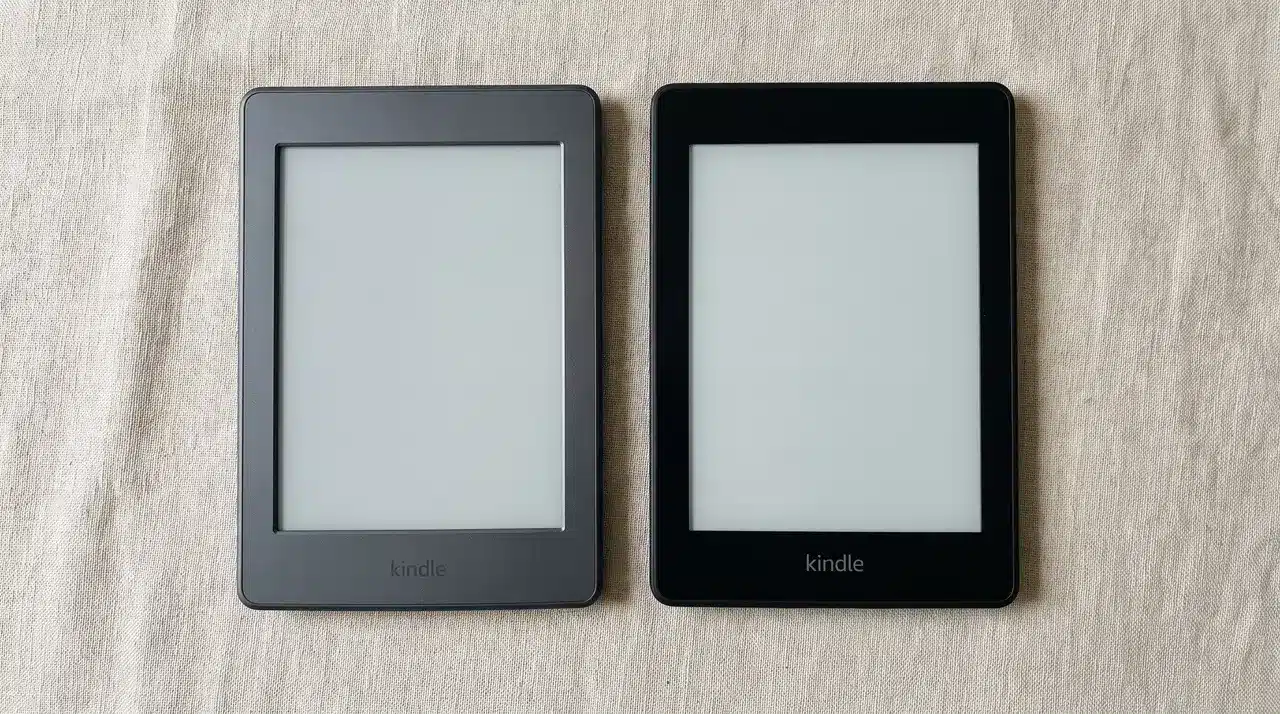
I’ve watched people agonize over Kindle vs Kindle Paperwhite for way longer than the decision deserves. Both are good. That’s exactly what makes it confusing.
The specs look close enough to ignore. Same resolution, same software, same basic shape.
But a few small differences change how these devices actually feel once you’re using them daily. Light quality, speed, and water resistance all play a bigger role than most people expect.
I’ll walk through what each device gets right, where the gap actually shows up, and which one fits your reading habits. Let’s start with the numbers side by side.
Kindle vs. Paperwhite: Quick Comparison
| Feature | Kindle | Kindle Paperwhite |
|---|---|---|
| Price | $109.99 | $159.99 |
| Screen Size | 6 inches | 7 inches |
| Resolution | 300 ppi | 300 ppi |
| Weight | 155g | 210g |
| Front Light | 4 LEDs | 17–19 LEDs |
| Warm Light | No | Yes |
| Waterproofing | No | Yes |
| Battery Life | Up to 6 weeks | Up to 12 weeks |
| Storage | 16GB | 16GB / 32GB Signature |
Key Difference Between Kindle and Paperwhite

Before you decide anything, it helps to see the raw numbers side by side. Here’s how the Kindle and Paperwhite stack up on paper.
1. Price
The Kindle costs $109.99. The Paperwhite costs $159.99, so you’re looking at a $50 gap between them.
That gap isn’t just for a bigger screen. It also buys better lighting, more speed, and water resistance, which the next sections cover.
Both prices can shift depending on region and currency. Check your local Amazon listing before assuming US pricing applies.
2. Screen Size and Weight
The Kindle has a 6-inch screen and weighs 155 grams. The Paperwhite has a 7-inch screen and weighs 210 grams.
That extra inch adds real weight. You’ll notice it more during long reading sessions, especially if you read one-handed.
The Kindle’s smaller size makes it easier to slip into a pocket or bag. The Paperwhite’s larger frame trades some portability for a bigger reading surface.
3. Storage
Both devices start at 16GB. For most readers, that’s enough to hold thousands of books without ever hitting a limit.
The math changes if you download a lot of comics or graphic novels. Those files are much larger than standard ebooks.
In that case, the Paperwhite Signature Edition doubles storage to 32GB. It’s the only option in this lineup built for heavier libraries.
4. Resolution
Both screens list the same 300ppi resolution. On a spec sheet, that makes them look identical.
Don’t stop at this number, though. Pixel density is just one part of what makes a screen good to read on.
Front lighting, contrast, and screen coating all shape how sharp text actually looks. The next section breaks down where the Paperwhite pulls ahead.
5. Ad-Free Upcharge
Both the Kindle and Paperwhite ship with lock-screen ads by default. That’s how Amazon keeps the base price lower on both models.
Want them gone? Add $20 to either device to remove the ads completely.
This cost applies the same way across both models. It doesn’t change the comparison between them, but it does add to your final total either way.
Why the Paperwhite’s Screen Feels Better in Hand
The Paperwhite feels more refined because of its improved front lighting and warmer display options. It uses 17 to 19 LEDs compared with only 4 on the standard Kindle, helping spread light more evenly across the page.
The biggest screen differences come from features you notice during longer reading sessions:
- More LEDs create a smoother front light with fewer uneven areas.
- The Paperwhite’s warm light setting changes the screen from cool white to an amber tone, making it feel closer to a printed page.
- A warmer display can feel easier on the eyes during nighttime reading.
- The flush-front screen gives the Paperwhite a cleaner, more premium look.
- The recessed screen on the Kindle may look older, but its raised edges can help reduce glare outdoors.
For indoor reading, both Kindles still deliver sharp text, strong contrast, and a comfortable experience.
The Paperwhite’s advantage becomes more noticeable when you read at night or move between different lighting conditions. The extra lighting controls make it easier to create a screen that feels closer to real paper.
Is the Paperwhite Actually Faster?
Yes, but you’ll only notice it in specific moments. Amazon says the Paperwhite turns pages 20% faster than the Kindle.
Hands-on testers back that up, though not exactly where you’d expect. Page turns feel similar on both devices during normal reading.
The real gap shows up elsewhere. Downloading books and navigating menus feels noticeably snappier on the Paperwhite.
Browse the Kindle Store or open a big file and you’ll feel the Kindle lagging behind.
So if you spend most of your time just reading one page at a time, speed won’t sway your decision either way. If you’re constantly downloading new titles or jumping between books, the Paperwhite’s extra responsiveness earns its keep.
Battery Life and Waterproofing: What You’re Really Paying For
The Paperwhite’s longer battery life and waterproof design are two features that separate it from the standard Kindle. The Kindle lasts up to 6 weeks on a charge, while the Paperwhite can reach up to 12 weeks.
The battery difference matters more depending on how you use your device:
- Reading for long sessions or keeping Wi-Fi on constantly makes the Paperwhite’s extra battery life more noticeable.
- If you only charge once a week, both models will easily handle regular reading.
- The Paperwhite is rated for water resistance, while the standard Kindle has no official water rating.
- Amazon lists the Paperwhite as capable of handling up to 2 meters of fresh water for 60 minutes.
- Some sources mention different figures, so check Amazon’s latest specifications before relying on water protection.
The waterproofing is where the Paperwhite becomes more practical. The standard Kindle works well for normal reading, but using it near a pool, bath, or beach comes with extra risk.
For readers who spend time around water, that added protection can make the higher price easier to justify.
Which One Should You Buy?
| Choose | Best For | Why It Fits |
|---|---|---|
| Kindle | Reading mostly at home and saving $50 | Small, light, and comfortable to hold with one hand for long reading sessions. |
| Kindle Paperwhite | Reading near water, in changing light, or for several hours | Waterproof design, more LEDs, and faster performance make reading more comfortable. |
| Paperwhite Signature Edition | More storage and wireless charging | Offers extra features missing from the standard Paperwhite. |
| Kindle Colorsoft or Scribe | Color pages or note-taking | Neither the Kindle nor Paperwhite supports these needs, so a different comparison is required. |
Conclusion
Choosing between Kindle vs Kindle Paperwhite really comes down to how and where you read. The Kindle keeps things simple, light, and affordable for anyone reading mostly at home.
The Paperwhite earns its price with better lighting, faster performance, and water resistance you’ll actually use. Neither one is the wrong choice.
It just depends on whether you’re reading in bed every night or bringing your device to the pool. Think about your own habits before you decide.
Still torn? Go back through the sections above and match your reading style to the right device.
Frequently Asked Questions
Is the Kindle Paperwhite worth it over the basic Kindle?
It depends on your reading habits. The Paperwhite’s extra LEDs, adjustable warm light, faster performance, and waterproofing justify the roughly $50 premium if you read near water, in varied light, or for long sessions. For casual indoor reading, the basic Kindle delivers a very similar core experience for less.
Why does the Paperwhite feel more pleasant to read on than the basic Kindle?
The difference comes down to lighting hardware, not just screen size. The Paperwhite uses far more LEDs (17–19 versus 4) and lets you adjust color warmth, which creates a more natural, paper-like look. The basic Kindle’s light is cooler-toned and not adjustable for warmth.
Is the basic Kindle good enough for casual reading?
Yes. For everyday indoor reading, the basic Kindle handles text well, includes an adjustable front light, and feels easier to hold one-handed. Its main trade-offs are a smaller screen, cooler light temperature, no waterproofing, and roughly half the battery life of the Paperwhite.
Which Kindle should I buy if I read near water?
Choose the Kindle Paperwhite. It carries an IPX8 waterproof rating, officially tested to withstand submersion in fresh water, while the basic Kindle has no water resistance at all. If you read in the bath, by the pool, or at the beach, this is the deciding factor.



One Response