Product advertisers need more video variations than most production teams can create by hand. The challenge is not only speed. Products must still look accurate, branding must stay consistent, and each ad must fit the platform where it will run.
That demand keeps growing. In 2026, 84% of consumers say they want to see more videos from brands, while 63% prefer a short video when learning about a product or service.
The right AI tool can help turn product pages, images, scripts, and campaign ideas into usable ads much faster. This guide compares six options based on product handling, creative control, ad variations, branding, platform support, and cost.
Table of Contents
- Best AI product video advertising tools
- How we evaluated them
- Six tools compared
- How to choose the right tool
- Common mistakes
- FAQs
Which AI tools are best for product video advertising?
The strongest choice depends on how much control your campaign needs. Invideo Agent is suited to product-focused campaigns where brand rules, visual continuity, product accuracy, and multiple ad variations need to remain connected across a larger project. Creatify and Zeely focus more directly on performance creative workflows, while Pippit combines product content with publishing features.
VidAU is useful for product link- and image-based video creation with multilingual options. QuickAds places more emphasis on creative research, variations, and performance advertising workflows.
For ecommerce teams, the key question is not simply which tool generates video fastest. Look at how well it preserves your actual product, supports your brand assets, creates multiple formats, and lets your team correct individual scenes without rebuilding the entire ad.
How We Evaluated These Tools
We focused on six practical areas:
- Product image and product URL support
- Brand and product consistency
- AI actors and voice options
- Ad variation workflows
- Social platform readiness
- Pricing and production control
Comparison Table
|
Tool |
Best for |
Product input |
Main strength |
Starting price |
|---|---|---|---|---|
|
Invideo Agent |
Controlled product campaigns |
Images, media, brand assets, references |
Project memory and consistency |
Plus $17/month billed yearly |
|
Creatify |
Performance ads |
URL, image, script |
Fast ad variation |
Free, Starter $39/month |
|
Zeely |
Small brand campaigns |
Product and campaign inputs |
Ads and campaign workflow |
$29.95/month |
|
Pippit |
Ecommerce content |
Links, images, product listings |
Creation plus publishing |
Free plan available |
|
VidAU |
Product and multilingual ads |
URL, images, text |
AI actors and product videos |
Around $29/month |
|
QuickAds |
Performance creative testing |
Prompts, products, ad ideas |
Research and variations |
Trial available, All Access $99/month |
*Pricing and plan details come from the tools’ current official pages.
1. Invideo Agent
Invideo Agent works more like a creative production crew than a single video generator. Brands can provide product images, footage, logos, colors, brand guidelines, campaign references, and other assets. The project context then helps maintain product appearance and brand rules while new shots and campaign versions are created.
With the AI ad maker, teams can create ads for YouTube, Meta, LinkedIn, and TikTok from descriptions, images, or product links. It supports product showcases, promotional ads, offers, catalog-style creative, AI actors, podcasts, and testimonial-style ads. Teams can also select 9:16, 1:1, or 16:9 formats.
Best for: Brands and ecommerce teams that need product accuracy across many ads.
Where it falls short: The workflow rewards teams willing to review, direct, and refine rather than expecting a simple one-step output.
Pricing: Plus currently starts at $17 per month when billed yearly. More than 200 image, video, audio, and music models are available with paid plans.
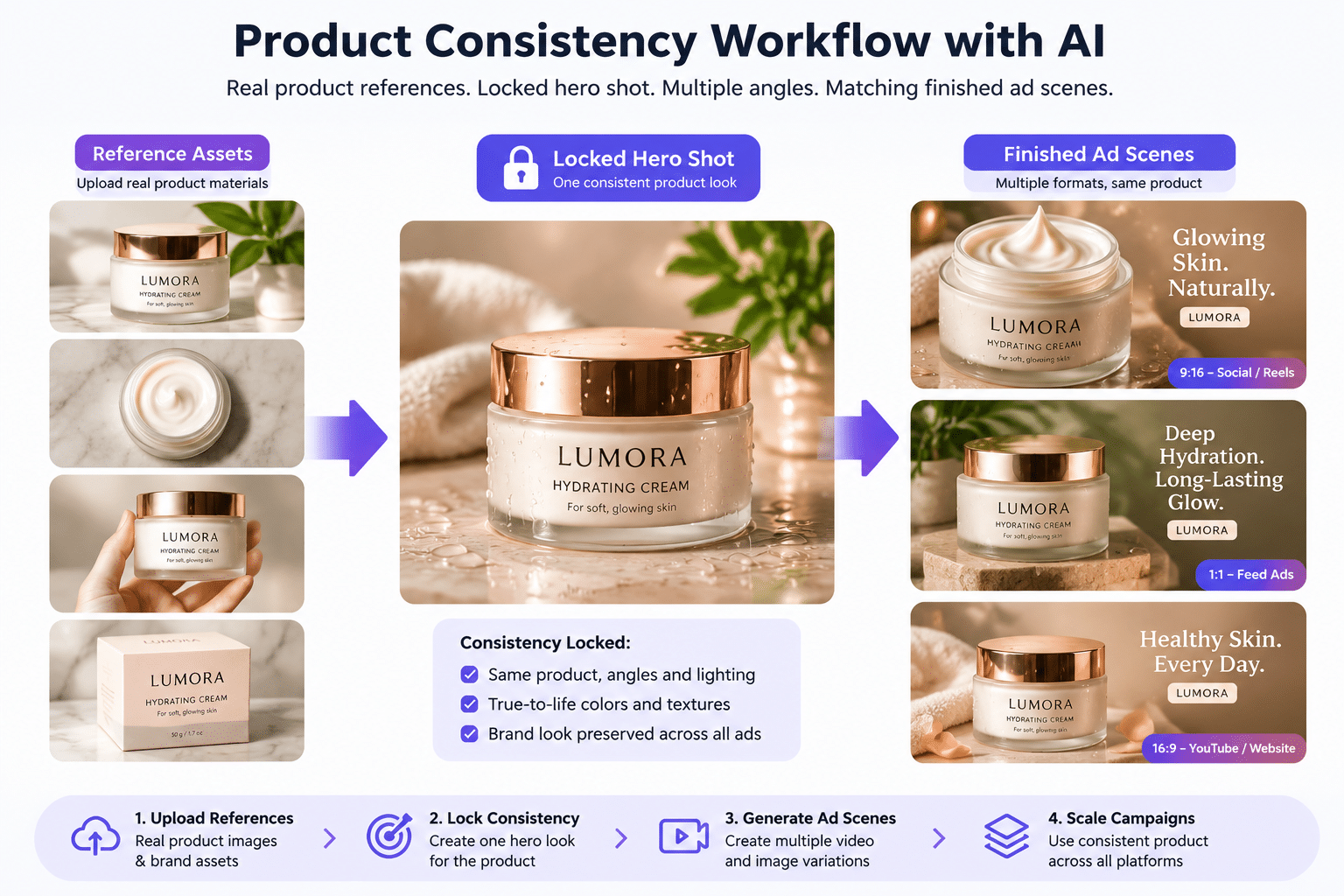
How to get 100% Product Consistency with AI
It is recommended to start with real product photos from several angles, including close details and different lighting. Product sheets can establish scale and packaging, while written material details help the system understand surfaces and fabric behavior. Teams can then lock the first approved setup so later shots inherit its visual direction.
This is especially useful for jewellery, fashion, detailed packaging, product animation, and other campaigns where small visual changes can make the product look incorrect.
What is new with Agent Two?
Agent Two is the latest version of the same product. Its project memory can retain creative decisions, while role-based expert agents can share context across tasks. It can also read scripts, PDFs, brand books, videos, and other project material. It is four times faster and half the price of the earlier version.
2. Creatify
Creatify is built around performance advertising. Users can start with a product URL, script, or image and create product videos and actor-led ad variations. Its paid plans also add larger actor libraries, more AI models, creative agents, competitor ad research, and team features.
Best for: Ecommerce teams testing many hooks and product ads.
Use cases: URL to video, product demonstrations, social ads, and creator style campaigns.
Falls short: Credit limits can matter at higher output volumes.
Pricing: Free plan available. Starter is $39 per month.
3. Zeely
Zeely focuses on AI-generated marketing creative and campaign production. It supports video advertising, talking reels, prompt-based ads, brand-inspired variations, AI actor customization, and campaign tools aimed at smaller businesses and online sellers.
Best for: Smaller brands that want ad creation and campaign features together.
Use cases: Product promotions, social ads, offer creatives, and actor-led videos.
Falls short: It offers less project-level production depth than filmmaking-focused systems.
Pricing: Starter is currently $29.95 per month.
4. Pippit
Pippit combines product video creation with ecommerce-focused content management. Users can generate marketing videos from product links, work with AI avatars and voices, create product images, manage assets, schedule content, and review publishing performance.
Best for: Sellers managing both creative production and social distribution.
Use cases: Product ads, marketplace videos, reviews, demonstrations, and social commerce content.
Falls short: Advanced generation can depend heavily on available credits.
Pricing: A free level is available, with several credit-based paid tiers.
5. VidAU
VidAU turns product URLs, images, or text into video advertising and supports AI actors, voices, reference-based video workflows, and several image and video models. Its product URL workflow can pair generated product visuals with actors for demonstrations or ecommerce ads.
Best for: Product campaigns that need actors or multilingual versions.
Use cases: Ecommerce ads, product explainers, creator style videos, and localized campaigns.
Falls short: Teams should check plan limits before producing at high volume.
Pricing: Current public offers place entry plans around $29 per month.
6. QuickAds
QuickAds combines AI creative production with advertising research and testing. Its video tools support changing hooks, calls to action, scenes, AI voices, and campaign variations, while its wider platform includes ad research, brand controls, publishing, and performance checks.
Best for: Performance teams that want creative testing alongside production.
Use cases: Product videos, offer testing, campaign variations, and social advertising.
Falls short: Its full feature set becomes more expensive than simpler generation tools.
Pricing: A trial is available, while All Access is currently $99 per month.

How to Choose the Right Tool
Choose based on the part of production causing the biggest problem.
- Choose invideo Agent when consistency, product accuracy, brand rules, and multi-ad campaigns matter most.
- Choose Creatify or QuickAds when performance testing and creative variations are the priority.
- Choose Zeely for simpler small business advertising workflows.
- Choose Pippit when ecommerce publishing and content production need to sit closely together.
- Choose VidAU when actor-led and multilingual product advertising is important.
Common Mistakes to Avoid
Do not judge a tool from one attractive demo. Test it using your real product images and brand rules.
Also check how easily you can replace a weak scene, preserve packaging details, change formats, create new hooks, and reuse approved assets. A fast first generation saves little time if every new variation changes the product or brand identity.
FAQs
Can AI create product video ads from a product link?
Yes. Several tools can read a product URL and turn its information and images into an initial advertising video. The quality still depends on the source material. For products with small details, packaging text, special materials, or exact colors, uploading high-quality reference images usually gives you more control.
Which AI tool is best for ecommerce product videos?
There is no single best option for every store. Ecommerce teams should compare product accuracy, variation speed, format support, editing control, and publishing needs. A store producing a few simple social ads may need a different workflow from a brand producing dozens of connected campaign videos each month.
Can AI keep the same product consistent across several ads?
It can, but the workflow matters. Strong reference images, multiple product angles, scale references, approved hero shots, and locked brand rules reduce visual drift. For detailed products such as jewellery, clothing, or complex packaging, consistency should be tested before a team commits to large-scale production.
Can these tools create ads for TikTok, Meta, YouTube, and LinkedIn?
Most product advertising platforms support common social video formats, but platform coverage differs. Before choosing a tool, check whether it supports the aspect ratios and export requirements your campaigns need. Creating separate platform versions is usually better than forcing one edit to work everywhere.
Should small businesses replace traditional product shoots with AI?
Not always. Real photography and footage remain useful when exact physical detail is critical. AI works especially well for extending existing assets, exploring creative concepts, producing variations, testing hooks, changing environments, and adapting campaigns. Many teams will get better results by combining authentic product media with AI-generated supporting scenes.
Final Thoughts
The best AI product advertising tool is the one that fits your production problem. Some tools focus on fast variations, while others focus on campaign management, actors, ecommerce workflows, or long-term product and brand consistency.
Start with one real product and create several campaign versions before committing to a larger workflow. Which part of your product advertising process would you most like AI to make easier?