


Something on your calendar runs itself. A form fires off a task, and an email lands in the right folder. You didn’t do any of it.
You’ve already automated work. The question isn’t whether automation belongs in your workflow; it’s how much further it can go.
Most people get stuck on the same things. What’s actually worth automating? How does it work under the hood? Where does AI change the equation?
Here we will answer all of that, from how automation works to the difference between rules and AI agents to what to hand off.
What Is Work Automation?
Work automation is software, and increasingly AI, that executes tasks and workflows without you completing every step yourself.
It’s easy to think it just eliminates repetitive work. That’s true, but it misses the bigger shift. What automation really does is move your role from doing to deciding.
Instead of completing the task yourself, you handle the exceptions. Those are the moments the system gets stuck or hits something it wasn’t built to resolve.
That shift tells you what’s actually worth automating:
- Predictable tasks with a clear output are best handled by simple rules.
- Tasks with variable input that require judgment are better suited for AI.
The line between the two is the whole game. Get it right, and automation saves you hours. Get it wrong, and you spend those hours fixing what the system broke.
How Does Work Automation Actually Work?
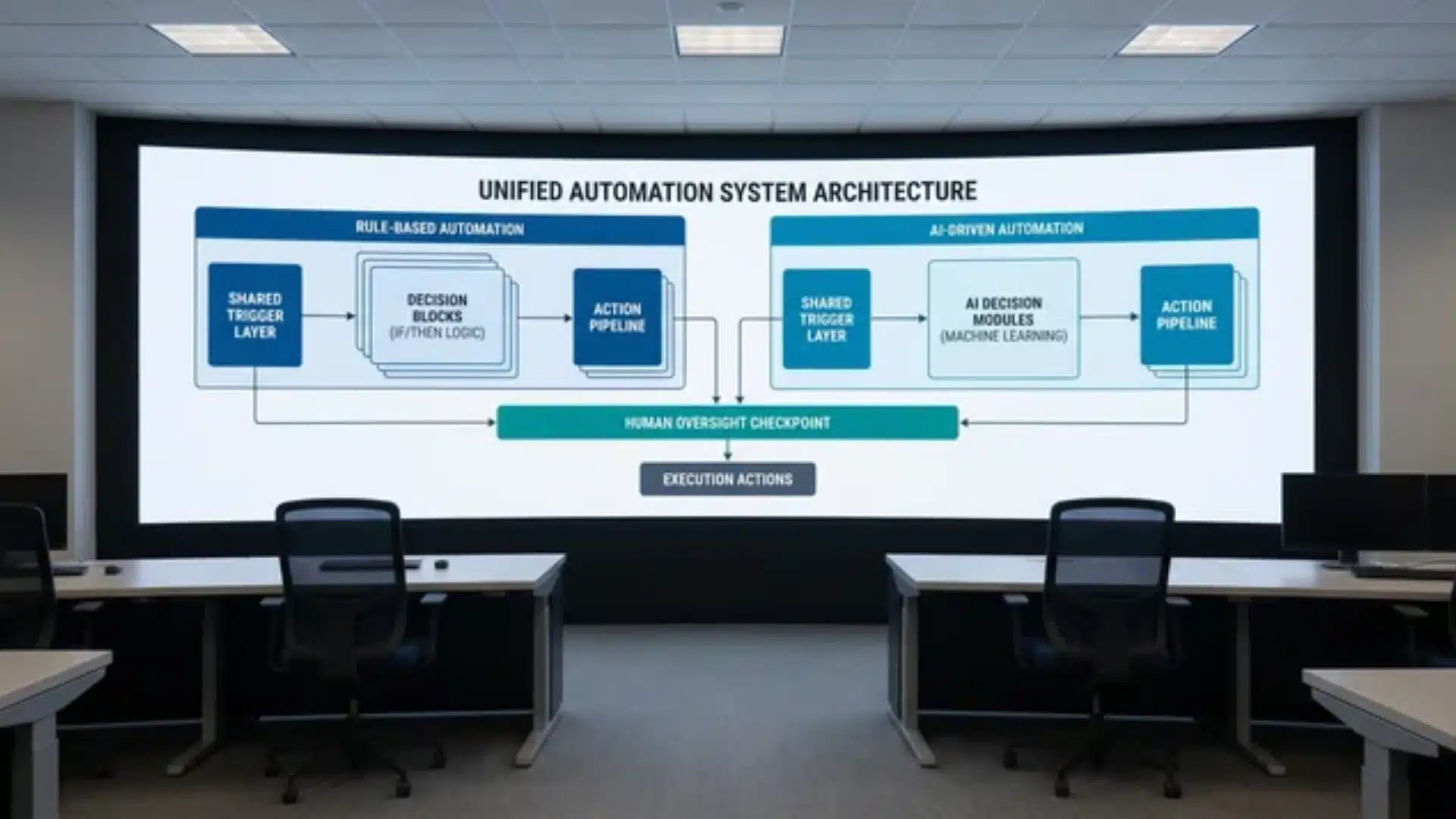
Every automated workflow follows a simple structure: a trigger starts it, logic decides what should happen, and an action carries it out. The real difference across systems sits inside that logic layer.
Rule-Based Automation
Rule-based automation is the original setup. You define conditions upfront, and the system follows them every single time without deviation.
-
Trigger-based execution: A form submission creates a task, or an email with a label gets moved to a folder.
-
Fixed logic flow: If condition A happens, action B always follows.
-
No interpretation: The system does not understand meaning or context, only matches patterns.
This makes it strong in predictable environments where inputs stay consistent.
However, small changes in input can break the flow. A missing field in a form or an email that slightly deviates from expected formatting can lead to missed actions or incorrect routing.
Rule-based automation handles repetitive, structured work well. It struggles when variability enters the system.
AI-Layer Automation
AI-layer automation works differently. It does not follow a fixed path. It evaluates context and decides what to do next based on the situation.
- Context-driven decisions: The system reads input and selects the most suitable action based on meaning and intent.
- Flexible execution: The system handles input variations without requiring new rules for each case.
- Multi-use capability: The system supports inbox summaries, reply drafting, and research based on need.
Instead of predefining every branch, you define the goal, and the system figures out the steps.
This flexibility is why AI agents are often used for tasks such as inbox summarisation, research assistance, and drafting content tailored to tone or history.
But there is a trade-off. AI systems can produce outputs that sound correct but are actually wrong. Rule-based systems fail visibly. AI systems can fail quietly. That makes oversight important.
Where Human Oversight Re-Enters
Automation does not remove humans from the process. It shifts where humans are needed.
- Rule-based systems: Human attention is required when inputs fall outside predefined rules or conditions.
- AI systems: Human attention is required when errors carry high impact or are difficult to reverse.
- Design principle: Automate execution while reserving human review for exceptions and high-risk decisions.
The most effective setups combine rules for stability, AI for flexibility, and humans for control points where errors matter most.
What to Automate at Work and What to Keep Manual?
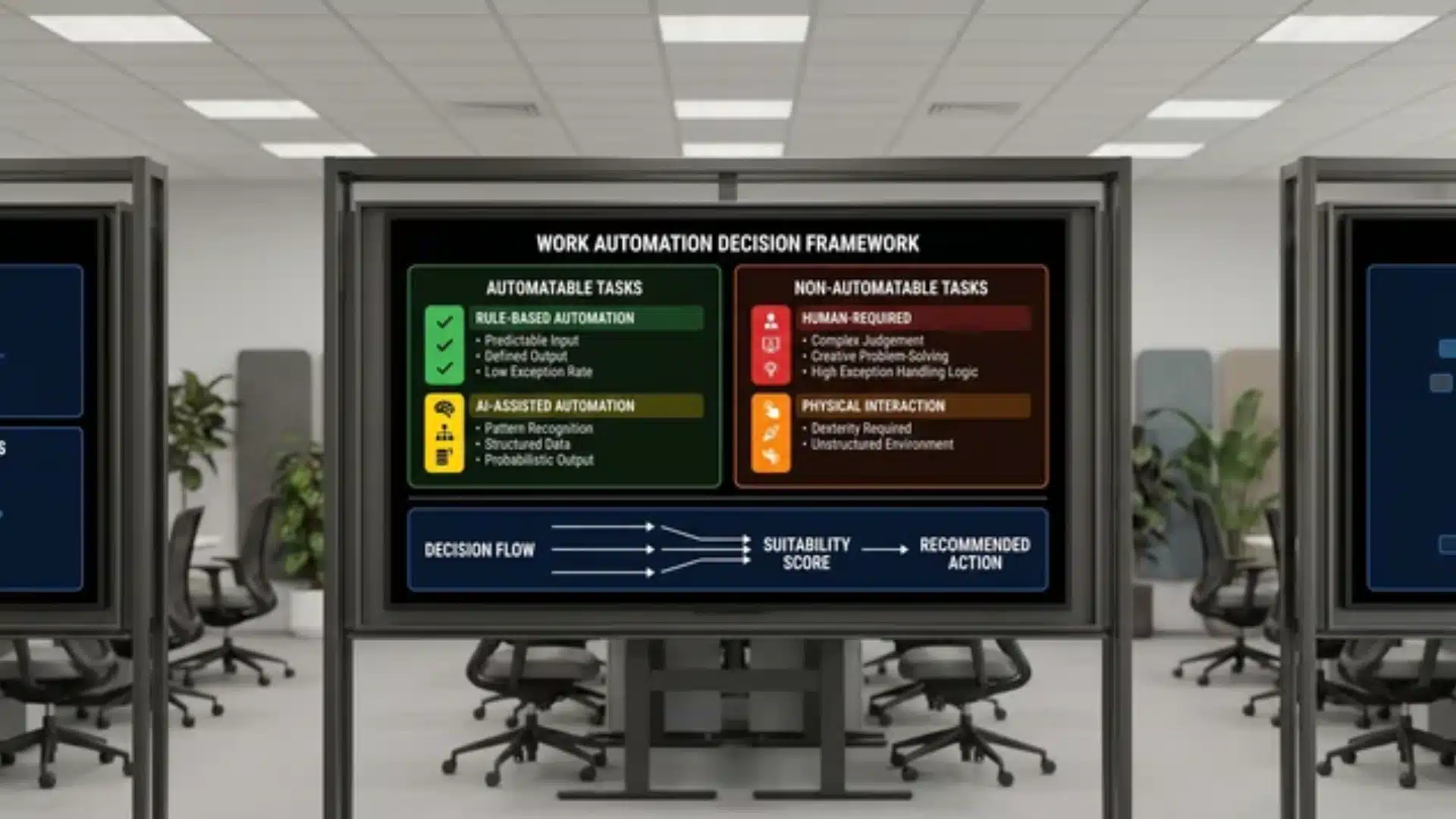
A task is automatable when two things are true. The input is predictable. And the correct output can be defined in advance.
The 80/20 rule maps directly onto this. Automate the high-frequency, low-variation core. Leave the edge cases, judgment calls, and context-dependent decisions with you.
AI extends the boundary further. Variable inputs, summarizing documents, drafting responses, and automating when the goal is clear, even if the path isn’t.
The real test isn’t” s this repetitive?” It’s “can I define done without being in the room?” If not, keep it.
What Types of Work Automation Exist?
The three types exist in layers, with each one building on the previous. Understanding where they sit helps you choose the right approach for the right problem.
| Layer | What it is | Example | Key idea |
|---|---|---|---|
| Task Automation | Single input leads to a single output with no branching | Form submission creates a spreadsheet row, or an incoming email gets filed automatically | Simplest automation layer, focused on one action at a time |
| Workflow Automation | A single trigger runs a chain of actions across multiple tools | A lead submits a form, a CRM record is created, a follow-up email is sent, and a task is assigned to a rep | Removes manual handoffs between steps, saving time across tools |
| AI Workflow Agents | Goal-based system that decides what steps to take instead of following fixed rules | You set a goal, and the agent selects and runs the necessary tasks and workflows. | Sits above workflows and coordinates tools dynamically toward an outcome |
Each layer builds on the previous, offering increasing complexity and flexibility, so you can match the automation type to the specific needs and goals of your workflow.
Which Tools Actually Handle Work Automation?
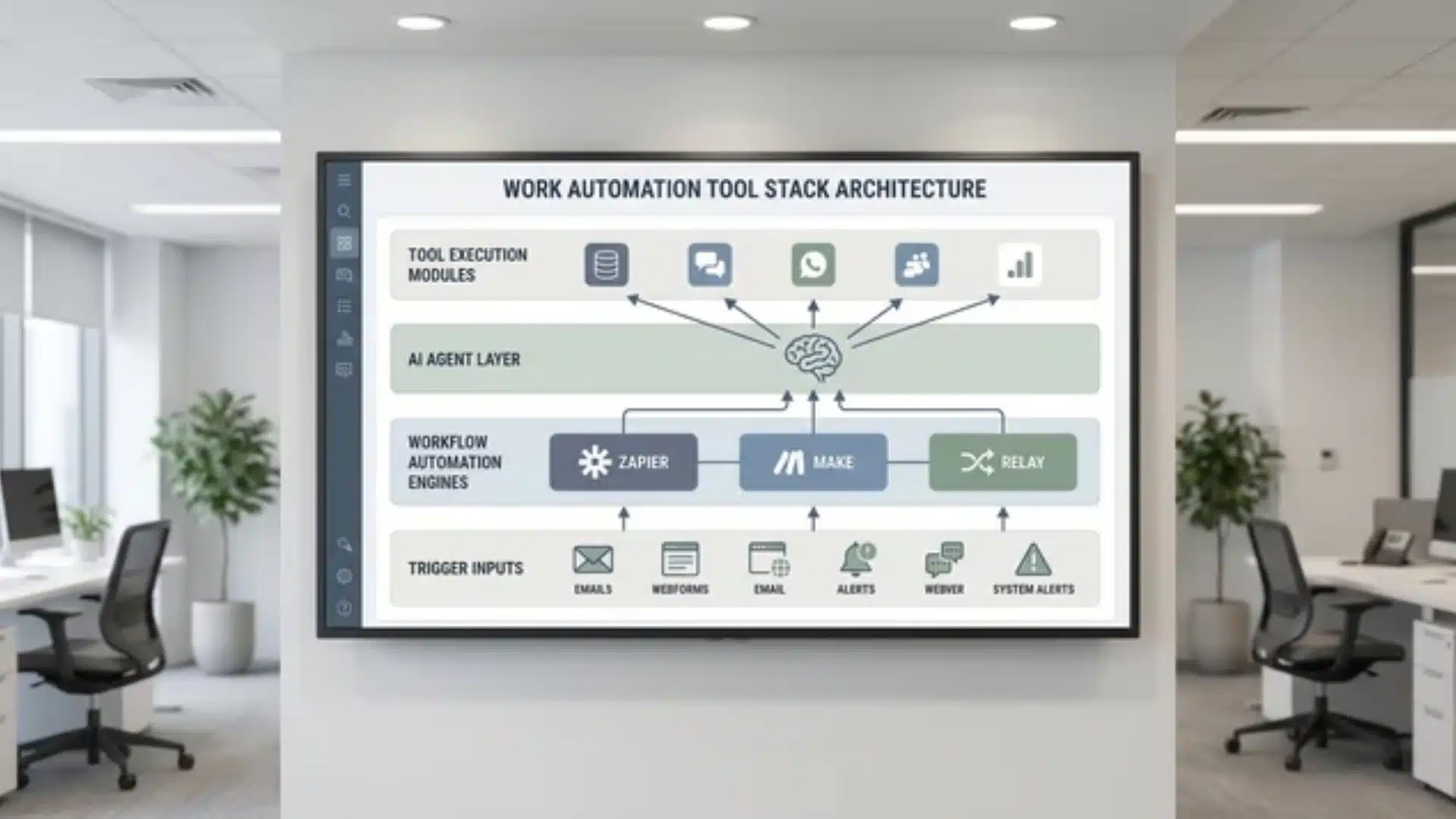
Tool choice follows from the automation layer you need, not the other way around. Match the tool to the problem, not the marketing.
These three operate at the workflow layer. They execute sequences; they don’t think.
- Zapier: Best for cross-platform task triggers with minimal logic, connecting apps quickly in simple, linear workflows.
- Make: Built for complex conditional workflows and high data volume, handling branching logic and heavy data processing efficiently.
- Relay: Adds human approval checkpoints inside workflows, ideal when review or sign-off is required before continuing automation.
For cognitive tasks, you need an agent sitting above these. Agents don’t replace these tools; they call on them. You need both layers working together, not a choice between them.
Conclusion
Work automation isn’t one thing; it’s a set of layers. You now know how rule-based systems and AI agents differ, what’s actually worth automating, and which tools belong where.
The original question most people arrive with is “How do I automate my work?” The real answer starts earlier, with knowing what automation actually does to your role.
You’re not handing off your job. You’re repositioning where you direct your judgment.
Start small. Pick one repetitive task, define what “done” looks like, and build from there. The system follows the clarity you give it.
Frequently Asked Questions
What is work automation?
Work automation is software, and increasingly AI, that executes tasks and workflows without you having to complete each step manually. It shifts your role from doing the work to handling exceptions. What’s automatable depends on whether the correct output can be defined before the task begins.
What are the four types of workplace automation?
The four types are task automation, workflow automation, robotic process automation, and AI agent automation. They’re not alternative; they’re layers. Task automation handles single actions. Workflow automation chains them across tools. RPA mimics manual computer tasks. AI agents work toward goals by choosing which tasks to invoke.
What is the 80/20 rule for automation?
The 80/20 rule means 80% of your workflow’s value sits in the most repetitive, predictable steps. That’s what you automate. The remaining 20% , edge cases, judgment calls, context-dependent decisions , stays with you. Trying to automate that 20% is where most automation projects break down.
How is AI changing work automation?
AI extends automation to tasks with variable inputs, such as drafting responses and researching topics, where rule-based systems fail. The shift is from automating what a workflow does to delegating what it decides. That expands what’s automatable, but requires clearer goal-setting and stronger output review.






One Response