


Pick a no-code automation platform by its feature list, and you’ll likely regret it within a few months.
The feature counts and integration tallies that dominate tell you almost nothing about whether a platform can actually carry your workflows as they grow more complex.
What matters is the execution model running beneath the visual interface: how a platform detects triggers, moves data between steps, and handles the moment your automation needs to branch, transform, or make a decision.
Get that wrong, and you’ll spend more time maintaining workflows than they save you.
What Is a No-Code Automation Platform?
A no-code automation platform is a visual tool that connects your apps through a trigger-action or node-based model, with no code required.
When something happens in one app, the platform detects it and does something in another. That’s the actual mechanism, not “connecting apps” in some abstract sense, but a structured chain: event fires, platform catches it, action executes.
The visual interface makes this feel simple. But you’re not skipping logic, you’re configuring it through menus and drag-and-drop instead of writing it out.
Every step you map is an API call happening underneath. That distinction matters more than most people expect.
Simple automations run fine on almost any platform, but how automation plays out in operational workflows shows how quickly execution model constraints surface when complexity increases.
But the moment you need conditional branching or data transformation, the platform’s execution model starts to matter. Some platforms handle that natively. Others push you toward workarounds that quietly become technical debt.
How Do These Platforms Actually Work?
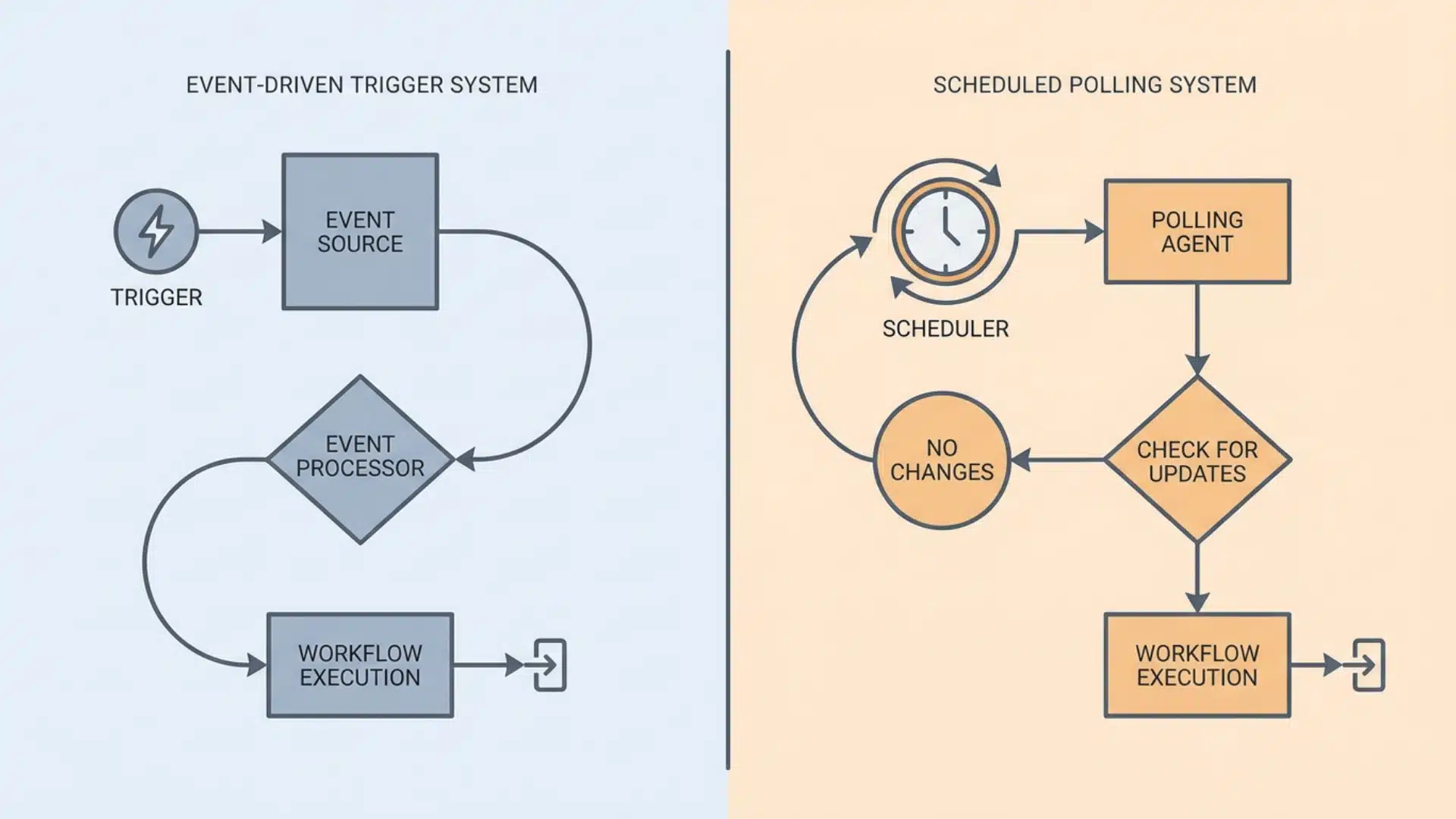
The way a no-code platform detects, processes, and responds to trigger events running beneath the visual interface varies more than most people realize.
That difference, not the interface, not the feature list, is what determines whether a platform can handle your workflows at scale. It’s also the part most comparisons skip entirely.
Event-Driven vs. Scheduled Execution
How a platform detects triggers affects speed, reliability, and what breaks when volume increases. These two models behave very differently in practice.
| Event-Driven | Scheduled Polling | |
|---|---|---|
| How it triggers | Fires the moment the condition is met | Checks for new data on a timer |
| Latency | Near-instant | Minutes to hours, depending on the plan |
| Silent failure risk | Low | Greater changes between checks can be missed |
| Best for | Time-sensitive workflows | Periodic syncs where timing isn’t critical |
If your workflows depend on fast, reliable execution, the polling interval on a lower-tier plan can quietly become a real problem. Event-driven platforms remove that variable entirely.
Linear Workflows vs. Node Graphs
The way data moves through a workflow shapes what you can actually build. These two models have different ceilings, and hitting the wrong one mid-project is costly.
| Linear Workflows | Node Graphs | |
|---|---|---|
| Data movement | Straight line, step by step | Branching paths between connected nodes |
| Data transformation | Limited to what each step passes forward | Possible at any point in the workflow |
| Build speed | Faster to set up | Steeper initial learning curve |
| Complexity ceiling | Reaches limits with conditional logic | Handles branching and transformation natively |
| Best for | Simple, predictable automations | Multi-step workflows with variable data |
The node graph model isn’t inherently better; it’s more appropriate for certain problems. The ceiling only matters if you’re going to hit it.
How Do Zapier, Make, n8n, and Gumloop Differ?
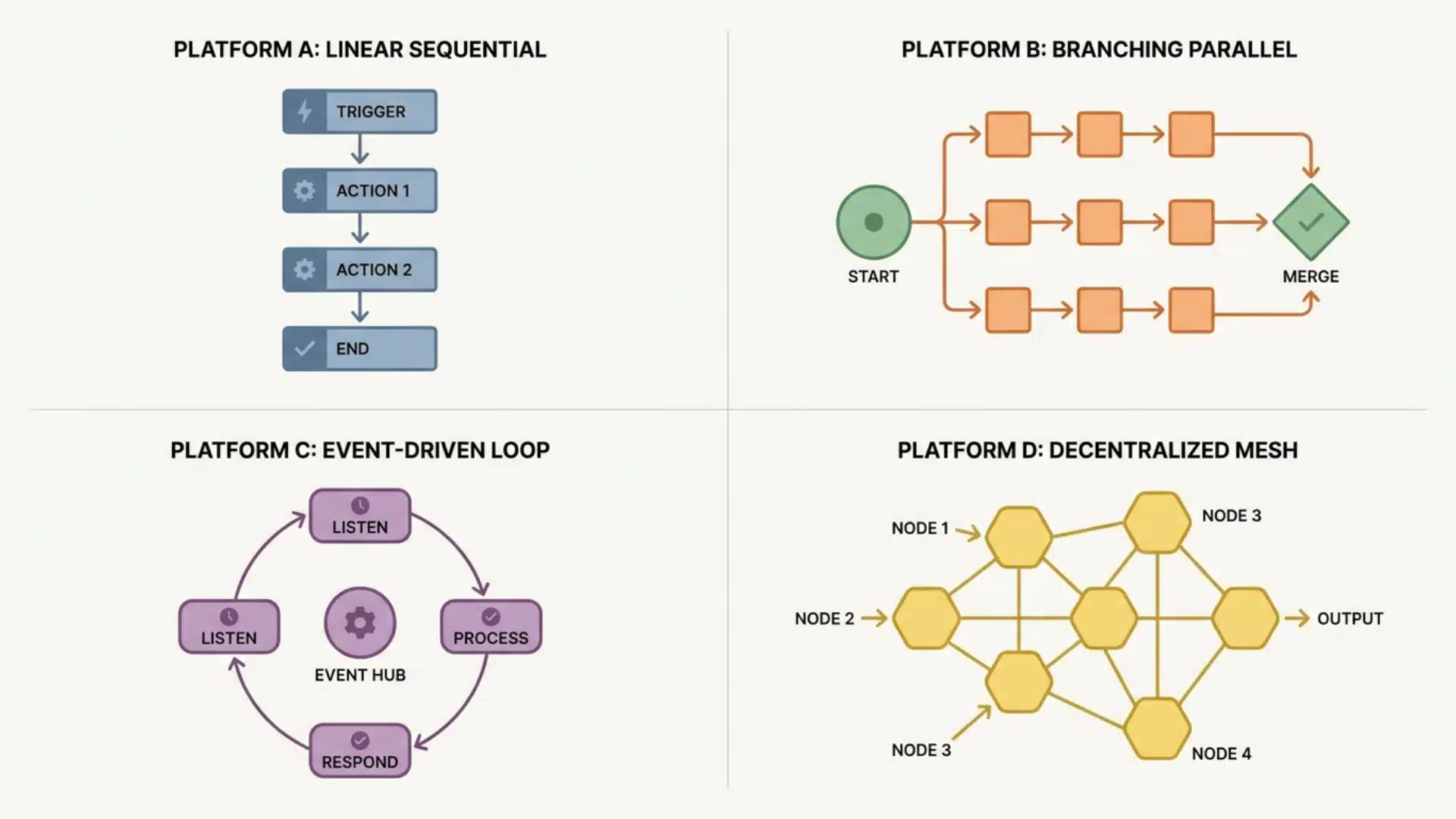
Knowing how these platforms are actually built and what runs beneath the visual interface tells you significantly more than any feature-by-feature comparison ever will.
The right choice depends on what kind of automation you’re genuinely trying to build and how complex it’s realistically likely to get over time.
Zapier
Zapier is built for speed and simplicity. If you need to connect two apps and get something up and running quickly, it’s the most straightforward way to do that.
Its strength is breadth, thousands of app integrations, a clean trigger-action model, and an interface almost anyone can navigate without training.
The limits show up when workflows grow more complex. Conditional logic requires filter steps and multi-path zaps that stack on top of each other, and maintaining them eventually becomes its own job.
Make
Make is where you go when your workflows need to think. Its scenario builder explicitly exposes branching and routing logic, so you can see exactly how data moves and where it splits.
That visibility makes complex workflows easier to build and, more importantly, easier to debug when something goes wrong.
The trade-off is setup time and learning curve. Make takes longer to get comfortable with than Zapier, and building a scenario requires more deliberate upfront thinking about data flow.
n8n
n8n sits at the edge of the no-code category, using a node-graph model in which data passes between nodes and can be transformed at each step.
That’s why workflows that break in Zapier often run cleanly in n8n; it preserves data state between steps in a way linear platforms simply don’t.
Getting the most out of it requires comfort with data structures and a working understanding of how APIs behave, which puts it out of reach for purely non-technical users.
Gumloop
Gumloop is a meaningfully different kind of platform. While the others execute fixed sequences, Gumloop is built for agentic workflows, ones in which an AI model decides what happens next based on context.
That design puts it in a separate category from the other three. Comparing it to Zapier in terms of integration count, or to Make for branching logic, misses what it was actually built to do.
If you’re building workflows that need dynamic decision-making, it belongs in the conversation. If your automations follow predictable paths, the other three tools are more appropriate.
Most people find this out the hard way. One workflow gets complicated enough that you’re spending more time maintaining it than it’s saving you.
When Does a No-Code Platform Stop Being Enough?
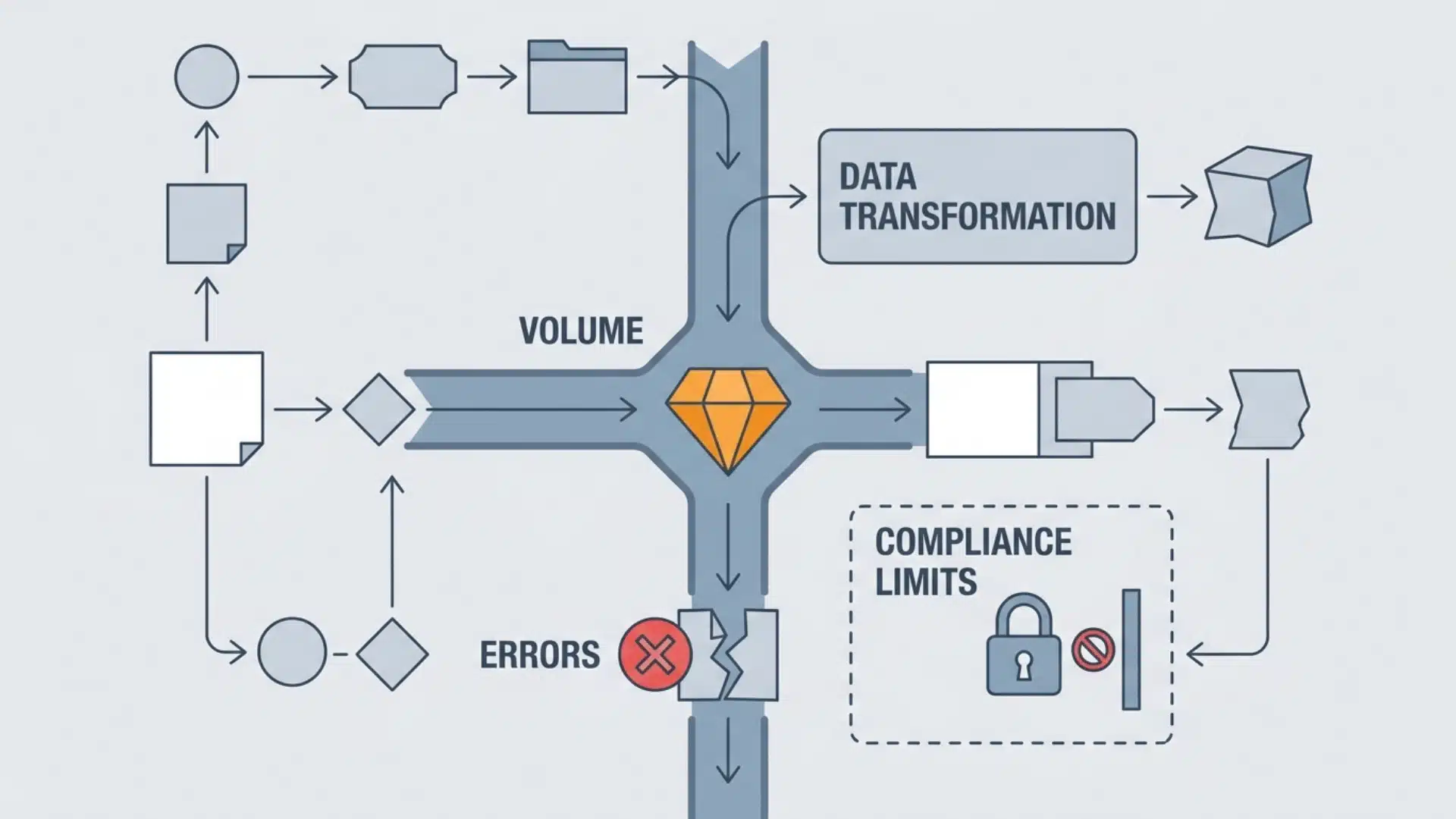
Most people find this out the hard way. One workflow gets complicated enough that you’re spending more time maintaining it than it’s saving you.
These are the conditions that signal you’re approaching that ceiling:
- Volume: Most platforms impose task limits, and high-frequency automations will hit them. Upgrading helps, but the execution model can become the constraint before pricing does.
- Error handling: Simple platforms fail silently or stop entirely when something unexpected happens. You need a platform that can catch errors and route around them.
- Data transformation: When workflows need to reformat data mid-execution, linear platforms hit their ceiling fast. Workarounds accumulate quickly.
- Compliance: If your data can’t leave a specific region or you need a full audit trail, self-hosted infrastructure is required. That rules out most cloud-only platforms.
When two or more of these apply, the question usually isn’t the approach; it’s whether the platform you’re on was ever the right fit.
Wrapping Up
Choosing a no-code automation platform gets easier once you stop comparing feature lists and start thinking about workflow complexity.
Simple, linear automations have different requirements than multi-step workflows with branching logic or compliance constraints.
Zapier earns its place for speed. Make gives you control. n8n handles complexity. Gumloop operates in a different category entirely.
None of them is universally the best; they’re each the right answer to a specific problem. Get clear on the problem first, and the platform choice usually follows.
Frequently Asked Questions
What is the difference between no-code and low-code automation?
No-code platforms use entirely visual interfaces; users configure logic through menus and drag-and-drop without writing anything. Low-code platforms allow optional scripting alongside visual tools. n8n sits in the middle: primarily visual, but it permits JavaScript or Python inside individual nodes when needed.
Is Zapier still the best no-code automation platform in 2026?
Zapier remains the strongest option for simple, event-driven workflows across a large app directory. For multi-step workflows with branching logic, Make is generally more maintainable. For data transformation or self-hosting requirements, n8n is more appropriate. The right answer depends on workflow complexity, not popularity.
Can non-technical users build automations on n8n?
Non-technical users can build basic workflows using n8n’s visual node editor, but the learning curve is steeper than Zapier or Make. The platform suits teams with at least one person who is comfortable with data structures and has a basic understanding of how APIs work.
What is an agentic workflow in the context of no-code automation?
An agentic workflow is one where an AI model decides which steps to take next, rather than following a fixed sequence. Platforms like Gumloop are designed specifically for this pattern. Traditional no-code tools can incorporate AI steps, but they aren’t built around dynamic, decision-driven execution.





