


Most marketing teams don’t fail because they lack effort. They fail because their tools don’t work together.
There are now over 15,000 martech tools on the market, yet studies show more than a third of stack capabilities go completely unused.
That gap between owning tools and actually using them well is where most teams lose money, time, and momentum.
Today, I’ll cover how these tools function as a connected system, what each category actually does, and what it takes to build a stack that performs. Let’s start with the basics.
What are Martech Tools and Why They Exist
Today’s marketing involves dozens of channels, including email, social, search, and paid ads. Managing all of them manually creates one big problem: fragmented data and inconsistent execution.
To understand how big this space has gotten, consider this: in 2011, marketing expert Scott Brinker cataloged around 150 martech solutions in his now-famous Marketing Technology Landscape. By 2025, that number had grown to over 15,000. That explosion tells you everything about how central these tools have become to modern marketing.
Martech tools are software solutions built to centralize, automate, and analyze marketing efforts.
But here’s the thing, they’re not just individual apps. Together, they form an operational system that helps marketers do more without burning out.
Here’s why manual marketing breaks down at scale:
- Data lives in too many places
- Teams waste time on repetitive tasks
- Personalization becomes impossible without automation
- Campaign results are hard to measure accurately
The result of getting this right? Better targeting, higher efficiency, and a stronger return on investment.
How Martech Tools Work Together as a System: The Martech Stack
Using tools in isolation is one of the most common mistakes in marketing. When tools don’t talk to each other, data gets siloed, and campaigns become inconsistent.
That’s where the concept of a martech stack comes in. It’s a set of integrated tools that work in layers, each one feeding into the next.
Here’s how data typically flows through a stack:
- Data collection: user interactions are captured across channels
- Storage: data is organized in a CRM or data platform
- Activation: automation tools trigger campaigns based on that data
- Analysis: analytics tools measure what’s working
- Optimization: insights loop back to improve future campaigns
This creates a continuous feedback cycle. The outcome is a unified view of the customer and smarter decision-making at every step.
When integrations break down, the whole system suffers, resulting in inconsistent data, missed triggers, and wasted budget.
Core Martech Tool Categories and Their Roles
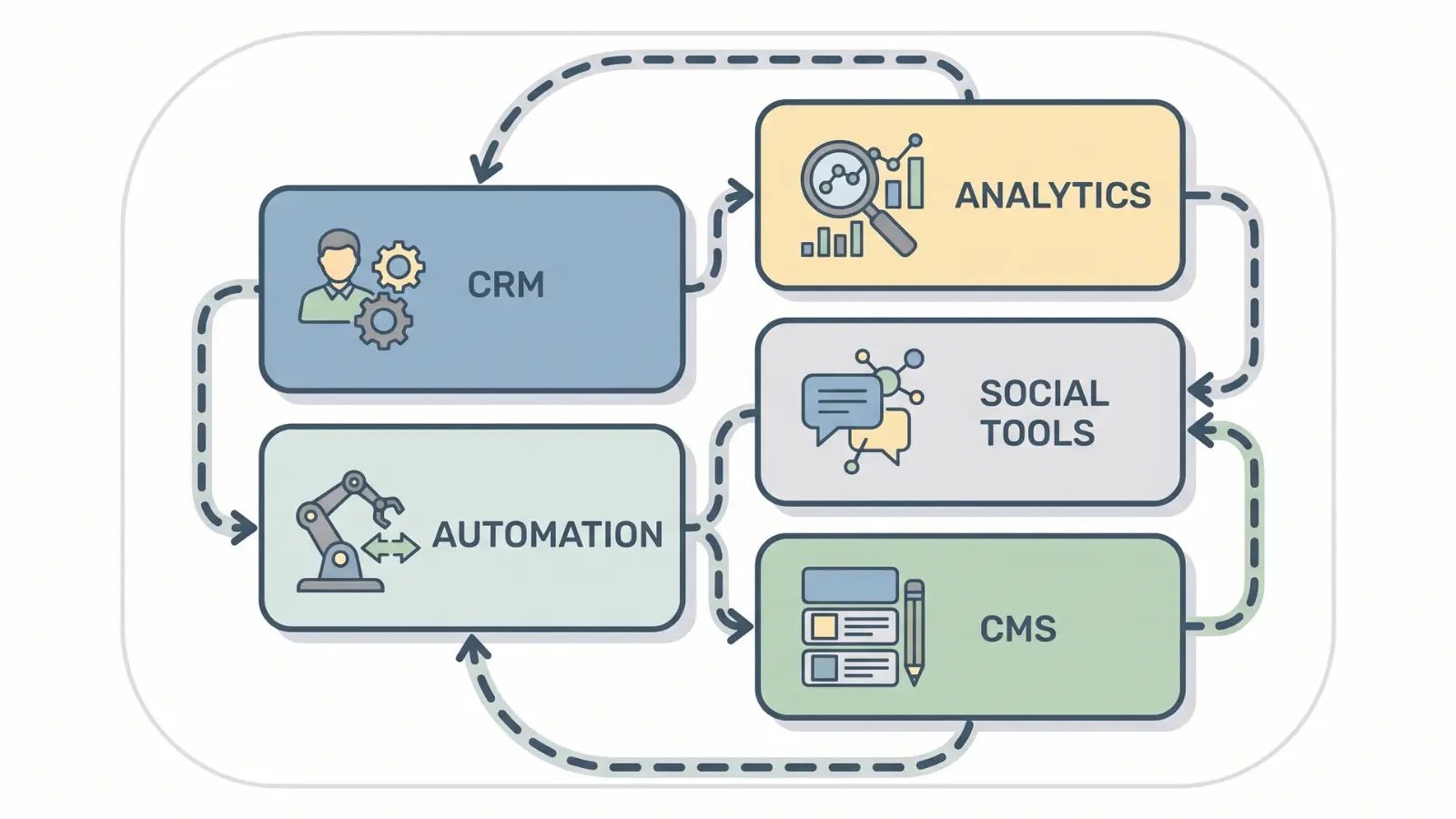
Martech tools aren’t one-size-fits-all. Each category handles a specific job within the stack. Here’s a breakdown of what each one does and why it matters:
Customer Data and CRM Tools
Customer data is the foundation of every marketing decision. Without a central place to store it, targeting becomes guesswork.
CRM tools collect, organize, and segment user data across every touchpoint. Popular options here include HubSpot CRM and Salesforce, both of which offer robust segmentation and pipeline tracking out of the box.
This makes it possible to track where a customer is in their journey and send the right message at the right time.
The risk? Poor data quality leads to wrong segmentation, and that means the right message goes to the wrong person.
Marketing Automation and Campaign Execution Tools
Running campaigns manually at scale simply doesn’t work. There’s too much volume and too little time.
Automation tools handle the heavy lifting, setting up workflows, defining triggers, and sending messages automatically based on user behavior.
Tools like Klaviyo, ActiveCampaign, and Marketo are built specifically for this; handling multi-step sequences across email, SMS, and ads without manual input.
The payoff is consistent engagement without constant manual effort.
The failure point here is over-automation. When messages aren’t relevant to the recipient, engagement drops and trust erodes.
Analytics and Data Visualization Tools
You can’t improve what you can’t measure. Analytics tools track campaign performance, map attribution, and surface trends through dashboards.
Google Analytics 4, Looker Studio, and Mixpanel are widely used here, each offering a different level of depth depending on team size and reporting needs.
The result is clearer decision-making and better ROI tracking. But there’s a common misconception worth addressing: more data doesn’t automatically mean better insights. The focus should be on the right data, not all of it.
Content and Website Management Tools (CMS)
A CMS handles how digital content gets created, edited, and published. It keeps your brand consistent across every page and post.
WordPress and Webflow are the most common choices, with platforms like Contentful gaining ground for teams managing content across multiple channels.
The problem arises when a CMS isn’t connected to analytics. You end up publishing without knowing what’s actually performing, a blind spot that can quietly hurt your strategy.
SEO, Ads, and Social Media Tools
Traffic doesn’t happen by accident. These tools manage keyword tracking, paid ad campaigns, and social media scheduling to drive consistent visibility.
Semrush and Ahrefs lead on SEO, while Meta Ads Manager and Google Ads handle paid traffic. Scheduling tools like Buffer or Sprout Social cover social publishing.
The trap many teams fall into is chasing vanity metrics, likes, impressions, and follower counts, instead of measuring actual conversions. Traffic means nothing if it doesn’t move the needle.
AI and Optimization Tools
As data volumes grow, human analysis alone can’t keep up. AI tools step in with predictive analytics and personalization engines that adapt in real time.
Platforms like Jasper, Persado, and built-in AI features within HubSpot and Salesforce are already being used to personalize at scale and forecast campaign outcomes.
The result is smarter targeting and better campaign forecasting. But one misconception needs to be cleared up: AI supports strategy, it doesn’t replace it. Without a clear direction, even the best AI tools will optimize toward the wrong goal.
How Data Flows Across Martech Tools
Most breakdowns in martech happen not because of the tools themselves, but because of how, or whether, they’re connected.
Here’s how data actually moves through a well-integrated stack:
- A user interacts with your website or ad
- That interaction is captured and sent to your CRM
- The CRM triggers an automation based on behavior or segment
- The campaign executes email, ad, and push notifications
- Analytics tools track how the campaign performs
- Insights flow back into the CRM to refine future targeting
APIs and integrations are what make this possible. They act as the connective tissue between tools. When they’re poorly configured or broken, data becomes inconsistent, and the whole optimization cycle stalls.
A well-connected stack doesn’t just run campaigns. It learns from them.
What Makes a Martech Stack Effective and When It Breaks
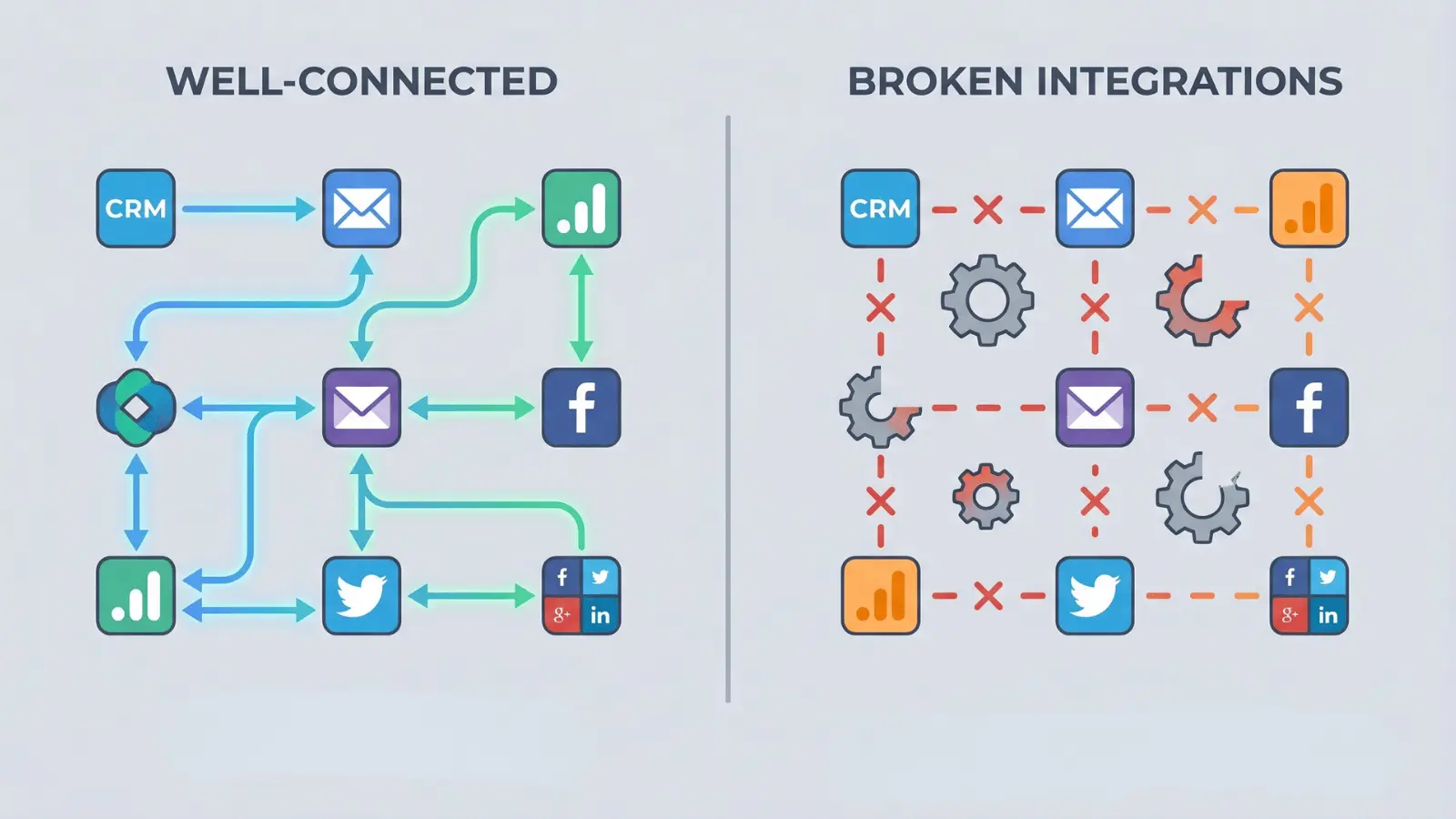
A martech stack is only as good as the thinking behind it. Having the right tools means nothing if they don’t align with your business goals.
Here’s what an effective stack actually requires, and what each one means in practice:
Goal alignment: Start by naming the outcome you’re trying to drive: lead generation, retention, or brand awareness. Then work backward to the tools that support it. If a tool doesn’t connect to a specific goal, it probably doesn’t belong in your stack.
Integration quality: Every tool in your stack should be able to share data with the others without manual exports or workarounds. Before adding a new tool, check whether it connects natively to your CRM and your analytics platform. If it doesn’t, the data gap will cost you later.
Data governance: Your stack is only as reliable as the data moving through it. That means consistent naming conventions, clean contact lists, and a single source of truth for reporting. When two tools report different numbers for the same campaign, you have a governance problem, and that erodes trust in your data fast.
When these conditions are met, you get scalable marketing operations that grow with your business.
But stacks break down in predictable ways:
- Stack bloat: too many tools doing overlapping jobs
- Poor integrations: data gets lost or duplicated between platforms
- Misaligned sources: different tools reporting different numbers
The biggest misconception? More tools equal better performance. In reality, a lean, well-integrated stack almost always outperforms a bloated one.
Key Trends Shaping Martech Tools Today
Martech isn’t standing still. The tools and capabilities available today look very different from even a few years ago.
A few shifts worth understanding:
- AI-driven personalization uses behavioral data patterns to deliver experiences tailored to individual users, not just segments
- Predictive analytics lets marketers forecast campaign outcomes before spending a dollar, reducing wasted budget
- Customer Data Platforms (CDPs) are solving the fragmentation problem by unifying data from multiple sources into a single profile
The bigger shift happening here is a move from reactive marketing, responding after something happens, to proactive marketing, anticipating what will happen next.
The risk in all of this is leaning too hard on automation and losing the strategic layer. Technology should amplify good thinking, not substitute for it.
Conclusion
The real gap in most marketing operations isn’t tool count; it’s tool clarity.
Knowing which martech tools to use, how to connect them, and what to measure from each one is what separates teams that scale from teams that stall.
A lean, well-integrated stack built around clear goals will always outperform a bloated one built around trends.
Start small if you need to. Pick one category, get it working, and expand from there. Every strong stack started with a single connected decision.
Ready to take the next step? Audit your current tools, cut what isn’t contributing, and build toward a stack that actually moves your marketing forward.
Frequently Asked Questions
What is the difference between martech and adtech?
Martech covers the full marketing operation: managing campaigns, customer data, automation, and relationships across every channel. Adtech is a subset focused specifically on buying, delivering, and measuring paid digital advertising. The two are distinct but often run side by side within the same stack.
How often should you review your martech stack?
Most teams benefit from a light quarterly review to flag underused tools and broken integrations. A deeper annual review, tied to the budget cycle, is where you make bigger decisions, cutting tools that aren’t earning their cost and strengthening the connections that matter most.
How many martech tools do companies typically use?
Most marketing teams run between 5 and 10 core tools. The right number depends on team size, goals, and how well each tool integrates with the rest of the stack. More tools don’t mean better results; a smaller, well-connected set almost always outperforms a bloated one.
Does martech work for small businesses or only large ones?
Martech scales to any business size. Many platforms offer free or low-cost entry tiers that cover the essentials, email, analytics, and basic CRM, making them practical even for early-stage teams. The key is starting with tools that solve a real problem, not tools that sound impressive.





