


Most AI music-video generators handle a ten-second teaser, then choke on a four-minute song. This guide covers only the platforms that render a full track in one pass and produce a YouTube-ready file. After a review of product docs, help centers, and policy pages, six tools stood out—each tuned to a different workflow: stem-reactive animation, scene-based storytelling, stock-footage edits, 4K visualizers, hands-off lyric videos, and rapid first drafts. If you already own the music and just need visuals that stay on beat, you’re in the right place.
How We Judged the Tools
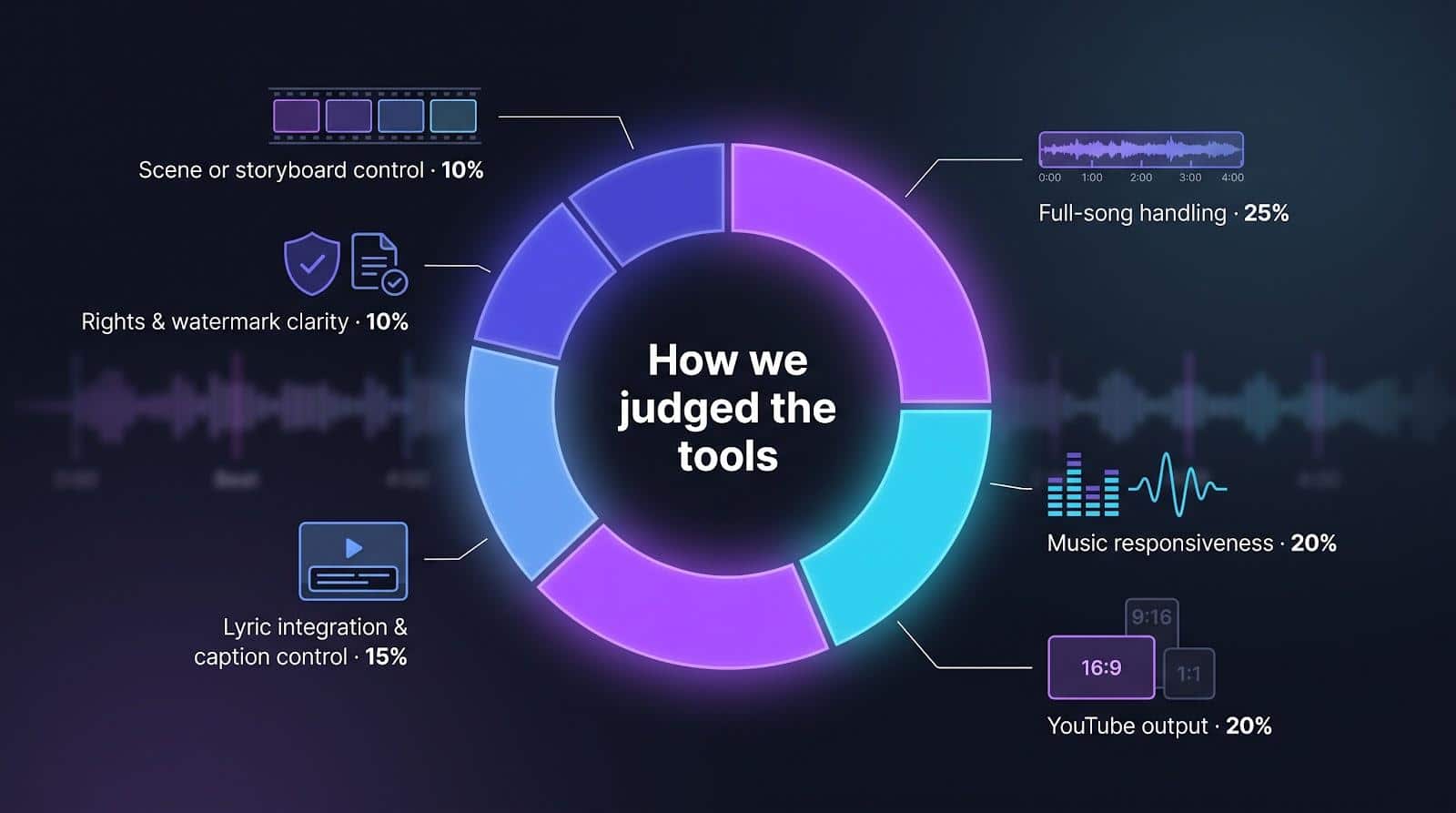
The ranking uses an evidence-based scorecard, not a hunch. Each candidate had to render a three- to four-minute song in one project with no clip splicing. Qualifiers were then scored on six weighted factors:
- Verified full-song handling: 25%
- Music responsiveness: 20%
- YouTube output (16:9 support, resolution cap): 20%
- Lyric integration and caption control: 15%
- Rights and watermark clarity: 10%
- Scene or storyboard control: 10%
Data comes only from first-party docs and help centers. Missing details cost points. Pricing is left out because plans change fast, so check current rates before you render, and let features—not promos—guide your pick.
Full-Song AI Music-Video Software at a Glance
Scan this snapshot to spot the platform that fits your workflow. The detailed reviews that follow explain why each one ranks where it does.
|
Tool |
Best for |
Verified full-song handling |
Music response |
YouTube format |
Max resolution |
Lyrics |
Watermark & rights |
|---|---|---|---|---|---|---|---|
|
Neural Frames |
8-stem, audio-reactive animation |
Yes (no stated cap) |
Per-stem visuals |
16:9, 9:16, custom |
4K |
Auto-detect |
Full ownership, commercial use |
|
MusVideo |
Scene-based storyboards |
Yes (5-min example documented) |
Mood & tempo planning |
Not published |
Not published |
Not published |
Commercial licence on paid plans |
|
Rotor Videos |
Stock + lyric videos |
Up to 10 min |
Beat-aware clip cuts |
16:9 |
1080p |
Auto alignment |
Commercial use; stock is non-exclusive |
|
Videobolt |
Long visualizers |
Up to 2 hr |
Template spectrum |
Template-dependent |
4K 60 fps |
Visualizer and lyric modes |
Commercial use, no watermark for subscribers |
|
SongScene |
Hands-off lyric videos |
Full song (Creator plan) |
Beat-timed cuts |
16:9, 9:16, 1:1 |
1080p (4K planned) |
15-language captions |
Commercial use, no watermark on paid plans |
|
BeatMotion |
Fast drafts |
Full song |
Mood & energy match |
16:9, 9:16 |
HD |
Word-level captions |
Check terms for uploaded tracks |
Keep this table handy as you read on. Each platform’s strengths and gaps come to life in the detailed reviews that follow.
1. Neural Frames: Best for 8-Stem, Audio-Reactive Full-Song Videos
Load your track, click Autopilot, and Neural Frames turns the whole song, from intro to fade-out, into motion. The engine splits your mix into eight stems (drums, bass, vocals, synths, and more), so kicks jolt the camera while pads breathe in the background.

Neural Frames AI lyric video maker (screenshot: neuralframes.com)
Need speed? Autopilot turns a song into a video in two clicks. Want precision? Switch to the Frame-by-Frame editor for control over every single frame, with more than 10 parameters that the music can modulate, so a kick drum can drive a pulse and vocals can trigger colour changes.
Neural Frames exports up to 4K in 16:9, 9:16, or custom aspect ratios, and its Smart Lyrics feature detects the lyrics and burns them into the video.
For static releases, the separate audio-to-video conversion tool pairs a still image with an MP3 or WAV and produces a 1080p widescreen MP4, which is useful for podcasts but not audio-reactive.
You own the videos you create and keep full commercial rights to monetize them. When musical detail deserves equally detailed visuals, Neural Frames sets the bar.
2. MusVideo: Best for Scene-Based Music-Video Storyboards
MusVideo treats your track like a screenplay. Upload the audio, and the engine listens from intro to outro, planning roughly one scene for every 12 seconds of audio on a storyboard of up to 40 scenes.
That storyboard is the standout feature. Add up to six reference images of your singer, choose a cinematic style, and review the plan before the scenes are generated. Because each scene is generated and synced to the beat, chorus cuts land where they should.
Videos made on paid plans come with a commercial licence that covers YouTube, TikTok, Instagram Reels, and Spotify Canvas, so you can schedule a premiere as soon as the file downloads.
Keep two caveats in mind. Identity consistency relies on the reference images you supply, and songs longer than roughly eight minutes hit the 40-scene cap, so the tool holds shots longer instead of adding new ones. MusVideo also does not publish its export resolution or aspect ratios on that page. A quick test render will show whether that trade-off suits your track.
If you want cinematic variety without frame-by-frame micromanagement, MusVideo hands you the most intuitive director’s chair in this lineup.
3. Rotor Videos: Best for Stock-Footage and Lyric Videos
Rotor is the pragmatic workhorse here. Upload any track up to 10 minutes, pick a visual style, and browse its stock library. After you add optional custom clips or artwork, Rotor analyses the music and your selected clips, then assembles a timed preview, which is watermarked but free to replay and tweak.
Rotor Videos homepage (screenshot: rotorvideos.com)
Purchase the 1080p render and the watermark disappears. You can publish straight to YouTube (16:9) or download for Instagram, TikTok, or distributors. Paid exports include commercial rights, yet stock clips remain non-exclusive, so another artist could use the same skyline or drummer.
Need karaoke-style text? Rotor’s AI Lyric Video mode auto-times captions and animates key words, saving hours of manual alignment.
Limitations: because the visuals come from shared stock, your video will not be one of a kind, and the interface feels more “approve the edit” than traditional timeline control. Still, when you need a polished cut fast and within spec, Rotor delivers.
4. Videobolt: Best for Long 4K Visualizers
Mixtapes, DJ sets, and ambient streams often run well past four minutes. Videobolt keeps pace, letting you create music visualizers or lyric videos up to two hours long, according to Videobolt.
The workflow stays linear: upload your audio, pick a template, customise colours or text, then click Render. Each template is already timed to beats and volume spikes, so even first-time users walk away with visuals that keep the music in sync.
Subscribers can export watermark-free files at resolutions up to 4K, 60 fps, the company notes. Most popular templates default to 16:9 for YouTube, and vertical designs exist for Shorts or Reels. If you need text, Videobolt’s lyric-video builder drops timed captions onto the same reactive backgrounds, preserving brand consistency.
Remember, Videobolt relies on templates; it will not invent characters or cinematic scenes. Think of it as a high-quality visualiser factory that keeps marathon tracks moving without a full video editor. If clean motion graphics and long runtimes top your wish list, Videobolt belongs on your shortlist.
5. SongScene: Best for Hands-Off Full-Song Lyric Videos
SongScene is the effortless pick. Upload an MP3 or WAV, choose a video style, and the platform handles beat analysis, scene changes, and auto-timed captions in 15+ languages, according to SongScene. There is no timeline and no keyframes; just watch the progress bar until a 16:9 HD (1080p) file without a watermark appears, ready for YouTube.
Speed over control is the pitch. Need a vertical Short? Re-render in 9:16 from your history without uploading the song again. Releasing a translated version? Swap the caption language and generate again.
Trade-offs remain. You cannot tweak individual scenes, and while 4K export is planned for paid plans, it is not live yet. Full-song music videos are listed only on the top Creator plan, so check the plan before you commit a four-minute track.
If you want a clean lyric video that tracks every bar without opening an editor, SongScene fits the bill; accept HD for now and run a quick test before launch.
6. BeatMotion: Best for Fast Full-Song Drafts
BeatMotion rewards experimentation. Upload any audio file, from a demo to a studio recording, and BeatMotion transcribes the vocals and builds a video that matches the song’s mood, tempo, and energy.
Speed is the draw: the full music video renders within a few minutes, according to BeatMotion, so testing ideas becomes almost as quick as tweaking a mix.
Videos export in HD, in vertical 9:16 for Shorts or widescreen 16:9 for YouTube, with word-level caption timing you can adjust. BeatMotion’s published monetization rights cover videos made from songs created on the platform, so check the terms for uploaded tracks. Run a short test before locking a release.
If rapid iteration matters more than pixel-perfect specs, BeatMotion delivers the fastest learning curve in this roundup.
Frequently Asked Questions
Does YouTube Require Disclosure for AI-Generated Music Video Visuals?
Only in some cases. YouTube asks creators to disclose content that is meaningfully altered or synthetically generated when it looks realistic, such as a real person appearing to say or do something they did not, or a realistic scene that never happened. Clearly animated, stylized, or fantastical visuals generally do not need the label. The rule applies per video, so review YouTube’s altered or synthetic content guidance before each upload.
Do Commercial Rights Guarantee YouTube Monetization?
No. A tool’s licence lets you publish the video and earn from it, but monetization depends on YouTube’s own review of your channel. On July 15, 2025, YouTube renamed its “repetitious content” policy to “inauthentic content,” and it targets mass-produced, templated uploads. Varied, song-specific visuals and a consistent release plan put a channel in a stronger position than bulk uploads do.
What Is the Difference Between Beat Sync and True Audio Reactivity?
Beat sync times cuts, transitions, or scene changes to the beat. Audio reactivity goes further: the sound continuously drives movement, colour, or effects throughout the video. Stem-level control is the most detailed version, because drums, bass, and vocals can each drive a different visual parameter instead of the whole mix moving everything at once.
When Is a Lyric Video Better Than a Scene-Based Music Video?
A lyric video suits text-led songs, fast release schedules, catalogue uploads, and viewers who watch with captions on. A scene-based video is the better choice when a story, a mood, or a recognisable character carries the song. The two formats also work in sequence: a lyric video on release day, then a scene-based video once the track has an audience.
Choosing the Right Full-Song Workflow
All six tools can carry a complete song, but each one solves a different problem. Neural Frames suits artists who want visuals driven by individual stems. MusVideo builds scene-based storyboards, Rotor cuts stock footage to the track, Videobolt handles long visualizers, SongScene automates lyric videos, and BeatMotion produces fast drafts. Test your shortlist with the same song, confirm the current export and rights terms, and then choose the workflow that fits the release.





