
AI creative tools news moves fast; new features, new names, new announcements arriving almost weekly.
The tools worth paying attention to aren’t the loudest ones. They’re the ones quietly changing how creative work actually gets done, step by step.
That shift is subtle enough to miss if you’re only reading headlines. Some of it is real progress. Some of it is still catching up to the hype.
Here’s a clear-eyed look at what’s changed, what it means for day-to-day creative work, and which tools are worth your attention right now.
What’s Changed Recently in AI Creative Tools: Spring 2026 Snapshot
AI tools are no longer making incremental improvements. They are changing how creative work is structured, what steps exist, who handles them, and where your effort actually goes.
The Rise of Agentic AI Tools
AI now handles multi-step tasks rather than producing single outputs. It takes a goal, breaks it into steps, and executes parts of the workflow without requiring you to manually bridge each stage.
Your role shifts from executing the process to directing it. The tool handles the sequence. You handle the decisions.
AI as a Creative Collaborator
AI no longer just responds to prompts; it participates in the thinking. It expands a starting point, surfaces variations, and pushes into directions you might not have reached on your own.
The practical result is that you begin with more options and stronger raw material, not a blank page waiting for a first move.
Faster Production and Workflow Compression
The main change is not speed. It is fewer steps. Drafting, early iteration, and basic editing now happen inside one continuous flow rather than across separate sessions.
What previously meant a brief, a first draft, a revision round, and a formatting pass can now move from prompt to usable output in a single sitting. The gaps between stages shrink, and so does the distance from idea to result.
Rapid Growth in Creator Adoption
Adoption is accelerating because the friction has dropped. Tools require less setup, fit more naturally into existing workflows, and deliver usable results early, before a creator has invested significant time learning them.
When a tool proves its value quickly, it moves from trial to habit. That pattern is playing out across creator categories right now, and the numbers are starting to reflect it.
The Biggest Shift: From Generative AI to Agentic AI
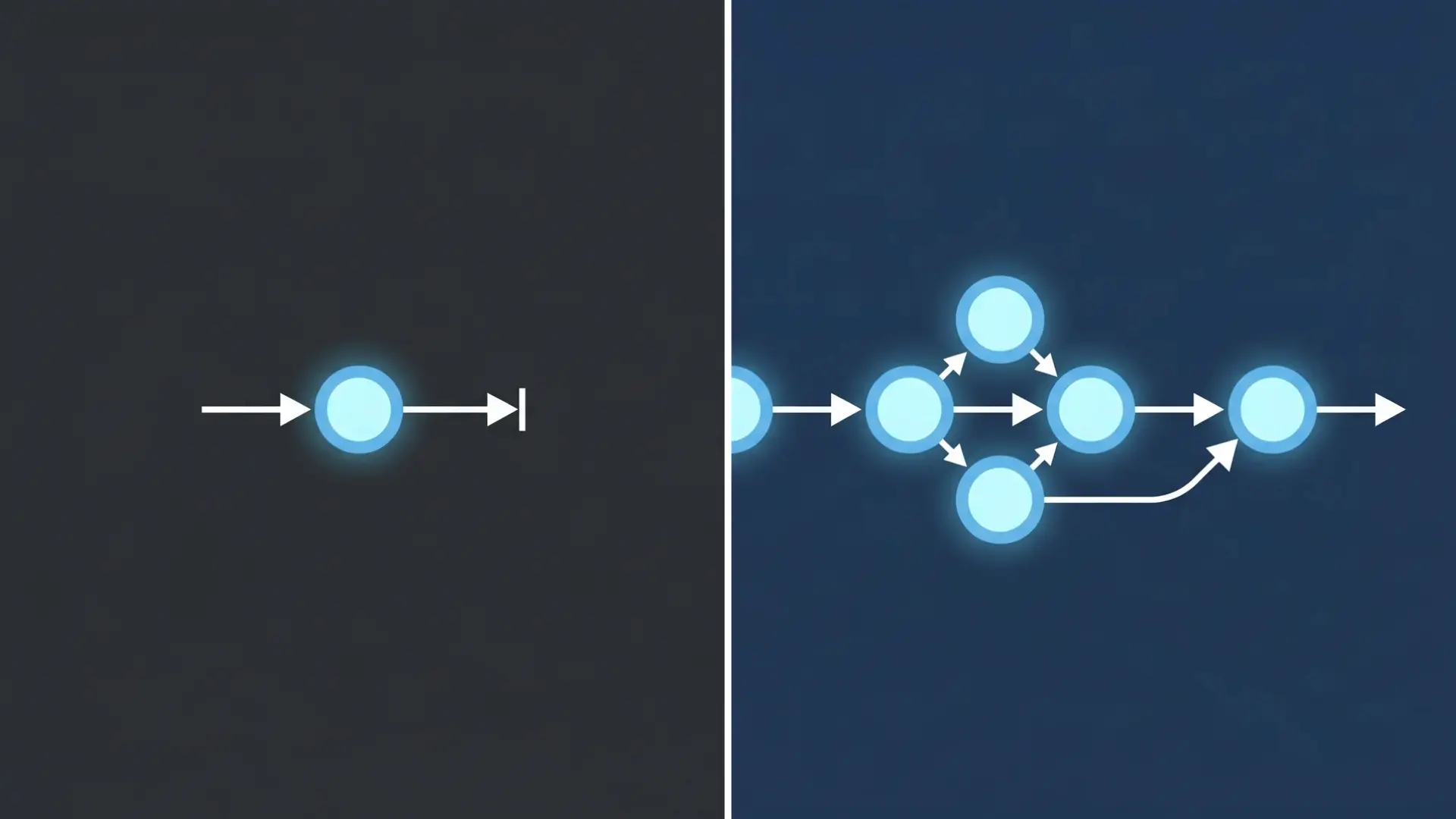
AI is moving from single-step output to handling parts of the process. This changes how work flows from idea to result.
Generative AI handled one task at a time. You gave a prompt, got an output, and then decided the next step. Each interaction was separate, so you had to move the process forward manually.
Agentic AI works across steps. It understands the goal, breaks it into actions, executes parts of the process, and adjusts based on results.
The key difference is continuity. It carries context rather than requiring a restart each time, reducing repeated inputs and interruptions.
How Does This Change Creative Workflows in Practice?
Work no longer resets after each step.
In practice, you describe a campaign goal in plain language, and the tool drafts copy, generates visual options, and formats assets for each platform without you manually restarting between stages.
Adobe’s Firefly AI Assistant, for example, lets you describe an outcome once and have it execute tasks across Photoshop, Premiere, and Illustrator in a single session, carrying context throughout.
You move from idea to refinement and variation without switching tools or re-entering instructions.
Direction still depends on you, but the role shifts from executing steps to guiding the process.
How AI is Changing the Creative Process (Not Just Speed)?
AI changes how ideas are formed, tested, and developed. The shift is not just faster output, but a different way of moving through creative work.
How Does Idea Generation Expand with AI?
Individual thinking is limited by memory, experience, and time. This limits the number of directions you can explore.
AI expands this starting point. From one idea, it generates multiple directions, styles, and alternatives in seconds, including combinations you wouldn’t have reached on your own because they sit outside your existing references and habits.
The main benefit is not more ideas, but access to ideas outside your usual patterns.
The New Iteration Loop: Generate, Refine, Expand
The loop changes what iteration costs.
Earlier, moving back meant restarting. Now, you generate a base idea, refine it, and expand it into variations in one continuous loop.
When a cycle that previously took a day takes an hour, you can test five directions instead of one. More options tested means more chances to find what actually works before committing to a final direction.
Why AI Increases Both Novelty and Complexity?
When you prompt an AI image tool, the model draws on patterns across millions of visual references; a range that sits well outside what any individual carries from their own experience. That’s the source of the novelty: not randomness, but combinations that don’t appear in your usual starting points.
The complexity builds through iteration.
Each refinement round can adjust color treatment, recompose the frame, or shift tone across an entire asset set, changes that would take significant time to make manually. Output after five rounds is structurally different from output after one.
Both effects depend on active direction.
An underspecified prompt averages across references and produces generic results. The more specifically you define style, mood, and constraints, the more the output reflects your decisions rather than the model’s defaults.
Where AI Fits in Modern Creative Workflows?
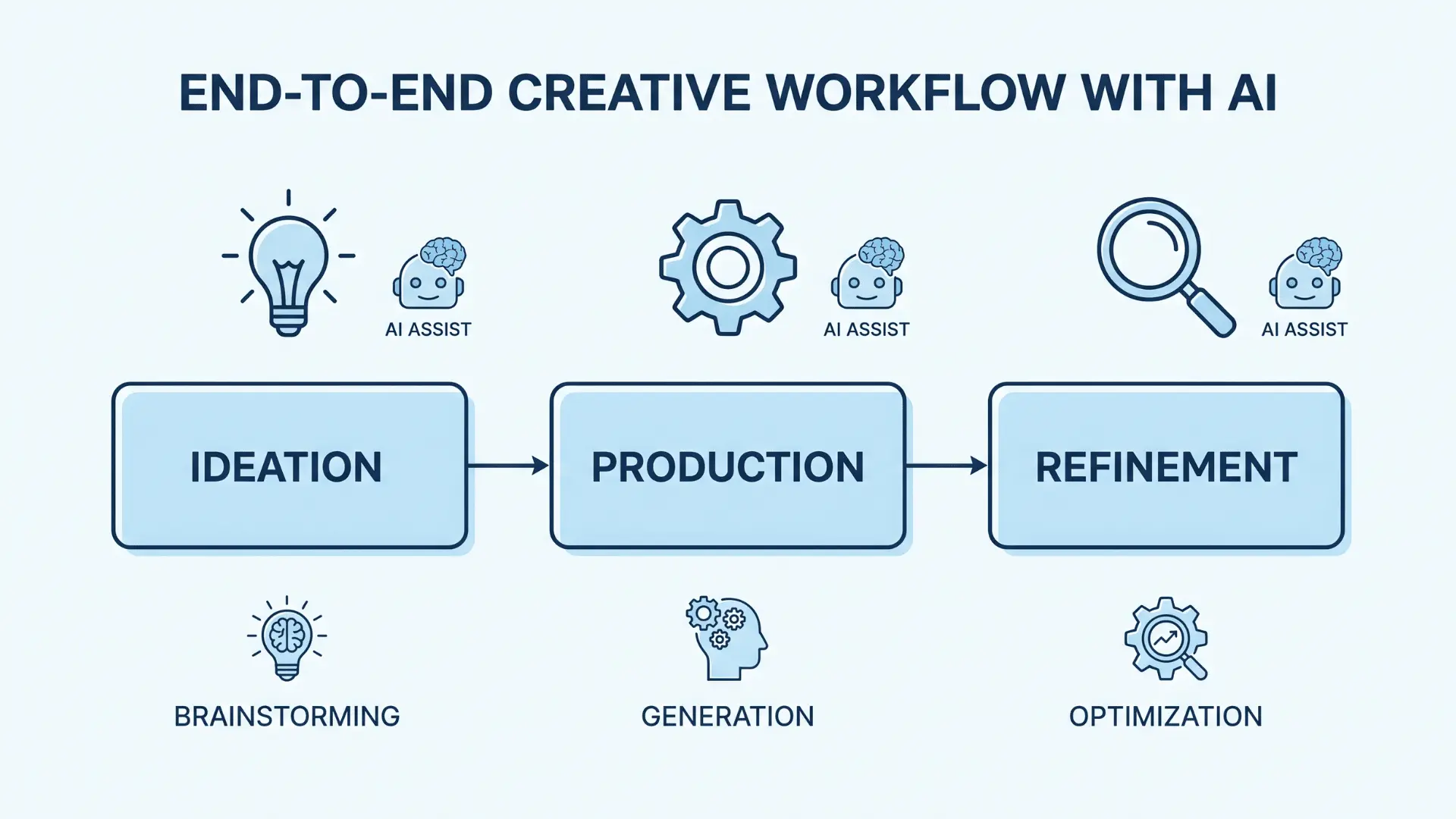
AI does not replace workflows; instead, it fits into them. The key is knowing where it adds value and where your input still matters.
- Early-Stage Ideation and Concept Development: AI helps generate initial ideas, test them quickly, and create drafts to respond to. This speeds up exploration. Direction still depends on you, as vague input leads to generic results.
- Production and Asset Creation: AI speeds up content creation across visuals, text, and modular assets. It reduces execution time, but quality depends on how clearly you guide the tool and on your selection of outputs.
- Editing, Refinement, and Output Scaling: AI supports adjustments, consistency, and format scaling. It handles structure, but final quality depends on your judgment around tone, detail, and intent.
AI adds value across the workflow, but it does not replace decision-making; its role changes by stage.
Major Platform Updates Driving the Industry: Adobe and Beyond
Large platforms are moving AI from a feature into the foundation of creative work. What they ship sets the direction for how the whole industry operates.
Adobe: Agentic AI Across Creative Cloud
Adobe’s Firefly AI Assistant, launched in public beta in April 2026, lets creators describe an outcome in plain language and have the assistant execute multi-step workflows across Photoshop, Premiere, Illustrator, and Lightroom.
The process no longer resets between apps. Context carries through the session.
Firefly also supports custom models trained on brand assets and style guidelines, replacing generic output with results that stay on-brand without manual correction at every step.
Platforms are embedding AI deeper into workflows. This sets new standards for speed, consistency, and control in creative work.
Canva: From Toolkit to Agentic Design System
Canva AI 2.0, launched in April 2026, shifted the platform from individual tools into a conversational design system.
Describe a goal, a product launch, a campaign, a report, and the platform generates multi-page assets and social content in one flow.
Connectors for Slack, Gmail, and Google Drive let it pull context from existing work rather than starting from scratch.
Video and Motion AI
AI now handles tracking, masking, and scene editing faster than manual workflows allow.
Runway’s Gen-4 model and Adobe’s video tools inside Premiere are the most referenced options for professional results at this stage.
The tradeoff is accuracy; complex scenes with overlapping subjects still produce errors, so the role shifts from doing the edit to reviewing what the tool produced. Speed is real. So is the need to check before anything ships.
Across platforms, the pattern is the same: AI is moving deeper into the workflow, not sitting at the edge of it. That shift is setting a new baseline for what creators can produce and how fast.
New AI Tools Getting Attention Right Now

New tools are getting attention because they solve clear problems. Instead of trying to handle everything, they focus on one task and do it well. This keeps workflows simple and faster.
Video Generation: Runway
Runway handles clip generation, scene edits, and visual changes in one place. You do not need to switch tools at each step. Keeping everything in one place saves time and cuts the back-and-forth between tools.
Voice And Audio: ElevenLabs
ElevenLabs covers voice generation, cloning, and audio cleanup without a recording setup. You can create clear audio directly from text. It also helps with localization by using the same voice across different languages.
Image Enhancement: Upscaling Tools
Upscaling tools improve images after creation. Topaz Photo AI and Magnific AI are the two most widely used options.
Topaz is faster for batch processing; Magnific handles fine artistic detail better at high magnification.
Both increase resolution, sharpen detail, and clean up noise; useful when working with older source material or raw AI outputs that need to reach print or web standards.
Image Generation: Midjourney and GPT Image
Midjourney V8 now has a web app, making it easier to use without Discord. OpenAI moved image generation into GPT Image inside ChatGPT. Both changes make high-quality image creation easier to access without switching tools.
Music Generation: Suno
Suno creates full tracks from text. It handles melody, instruments, and lyrics together. For creators who need background audio fast, it removes the need for a recording setup or a licensing search.
Short-Form Video Editing: CapCut
CapCut uses AI to detect scenes, cut clips, add captions, and format videos for platforms like TikTok and Reels. Manual editing steps drop significantly, which matters when you’re producing content at volume.
How to Choose the Right Tool
The best tool depends on what you are creating, not what is trending.
| Category | Tool | Best Use |
|---|---|---|
| Video Content | Runway | Detailed scene editing and generation |
| Video Content | CapCut | Fast short-form content with built-in formatting |
| Images | Midjourney | Strong control over style |
| Images | GPT Image | Quick results inside ChatGPT without switching tools |
| Audio And Voice | ElevenLabs | Voice generation and cloning |
| Audio And Voice | Suno | Music and background audio creation |
| Full Workflow Integration | Adobe Firefly | Works well with Creative Cloud tools like Photoshop and Premiere |
The right starting point is the tool that removes the most friction in your current workflow. Tools that focus on one task help you move faster from creation to final output.
Why AI Adoption Among Creators is Rising so Fast?
Adoption is rising because AI tools are easier to use and yield useful results with less effort. As friction drops, more creators start using them and continue to do so over time.
The numbers reflect how far and fast this has moved. According to Research and Markets, the generative AI in creative industries market is projected to grow from $4.06 billion in 2025 to $5.38 billion in 2026, with the AI video segment alone on track to reach $3.44 billion.
According to the IAB’s 2025 Digital Video Ad Spend & Strategy Report, 86% of advertisers already use or plan to use generative AI in video production. These are not projections for a distant future; they describe what is happening in current production workflows.
Early results drive this shift. When a tool delivers value quickly, it moves from trial to regular use. Creators improve with use, rely on it more, and gradually incorporate it into their workflow.
Integration also plays a key role. When AI is built into existing tools, it removes extra steps. Using it becomes part of the process rather than a separate task, which increases usage.
Adoption still varies. It depends on comfort with the tools, how well they fit into existing workflows, and how much control a creator wants to keep. As tools improve and familiarity grows, usage tends to deepen.
Legal and Authenticity Changes Around AI Content
Rules around AI content are still developing, but some clear patterns are already shaping how ownership and usage are handled. Understanding where the lines currently sit helps you make better decisions about what you publish and how you document the process.
AI-Only Work Usually Cannot Be Owned
AI-generated content without human input is generally not eligible for copyright protection.
Copyright law is built around human authorship; it protects the creative decisions a person makes, not the output of a machine. Fully AI-created work falls into a grey area or simply lacks protection, meaning anyone can use it without permission.
This matters most when the content has commercial value. A product image, a marketing headline, or an article that drives traffic. If there is no human authorship on record, there is no legal basis to stop someone else from republishing it.
Human Contribution Changes the Ownership Equation
Ownership does not switch on or off; it scales with how much you shape the output. Writing a detailed prompt, selecting from multiple variations, and editing the result for tone and accuracy all count as human input. But they are not treated equally.
The more decisions you make and the more the final output reflects those decisions, the stronger the ownership claim. Compare two approaches:
Weaker claim: Typed a single-line prompt, published the first output without changes. The result reflects the model’s defaults more than any human decision.
Stronger claim: Wrote a detailed brief, selected from 20 variations, edited for tone, accuracy, and structure before publishing. The final output is substantially shaped by human choices.
The practical takeaway: document your process. The more you can show that specific decisions were yours, the more defensible the ownership claim becomes.
Content Tracking is Becoming Standard
The Coalition for Content Provenance and Authenticity (C2PA) is the main framework being adopted across the industry. It works by attaching metadata to a file at the point of creation, recording which tools were used, whether AI was involved, and when edits were made.
That record travels with the file when it is exported or shared.
Adobe, Microsoft, and Google have all adopted C2PA. When you export from a supporting tool, the provenance data is embedded automatically.
Platforms are beginning to require this disclosure for professionally published content, and it is likely to become a standard expectation within the next few years, not just a transparency gesture, but a baseline requirement for publication.
Ownership and authenticity now depend on two things: how much human involvement went into the work, and how transparently that involvement is recorded.
What Do These Changes Mean for Creative Work Right Now?
AI is not replacing creative work. It is changing how the work is done and where your effort goes.
How are the Process and Effort Shifting?
You can explore more options early, iterate faster, and move through steps without stopping. This makes the process more continuous and shortens the path from idea to result.
The effort does not reduce. It shifts. Less time is spent on execution and more on selecting, refining, and shaping outcomes. You are making more decisions throughout the process.
Why Your Role Still Matters?
AI can generate options, but it cannot decide what fits your goal. Direction and selection depend on you. The role shifts from producing each piece to guiding the process and choosing what works.
Creators who stay involved get better results. Treating outputs as drafts and refining them yields stronger work, whereas accepting them as final results in generic work yields weaker work.
AI changes the process, but the outcome still depends on how you guide and refine the work.
Wrapping Up
The changes in AI creative tools news can feel overwhelming at first. New tools, new terms, and new workflows keep showing up. But when you slow it down, the pattern becomes easier to see.
AI is not just adding speed; it is changing how ideas move from start to finish. You are no longer working alone, but you are still in control. That balance is what matters most.
If you take one step from here, just notice how your own process is changing. Where AI helps, where it doesn’t, and where your input still makes the difference. That awareness keeps your work grounded as things continue to evolve.
Frequently Asked Questions
What are the latest AI creative tools?
New tools focus on video, audio, and workflow automation. Platforms like Runway, ElevenLabs, and Adobe tools are gaining attention for their integrations and speed improvements.
How is AI changing creative work?
AI is expanding idea generation and speeding up iteration. It supports the process but still depends on human direction for quality and meaning.
What is agentic AI in simple terms?
Agentic AI can handle multi-step tasks. Instead of giving one output, it plans, executes, and adjusts parts of a process automatically.
Are AI tools replacing human creativity?
No. AI supports creativity by expanding options. Human input is still needed for direction, refinement, and final decisions.
Why Are Creators Using AI Tools More Now?
Tools are easier to use and fit better into workflows. As friction decreases and results improve, more creators naturally adopt them.