


Keeping a team aligned is harder than it looks. Tasks get lost, ownership gets blurry, and deadlines slip — not from lack of effort, but lack of structure.
Asana is a work management platform built to fix exactly that. It gives every task a home, every deadline a name, and every goal a visible path.
It’s used by solo freelancers and Fortune 500 teams alike. The tool scales, but the core idea stays the same: clarity over chaos.
What is Asana?
Asana is a work management platform that helps teams coordinate tasks, deadlines, and goals. It gives a clear view of who is doing what and when.
It goes beyond a standard to-do list. While lists track individual tasks, Asana connects them to a shared workspace, giving the whole team visibility on progress and blockers.
The platform works for freelancers managing solo projects and large organizations running complex campaigns. Everyone sees the same workspace, which cuts confusion and missed responsibilities.
The core idea is simple: one central place for all work. Nothing falls through the cracks, and every team member stays aligned on what matters.
What Problem Does Asana Solve?

Most teams don’t lose projects because people stop caring. They lose them because the same task lives in three places, nobody knows which version is current, and ownership only gets sorted after a deadline slips.
Work spreads fast across channels that were never built for coordination:
- Email threads: tasks get buried in long conversations.
- Slack messages: updates appear in scattered chats.
- Personal to-do lists: everyone tracks differently, causing version confusion.
Each channel works fine on its own. Together, they create a coordination gap that grows quietly until something important gets missed.
That’s the exact problem Asana addresses: centralizing work so every task has a clear owner, a visible status, and a single place to live.
Visibility alone doesn’t fix it, though. Knowing a task exists isn’t enough. You need to see who owns it, where it stands, and what’s blocking it from moving forward.
Structural accountability closes that gap:
- Single owner: every task has one responsible person, no ambiguity.
- Due date: deadlines are explicit and visible to the whole team.
- Live status: progress and blockers update in real time.
These three things together change how a team operates. It works whether you’re in one office or spread across five time zones. The problem was never proximity, it was structure.
What Does Asana Include?
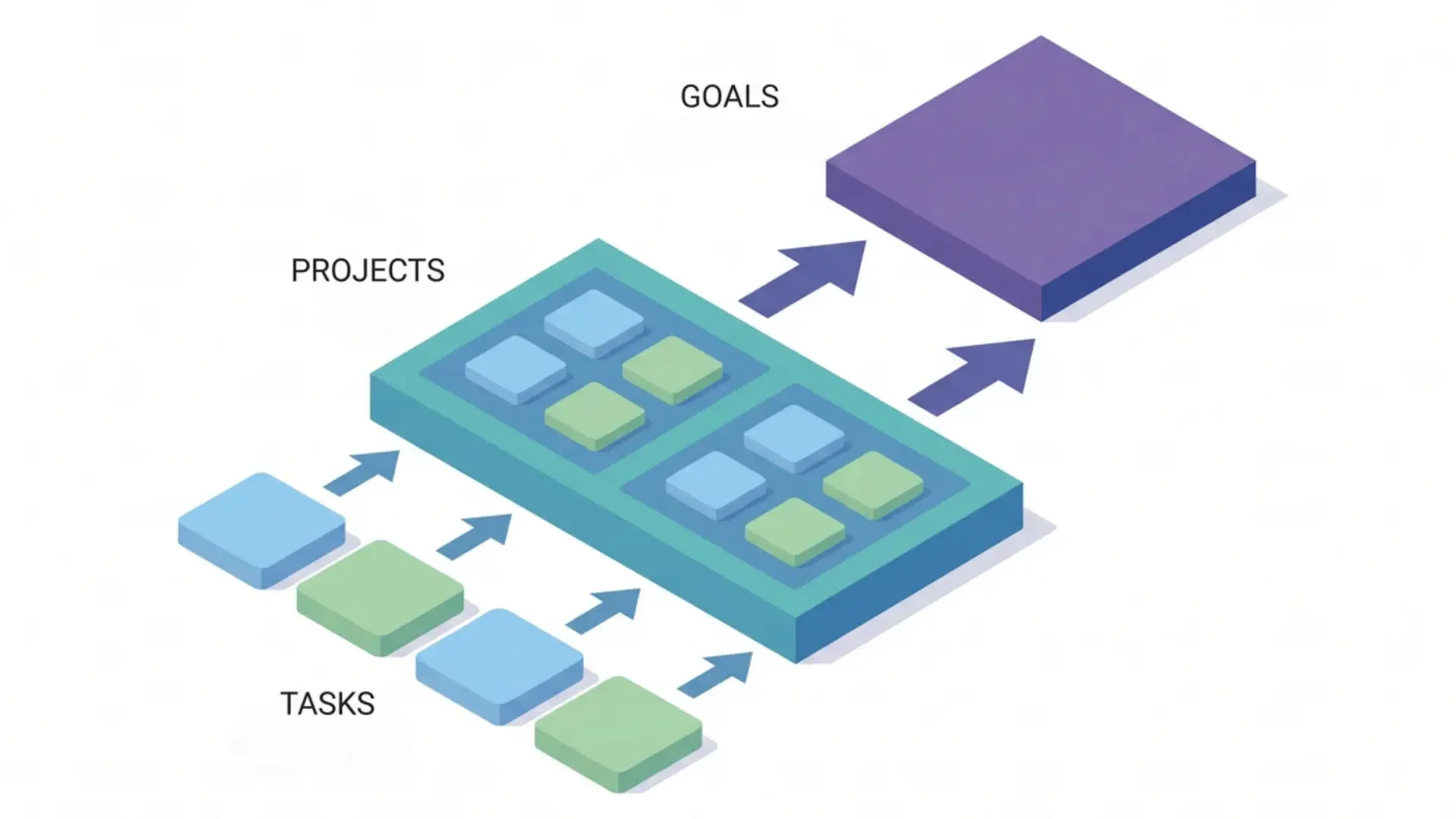
Asana is built around a three-tier hierarchy: tasks, projects, and goals. Every other feature in the platform sits on top of this structure.
Understanding how these three layers connect makes everything else in Asana easier to use.
Tasks, Projects, and Goals
A task is the smallest unit of work. It carries an owner, a due date, and a status, so responsibility and progress are always visible.
Tasks live inside projects. A project represents a larger body of work: a product launch, a content calendar, a hiring process. It gives individual tasks structure and shared context.
Goals sit above projects. They represent the outcomes your team is actually working toward. Connecting daily tasks up through projects to goals lets you see whether the work being done is moving the needle or just filling time.
Views and Visualization
Asana lets you view the same work four different ways: list, Kanban board, calendar, or timeline.
Switching between them doesn’t change the underlying tasks, it just changes how you see them.
That distinction matters. A developer tracking sprints and a campaign manager watching deadlines need different perspectives on the same project. Both are looking at the same data.
Timeline view is especially useful for spotting scheduling conflicts before they happen. When tasks are laid out side by side against dates, overlaps and gaps become obvious fast.
Automation and AI
Asana’s automation works on triggers. When a task moves to a specific section, a rule can auto-assign an owner, update the due date, or notify a teammate without anyone doing it manually.
For example, every time a content task moves to “Ready for Review,” it can automatically assign your editor and send them a notification. That’s one less thing to remember each time.
The AI layer handles a different set of tasks: drafting project status updates, summarizing comment threads, and flagging at-risk projects based on deadline and progress signals.
Both tools work best on a clean task structure. Automation applied to a disorganized project speeds up the mess, not the work.
Integrations
Asana connects with over 300 third-party tools. The most common are Slack, Google Drive, Microsoft Teams, Zoom, Salesforce, and Zapier.
These connections mean work doesn’t have to live in two places. A Slack message can become an Asana task. A Google Doc can attach directly to a project. Zapier extends automation to tools Asana doesn’t natively support.
If your team already runs on a specific stack, Asana is built to fit into it rather than replace it.
Is Asana a Project Management Tool or Something Else?
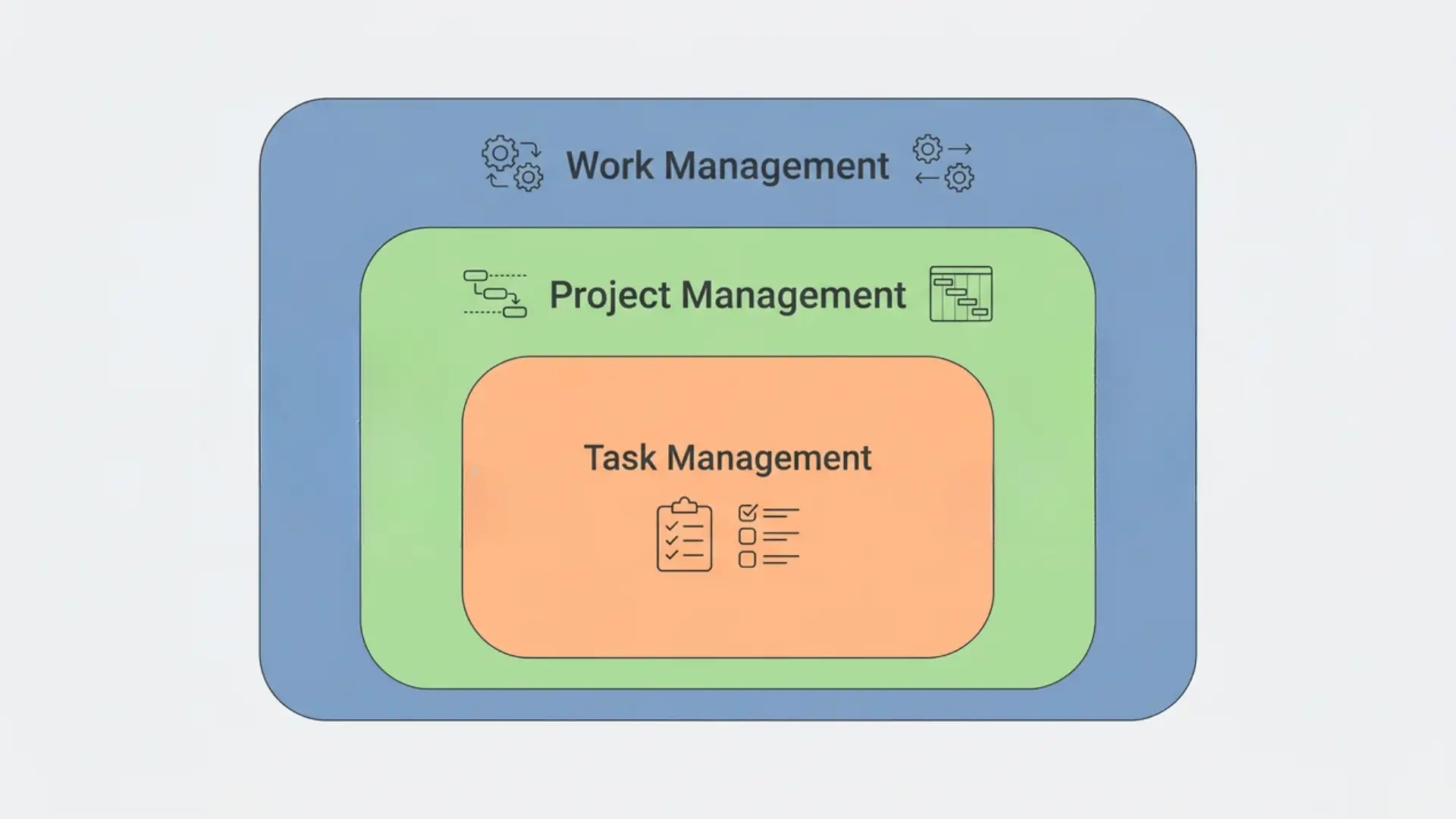
You’ll see Asana described as a task management tool, a project management tool, and a work management platform. The distinction isn’t just marketing; it changes what you expect the tool to do.
Task management is individual and flat. It’s a list of things to do. Project management software focuses on formal phases, resource scheduling, and Gantt-heavy planning.
Asana sits above both. Work management connects tasks and projects to goals. That top-layer, visibility into whether daily work is driving real outcomes, is what separates it from a standard project tracker.
“Project management” has become a catch-all in software marketing. Asana’s positioning as a work management platform is more precise and more honest about what it actually does.
Asana is not a CRM. It doesn’t store contacts, track customer communication, or manage a sales pipeline. Teams using it for client relationship management are working around the tool, not with it.
Who Is Asana Best For?
Asana works across team sizes, but it’s not equally useful for everyone at every stage. Where you get the most value depends on how complex your coordination actually is.
| User Type | Team Size | Best Plan | Use Case / Value | Notes / Limitations |
|---|---|---|---|---|
| Freelancers & Small Teams | 1–4 people | Personal (Free) | Managing recurring projects, tracking deliverables for a few clients, collaborating with a small group | Handles core workflow at no cost |
| Growing Teams | 5–50 people | Starter (Paid) | Running multiple projects in parallel with handoffs between team members | Unlocks timeline views and automation; free plan shows limits at this stage |
| Larger Organizations | 50+ people | Advanced (Paid) | Connecting task-level output to company-level outcomes; leadership visibility across teams | Includes goal tracking and portfolio features |
| Teams needing native time tracking, built-in CRM, or database/spreadsheet functions | Any | N/A | N/A | Asana is a poor fit at entry-level plans for these needs |
Asana is a poor fit if you need native time tracking on an entry-level plan, built-in CRM capabilities, or a tool that doubles as a database or spreadsheet. Those gaps are real and worth knowing before you commit.
How Much Does Asana Cost?
Asana has a free plan, and it’s a real one, not a trial. The Personal plan covers unlimited tasks and projects for teams of up to 10 users at no cost.
Paid plans start at $10.99 per user per month on the Starter tier, billed annually. The Advanced tier runs $24.99 per user per month. Both require at least two users.
The jump between tiers is significant. Starter unlocks timeline views and workflow automation. Advanced adds goals, portfolios, and resource workload visibility; the features that shift Asana from project tracker to something closer to a strategic planning tool.
Enterprise and Enterprise+ pricing isn’t listed publicly. Those require a direct conversation with Asana’s sales team.
Annual billing saves roughly 18–19% compared to paying month-to-month. Check the pricing page directly before deciding, tier names and rates have shifted before.
Wrapping Up
Asana exists because scattered work kills momentum, and structure is how you get it back.
Now you know what it is, how its hierarchy connects tasks to goals, and where it fits among other tools. That’s enough to make a real evaluation.
The free plan is a genuine starting point — up to 10 users, unlimited tasks, and core project views, no credit card required.
Whether it fits depends on your team size, workflow complexity, and what you actually need from a shared workspace. The breakdown above gives you enough to judge that honestly.
Frequently Asked Questions
What exactly does Asana do?
Asana gives teams a shared space to assign tasks, set deadlines, track progress, and connect daily work to broader company goals.
Is Asana actually free?
Yes. The free Personal plan covers core task and project management for up to 10 users. Paid plans unlock timeline views, automation, and AI features.
Is Asana a CRM tool?
No. Asana doesn’t manage contacts, pipelines, or customer communication. It’s a work management platform, not a CRM replacement.
Why is Asana so popular?
It’s free for small teams, scales well for complex work, and integrates with over 300 tools. Teams can shape it around how they already work instead of rebuilding their stack.





