


As organizations grow, managing work stops being about individual tasks and starts becoming a coordination problem across teams, timelines, approvals, and shared resources.
That’s where Adobe Workfront enters the conversation. More than a standard project management tool, it’s built to help enterprises organize complex workflows, improve visibility, and reduce the operational friction that slows large teams down.
In this blog, you’ll see how Workfront functions, where it fits inside Adobe’s ecosystem, and why certain organizations benefit from it far more than others.
What is Adobe Workfront?
Adobe Workfront is enterprise work management software. It centralizes how organizations plan, assign, track, and report on work across every team, every project, at the same time.
That last part matters. Workfront isn’t a project management tool in the way Asana or Jira are. Those tools help you run one project well. Workfront is built for the layer above that manages all the work happening across an entire organization, with shared resources and competing priorities.
It’s designed for marketing and operations teams running dozens of concurrent projects. Not individual contributors managing their own tasks.
Adobe acquired Workfront in 2022. It now sits inside Adobe Experience Cloud, alongside tools built for enterprise marketing and digital experience teams.
What Does Adobe Workfront Actually Do?
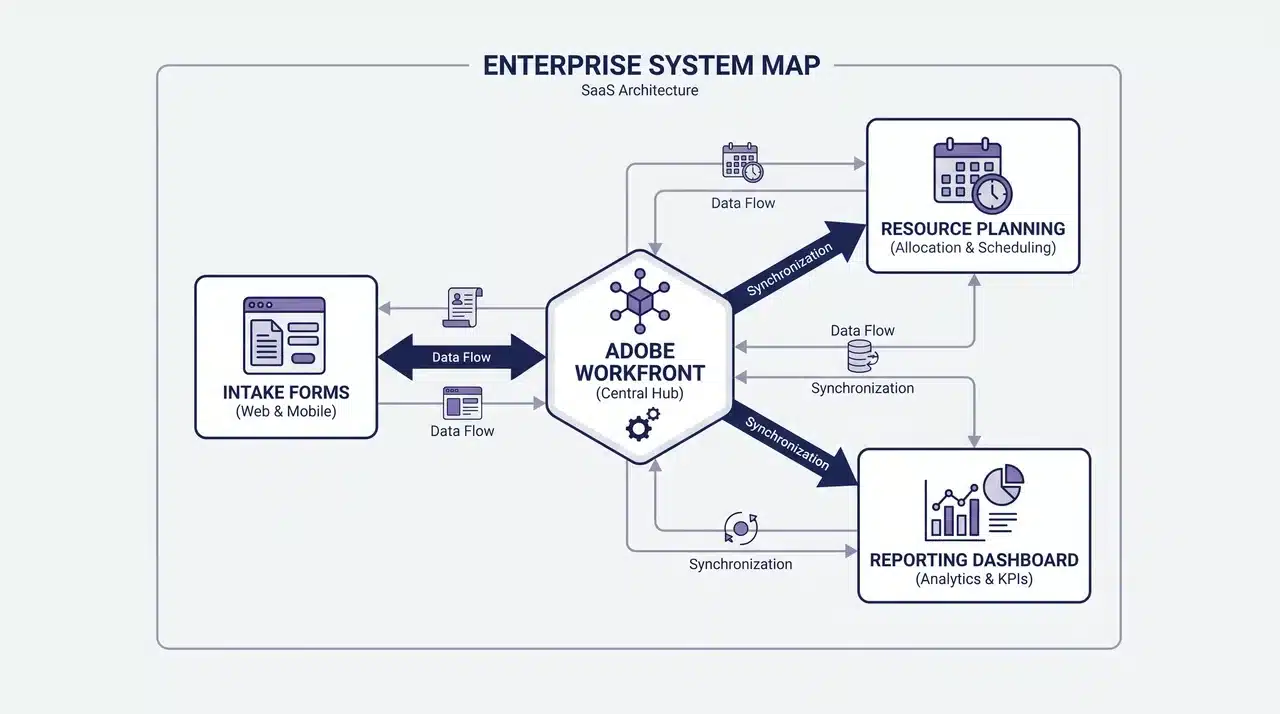
Most software tools are easier to understand once you see the system behind them. Workfront is no different. Its value isn’t in any single feature; it’s in how five functions connect into one continuous flow.
Work Intake and Request Management
Workfront centralizes incoming work through structured intake forms, creating consistency before projects begin.
- All requests enter through one centralized system.
- Intake forms collect required details before approval.
- Work is less likely to get lost across emails or chat tools.
- Managers gain clearer visibility into priorities and incoming requests.
- Standardized intake improves accountability and reduces confusion.
By structuring work at the intake stage, Workfront helps teams start projects with the right information and better organization.
Resource and Capacity Planning
Workfront gives managers visibility into actual team capacity before work is assigned, making resource planning more accurate across multiple projects.
- Managers can track real-time workloads across teams and projects.
- Work is assigned based on actual availability, not assumptions.
- Capacity planning helps prevent employee overload and missed deadlines.
- Resource visibility makes it easier to identify bottlenecks early.
- Teams gain more predictable timelines through balanced workload distribution.
By improving visibility before decisions are made, Workfront helps organizations plan resources more effectively and reduce operational bottlenecks.
Reporting Across Projects
Workfront gives organizations a centralized view of all active projects, rather than limiting visibility to individual project dashboards.
- Leadership can monitor all projects from one place.
- Cross-project reporting improves visibility into timelines, risks, and priorities.
- Managers can quickly identify delays and resource conflicts.
- Automated reporting reduces manual status updates and reporting overhead.
- Stakeholders receive more consistent, real-time visibility into the project.
By centralizing reporting, Workfront replaces fragmented updates with a single source of truth for organization-wide performance tracking.
Together, these functions make Workfront a centralized system for managing work intake, resource planning, and project visibility across an organization from one platform.
What is Workfront Fusion?
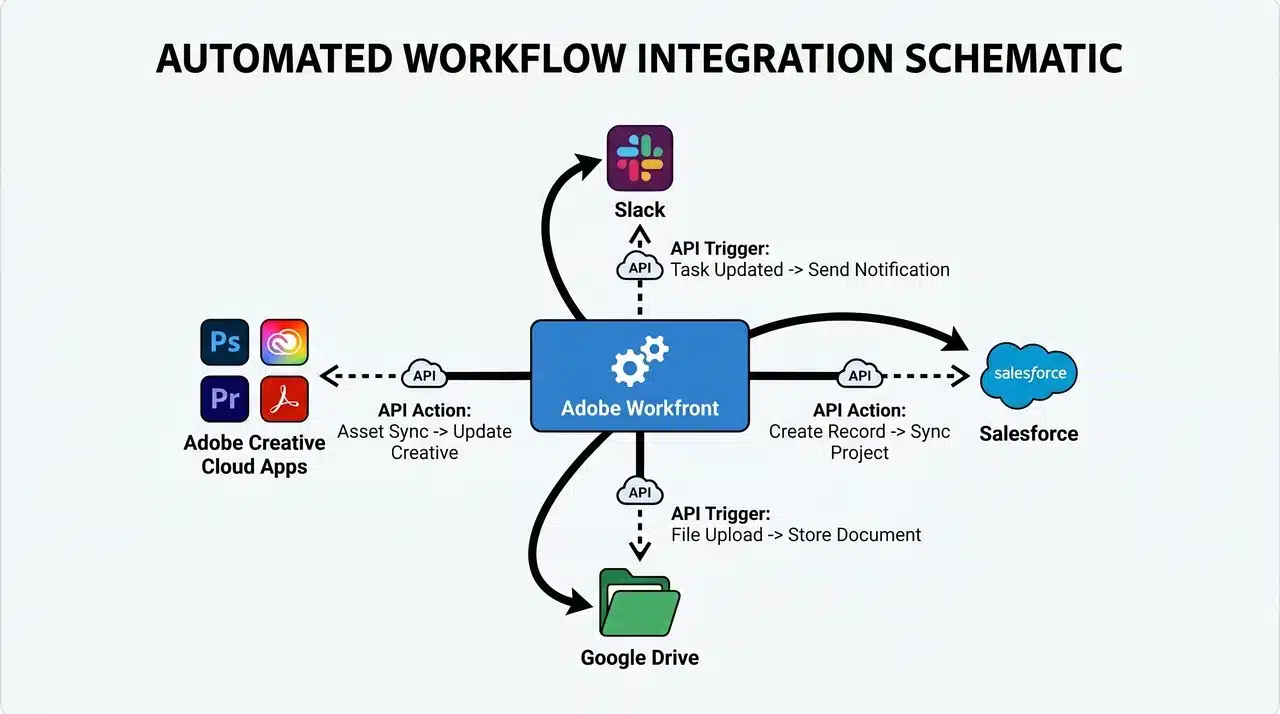
Adobe Workfront Fusion is the automation layer connected to Workfront. It links Workfront with tools like Slack, Salesforce, and Google Drive so actions in one system can automatically trigger updates in another.
Instead of manually syncing work across platforms, Fusion automates those workflows and reduces repetitive coordination tasks.
It’s important to note that Fusion is not included with core Workfront. It’s a separate automation add-on with its own licensing.
How Does Workfront Fit Into Adobe’s Ecosystem?
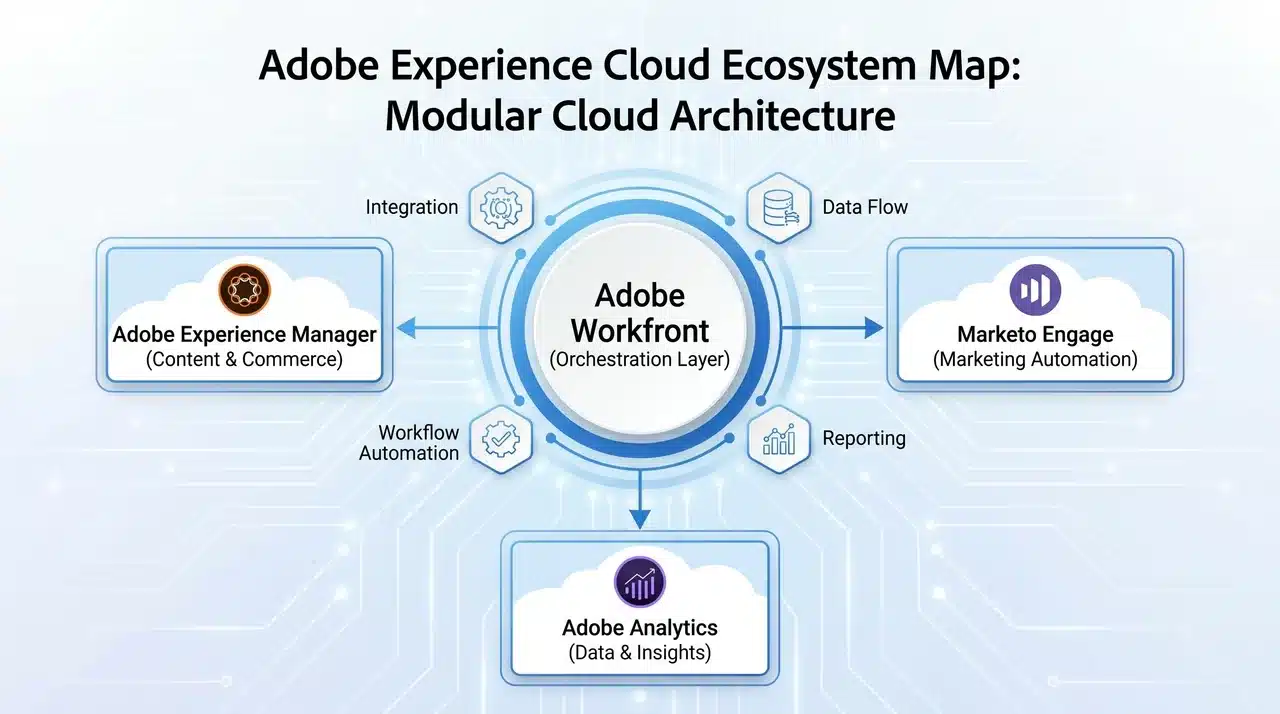
Workfront is not included with Adobe Creative Cloud. It’s a separate enterprise product within Adobe Experience Cloud with its own licensing.
Its value comes from integration. Organizations using Adobe tools like Experience Manager or Marketo can connect assets, approvals, campaigns, and project workflows within a single system rather than across multiple platforms.
Workfront is designed for enterprise teams, typically purchased by marketing operations leaders, PMO directors, or IT managers looking for centralized work management.
Who is Adobe Workfront Built For?
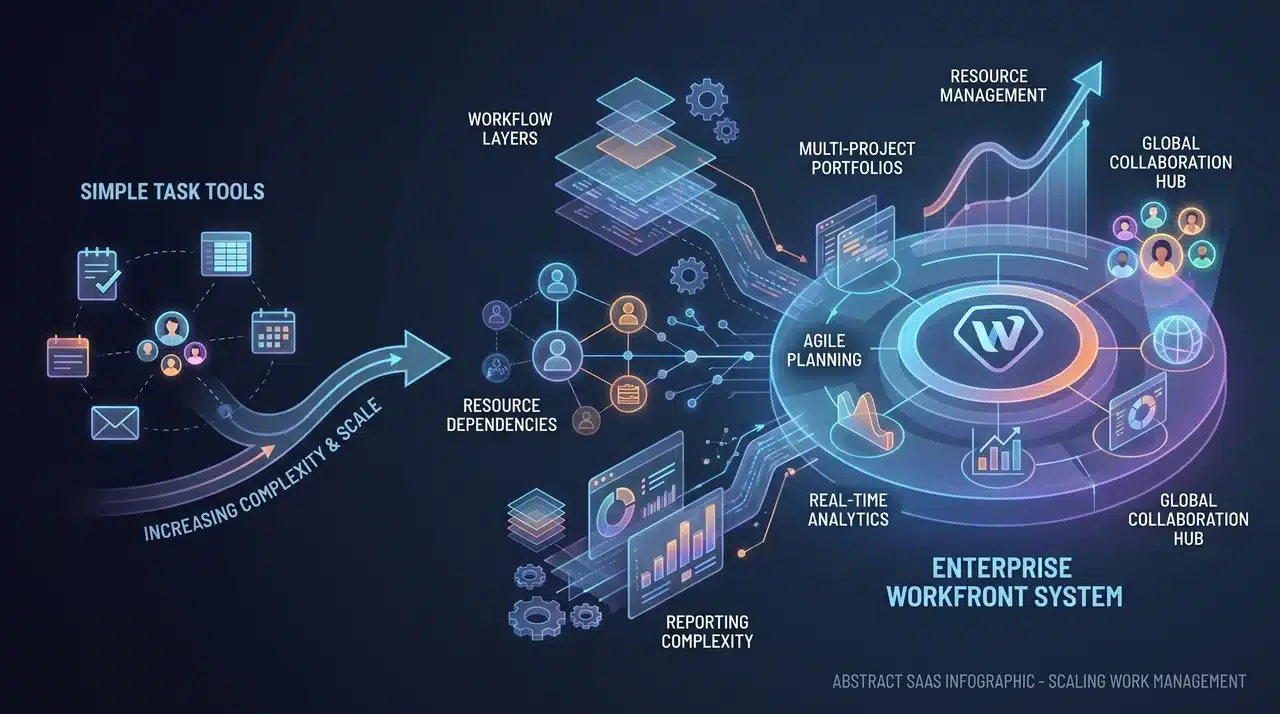
Workfront is designed for organizations whose operational complexity has outgrown simpler project management tools.
It’s typically used by project managers, marketing operations teams, and PMO leaders who need visibility across multiple teams, shared resources, and concurrent projects.
For smaller teams with limited projects, the implementation overhead often isn’t worth it. Workfront becomes valuable when coordination, resource planning, and cross-project visibility turn into operational bottlenecks, especially in large organizations and high-volume agencies.
Pros and Cons of Adobe Workfront
Like most enterprise platforms, Workfront delivers significant value in the right environment but also comes with trade-offs.
Its strengths become more apparent as organizational complexity increases, while smaller teams may find parts of the platform excessive for their needs.
| Pros | Cons |
|---|---|
| Centralizes work intake, planning, and reporting in one system | Implementation can be time-consuming and resource-intensive |
| Improves visibility across teams, projects, and shared resources | May feel overly complex for smaller teams or simple workflows |
| Strong resource and capacity planning for enterprise operations | Requires training and onboarding for effective adoption |
| Integrates well with Adobe Experience Cloud and other business tools | Separate licensing for add-ons like Workfront Fusion increases cost |
| Reduces manual reporting through centralized dashboards and automation | Higher pricing compared to lightweight project management tools |
Ultimately, Workfront works best for organizations where operational coordination has become difficult to manage across disconnected systems.
For enterprises handling large-scale workflows, the structure and visibility can outweigh the complexity and implementation overhead.
Conclusion
Adobe Workfront is ultimately less about task tracking and more about operational control at scale.
Its real value becomes apparent when organizations need structure for how work enters the system, how resources are allocated, and how leadership gains visibility across multiple teams and projects simultaneously.
Combined with integrations and automation through Fusion, it becomes part of a broader workflow infrastructure rather than just another productivity tool.
If your current systems are creating bottlenecks instead of clarity, now may be the right time to evaluate whether Workfront fits your organization’s long-term workflow strategy.
Frequently Asked Questions
Is Adobe Workfront similar to Jira?
Not exactly. Jira is primarily built for software development and agile workflows, while Workfront is designed for enterprise-wide work management across marketing, operations, and cross-functional teams.
Does Adobe Workfront include automation features?
Yes. Workfront supports workflow automation through Workfront Fusion, which connects Workfront to tools such as Slack, Salesforce, Google Drive, and Microsoft applications.
Can small teams use Adobe Workfront?
They can, but Workfront is generally better suited to organizations managing complex workflows, shared resources, and multiple concurrent projects. Smaller teams often find lighter project management tools more practical.
Is Adobe Workfront part of Adobe Creative Cloud?
No. Workfront is a separate enterprise product within Adobe Experience Cloud and requires its own licensing outside of Creative Cloud subscriptions.
What Types of Teams Typically Use Adobe Workfront?
Workfront is commonly used by marketing operations teams, PMO departments, enterprise project managers, and agencies that need centralized visibility across large volumes of work.





