People trying an AI art generator for the first time have one of two reactions. They’re either hooked immediately or left wondering why their results don’t match what they imagined.
In my experience, the difference usually comes down to understanding how the tool works, not just knowing where to click.
OpenDream AI Art operates in specific ways, and knowing them helps you get better results. Let’s start with the basics.
What is OpenDream AI Art?
OpenDream AI Art is a free, browser-based AI art generator that turns text prompts into original images using AI image creation technology.
You type what you want to see, hit enter, and seconds later, an image appears. No software, no design degree, no powerful graphics card, and it still runs smoothly, all in your browser.
How OpenDream Generates Unique Images
Here’s what happens behind the scenes. OpenDream doesn’t pull images from the web or remix existing pictures. It generates each image from scratch based on patterns it learned during training. Every output is unique.
Repeating a prompt or tweaking a word produces completely different visuals. I’ve tested it myself, and even tiny wording changes can yield surprising results.
It is also worth noting what it is not. OpenDream will not replace Photoshop or Canva. It is not for editing photos, designing marketing materials, or creating brand assets. It is for generating art, experimenting, and seeing where your imagination leads.
If your goal is creative exploration rather than polished commercial graphics, this is the right tool.
How Does OpenDream Generate Images From Text?
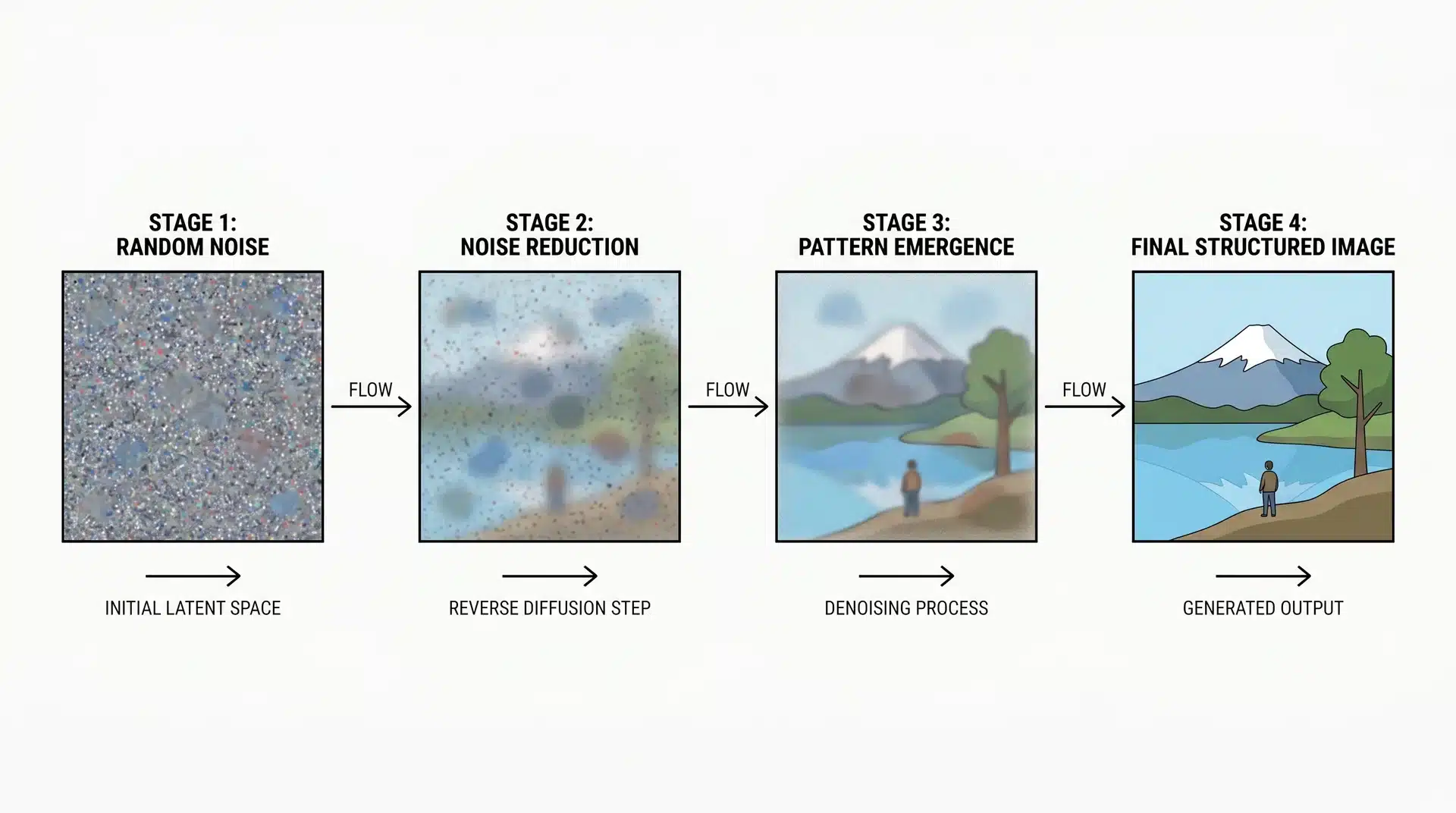
OpenDream doesn’t search the web or stitch together stock photos. The process is more interesting, and understanding it helps you use the tool better.
When you submit a prompt, the model turns your words into a mathematical map. It starts with random noise and gradually refines it until a clear image appears.
This step-by-step refining is called diffusion, and it is why the AI responds so strongly to how you describe things.
Why Specific Prompts Matter
Vague prompts leave holes. The model fills those gaps based on what it learned during training. That can give you something plausible, but not exactly what you imagined.
Specific prompts give the AI more guidance at every step.
For example, “a misty forest at dawn with golden light filtering through tall pine trees” produces a much closer result than just “a nice forest.”
Every extra detail narrows the path from random noise to the final image. The more direction you give, the less the model has to guess.
How Templates Help
Templates work in a similar way. They do not replace your prompt. They provide structure, aspect ratio, and style settings. Your prompt still decides the subject. Think of it as the AI getting ready before you tell it where to go.
Finally, each image starts from a different random noise seed. That is why the same prompt run twice produces two different images. The AI is not inconsistent; it is just starting from a different point each time.
Which Model Should You Use on OpenDream?
OpenDream offers four AI models, each producing a very different type of image. The same prompt can generate completely different results depending on the model. Picking the right one before writing your prompt can save wasted credits.
Here’s what each model is best for:
- Dreamlike Photoreal 2.0: realistic portraits, landscapes, and product-style shots. If you want something that looks like a photo, start here.
- Dreamlike Anime 1.0: stylized character art, manga aesthetics, Japanese animation styles. One of the stronger free options for anime work.
- Stable Diffusion 2.1: general creative work with a wide range of styles. A solid choice if you want to experiment.
- Deliberate: experimental compositions, concept art, and surreal or abstract imagery. It interprets prompts loosely, so results can be surprising.
A good habit I learned was to choose your model first, then write your prompt around it. The same description behaves differently across models. What works for Photoreal often undersells Deliberate, and vice versa.
How to Use OpenDream AI Art: Step-by-Step
Getting your first image takes less than two minutes. The steps are simple, but what separates a good result from a frustrating one is how you handle each step, especially writing the prompt.
Step 1: Set Up and Start Your First Generation
Go to opendream.ai and create a free account. No credit card is required. You get 24 credits per day, which reset every day.
Once you’re in, pick your model, type your prompt, and hit generate. That completes the full loop
Step 2: Write a Prompt That Gets Specific Results
Most people under-invest here. A prompt with four elements usually produces better results: subject, style, lighting, and composition.
For comparison, look at these two:
- “A woman in a forest”
- “A young woman standing in a dense pine forest, soft morning light, painterly illustration style, close-up portrait framing”
You don’t have to include all four elements every time. But the more you add, the less the AI has to guess.
Step 3: Refine, Not Restart
If the output isn’t right, don’t start over. Small adjustments usually work better than full rewrites.
Change one thing at a time: adjust the lighting, tweak the composition, or shift the style. If a part of the image looks off, use the in-painting tool to fix just that area without regenerating the whole image.
As someone who gets consistent results with OpenDream now, I didn’t get it perfect the first time. I iterate intentionally and learn from each generation. Each attempt teaches me how prompts, lighting, and composition influence the outcome. Over time, this approach turns trial and error into reliable results.
What Are OpenDream’s Limits?
OpenDream is very useful for what it’s made for. But there are some limits you should know about before they slow you down mid-project.
The Free Tier Runs out Quickly
24 credits per day sounds fine until you start testing prompt variations. At 2–4 credits per image, that’s only 6–12 images before hitting the daily cap. Credits don’t carry over, so serious iterative work can feel blocked fast.
Complex Scenes Are Tricky
Multi-subject setups, two characters interacting, a crowd, or a detailed environment with several focal points often turn out weaker than single-subject prompts.
This isn’t unique to OpenDream. It’s about the model’s capacity. Tools like Midjourney v6 or DALL-E 3 handle this better, but they run on heavier infrastructure.
Advanced Controls Are Limited on The Free Plan
No negative prompting, CFG scale adjustments, or seed control unless you pay. Seed control matters more than it sounds. Without it, you can’t reliably reproduce a result you liked or build on a previous image.
There’s no API
You can’t automate OpenDream, connect it to workflows, or send outputs into other tools programmatically. If that’s essential, DALL-E 3 via API is the usual alternative.
None of this means you should avoid OpenDream. It excels at creative, artistic, single-subject generation. Beyond that lane, you start noticing its edges.
OpenDream Pricing: Free vs. Paid Plans
OpenDream offers flexible plans for different types of users. Here’s how the free and paid tiers compare:
| Plan | Price | Credits | Models | Features | Access To | Notes |
|---|---|---|---|---|---|---|
| Free | $0/month | 24 daily | Photoreal 2.0, Anime 1.0 | Standard speed | 2 models | No credit card, no trial, no expiry. Learn and experiment freely. |
| Core | ~$12/month | 3,000 monthly | All four models | Faster, parallel generation | All 4 models, Stable Diffusion 2.1, Deliberate | Ideal for regular users, creates ~750–1,500 images/month. |
| Pro | ~$24/month | 12,000 monthly | All four models | Priority support, advanced tools | All 4 models, full advanced features | Best for business or high-volume projects. Overkill for casual/hobby use. |
Each plan is designed to fit different needs, from casual experimentation to high-volume professional use.
How Does OpenDream Compare to Midjourney and DALL-E 3?
Many say OpenDream is for beginners and Midjourney is for pros. That’s not wrong, but the more useful question is what you want to create and whether the tool fits that purpose.
OpenDream vs. Midjourney
- Image Quality & Style: Midjourney produces higher-quality artistic images and handles complex compositions better. It also has a larger creative community. If top-tier image quality is your priority and you’re ready to pay upfront, Midjourney is stronger.
- Access & Ease of Use: Midjourney requires a paid subscription before generating anything and runs through Discord, which can be cumbersome if you prefer a browser interface.
OpenDream, on the other hand, lets you start immediately for free with no credit card required. If you’re unsure whether AI art fits your workflow, this low barrier matters.
You can learn the basics of prompting on OpenDream and make a more informed choice about Midjourney later.
OpenDream vs. DALL-E 3
- Instruction Following: DALL-E 3 is more precise with instructions. For very specific scenes, objects in exact positions, text in an image, or multiple subjects, DALL-E 3 is more reliable.
- Artistic Variety: OpenDream produces more varied artistic styles, especially for anime, painterly, and experimental images. DALL-E 3 leans realistic and instructional by default.
- Integration: DALL-E 3 offers API access, allowing integration into products or automated workflows. OpenDream does not.
These tools aren’t a strict quality ladder. They just have different strengths. OpenDream is perfect for free artistic exploration, anime-style art, and creative experimentation without financial risk.
It’s not ideal for complex scene composition, marketing assets, or automated workflows.
Conclusion
OpenDream AI art sits in an interesting position in a crowded market. It’s not the most powerful option available, and it doesn’t try to be.
What it offers is a genuinely free, low-friction starting point for anyone who wants to explore AI image generation without a financial commitment upfront.
The free tier has real limits. The model selection is smaller than that of some competitors. But for creative exploration, anime-style output, and learning how prompting actually works, it delivers.
If you’ve been curious about AI art but haven’t started yet, OpenDream is a reasonable first step. Sign up, run a few generations, and see what sticks.
Frequently Asked Questions
Is OpenDream AI free to use?
Yes. OpenDream offers a permanent free plan with 24 daily credits, enough for casual use. Paid plans start at ~$12/month with more models, speed, and credits.
Who owns the images created on OpenDream?
You retain full ownership of generated images and can use them commercially, as long as OpenDream’s content policies are followed.
Why do my OpenDream results look different each time?
Each image starts from a different random noise seed. Variations are normal. Using seed control or more specific prompts can produce more consistent results.
How does OpenDream compare to running Stable Diffusion locally?
OpenDream runs hosted models with no setup or hardware needed. Local Stable Diffusion offers more options and control but requires technical setup and capable hardware.