


The Google Gemini vs. ChatGPT debate keeps coming up because both tools are genuinely good and genuinely different.
Choosing between them can feel like picking sides in a battle that doesn’t exist. Both handle complex tasks well, yet they behave differently depending on what you throw at them.
Gemini excels at analyzing massive documents and integrating with Google tools. ChatGPT consistently leads on writing, coding, and long-term personalization.
The real question isn’t which one is “better,” but which one fits your workflow.
By looking at how each tool handles information, research, and complex projects, you can see where they work best, and when it makes sense to use both.
What You’re Actually Choosing Between
Neither Gemini nor ChatGPT is objectively better. Each handles certain tasks more naturally than the other, depending on how you work. The key isn’t which is superior, it’s which one fits your setup.
Core Differences in Design
Both run on large language models, but their architectures are built for different contexts.
- Gemini Advanced (Gemini 3.1 Pro): Built to extend the Google ecosystem, integrates naturally with Google Workspace apps and services.
- ChatGPT Plus (GPT-5): Functions as a standalone conversational and productivity layer, flexible across any workflow.
Those architectural differences shape how each tool responds, what it connects to, and where it works best.
Workflow Matters More Than Rankings
If you don’t rely on Google tools, Gemini’s integration advantages don’t apply. ChatGPT becomes the more flexible default.
Treating this as a performance ranking misses the point. The real decision is about your tools, your tasks, and how you work day to day.
Choosing Based on Task Type
Both handle complex prompts and produce high-quality output. The right choice comes down to which assistant fits your environment and the work in front of you.
Why ChatGPT and Gemini Differently on the Same Prompt
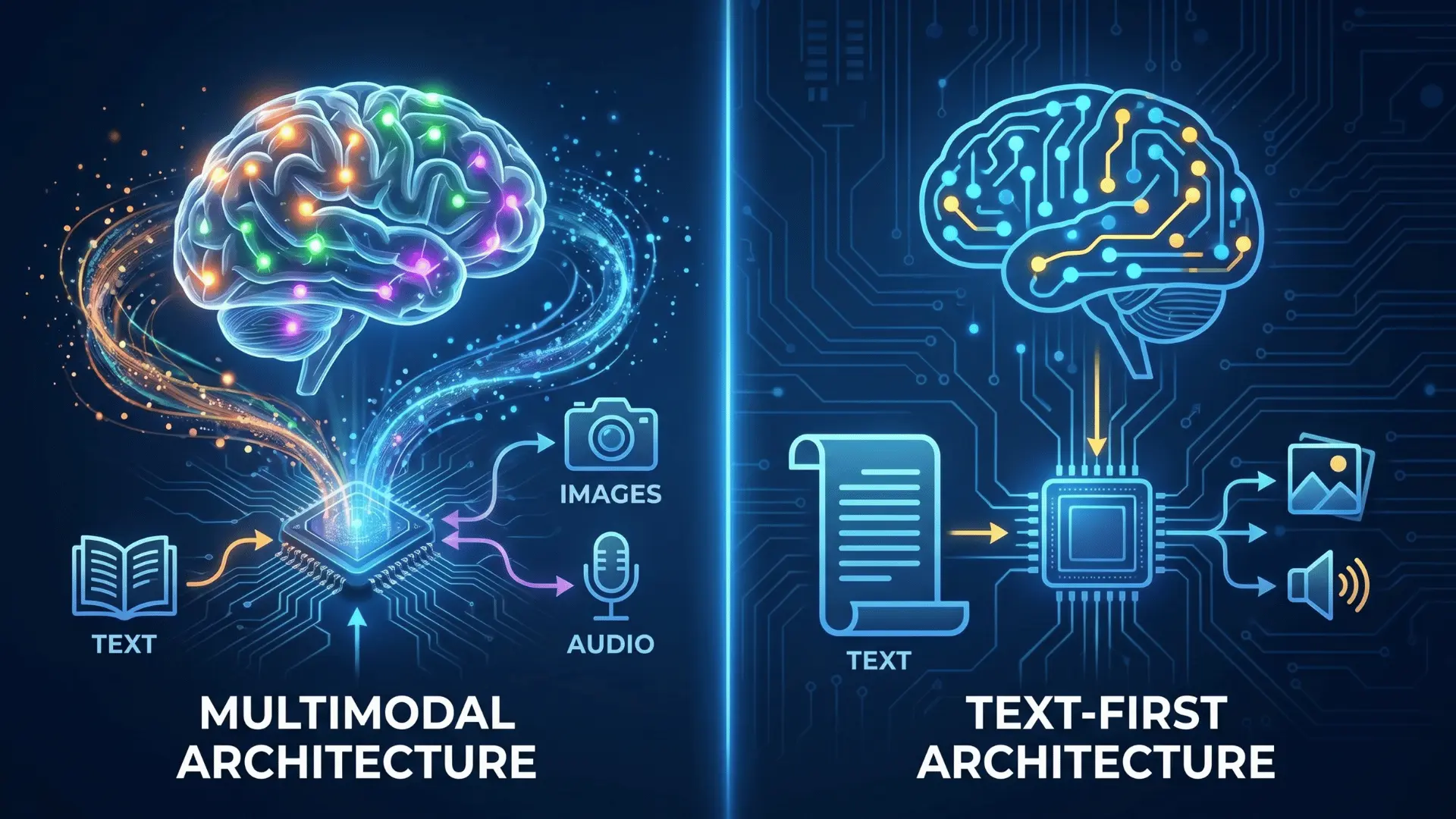
Gemini and ChatGPT are both capable tools, but they’re built differently and that shows up fast when the task gets complex.
| Feature / Aspect | Gemini Advanced (Gemini 3.1 Pro) | ChatGPT Plus (GPT-5) | Notes / Implications |
|---|---|---|---|
| Architecture | Multimodal-native: text, images, audio, structured data treated equally | Text-first, multimodal added later | Explains the different handling of complex prompts |
| Context Window | Up to 1 million tokens | Smaller, sequential processing | Better for long or multi-document analysis |
| Media Handling | Integrates across formats holistically | Processes mixed inputs sequentially | Gemini excels on multi-format tasks; ChatGPT on text-only tasks |
| Output Style | Context-focused, integrates media | Structured, precise text | ChatGPT preferred for consistent text reasoning |
| Integration | Native with Google Workspace | Standalone, flexible | Gemini is better for Workspace users; ChatGPT is for general workflows |
| Complex / Mixed Tasks | Strong, maintains cross-format understanding | Works, but sequential reasoning | The gap is most noticeable on PDFs, charts, and multi-step prompts |
| Simple / Single-Format Tasks | Performs reliably | Performs reliably | Minimal difference in text-only Q&A or simple prompts |
Gemini’s multimodal-native design means it builds a single understanding across text, images, and files at once. Drop in a PDF with charts and ask a question; it reasons across all of it together.
ChatGPT processes inputs more sequentially. That’s why it produces tighter, more consistent prose on text-only tasks, but can lose cross-format context on complex mixed inputs.
Gemini’s 1M-token context window also matters for heavy work. You can feed it an entire codebase or a stack of research documents and ask questions across all of them in one session. ChatGPT’s smaller window makes that impractical.
Neither approach is wrong. They reflect different design priorities and that shows up most clearly when tasks get long or multi-format.
What Each Tool Is Actually Better At
Each assistant has a natural lane. Knowing which does what better saves you from forcing the wrong tool through a task it wasn’t built for.
| Task / Area | Gemini | ChatGPT |
|---|---|---|
| Writing and Creative Work | Can do writing tasks, but focuses more on context across media | Writes clear, consistent, and well-structured text |
| Research and Document Analysis | Can handle large documents, PDFs, and web content in one go | Can do research too, but slower on long or mixed documents |
| Coding | Good for big code projects and cross-file analysis | Good for debugging, logical reasoning, and writing clean code |
| Google Workspace & Productivity | Works best with Google Docs, Sheets, Drive, Gmail | Standalone tool; less advantage outside Google Workspace |
| Personalization & Long-Term Use | Limited memory and personalization | Remembers past interactions and adapts responses |
Here’s what those differences mean in practice:
- Writing and Creative Work: Use ChatGPT when the output needs to be clean and consistent. It follows nuanced instructions more reliably and produces prose that reads like it was written by one person.
- Research and Document Analysis: Gemini handles large or mixed documents faster. Its long context window means fewer trips back to re-upload or re-summarize.
- Coding: Bring ChatGPT in for debugging and step-by-step logic. Use Gemini when you need to reason across multiple files or a large codebase at once.
- Google Workspace & Productivity: If you live in Google Docs, Sheets, or Gmail, Gemini saves real time. The integration is native; not bolted on.
- Personalization & Long-Term Use: ChatGPT’s memory stores what you share across sessions; your preferred writing tone, recurring project context, how you like responses structured and applies it automatically. Gemini’s memory is more limited and mostly tied to the current session.
The task in front of you should drive the choice. Both tools are capable. The question is which one is already set up to handle it well.
Pricing, Free Tiers, and What You Actually Get
The pricing between these two tools is closer than most people expect. Here’s what each tier actually gives you, and where the real differences sit.
Premium Plans
Both paid plans are priced similarly and unlock the full model capabilities for each tool. A few things worth knowing:
- ChatGPT Plus and Gemini Advanced cost about the same (as of May 2026).
- Gemini Advanced includes Google One AI Premium, adding extra Google storage for existing Google One users.
- That storage bonus adds value if you’re already in the Google ecosystem — but it doesn’t change what either tool can do.
Free Tiers
Both free versions are usable, but they have real limits. Don’t expect either to carry a serious workflow.
- ChatGPT’s free tier gives you access to GPT-5.3; capable for everyday questions and simple drafting, but you’ll hit limits on complex reasoning and longer outputs.
- Gemini’s free tier runs on a lighter Flash model, which handles quick queries well but struggles with large document analysis or multi-step tasks.
If your use is light, like only a few queries a day, and no heavy documents, either free tier works fine. For anything workflow-critical, the paid plans are worth it.
Price alone shouldn’t drive the decision, both premium plans unlock similar core capabilities.
When to Use Both (and How to Split the Work)
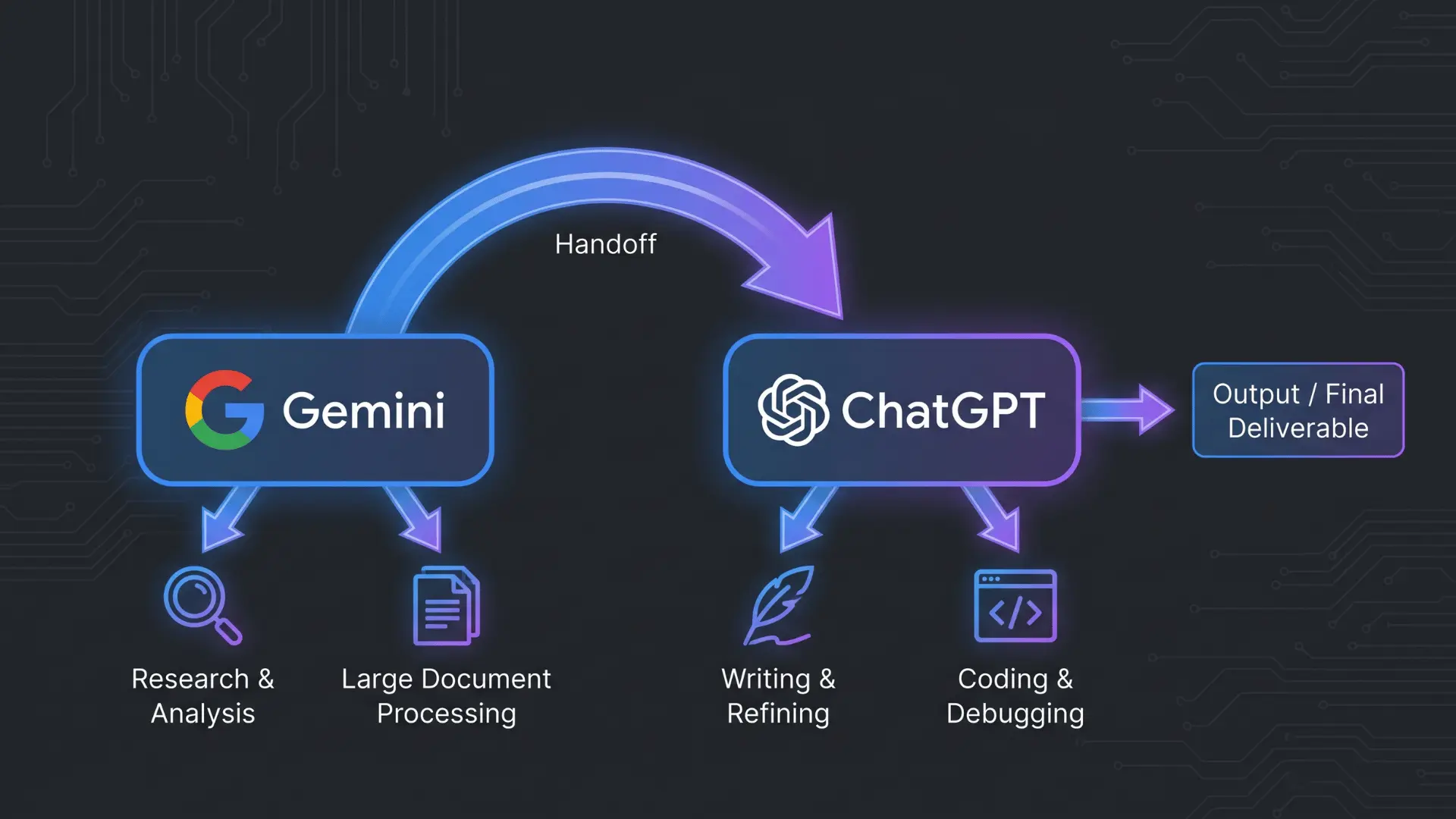
The handoff point is where the real efficiency gain lives. Gemini’s Deep Research and 1M-token context make it the stronger first pass; processing PDFs, pulling from web sources, synthesizing across files.
Once you have that synthesis, ChatGPT takes over for drafting, structuring, and refining. Its text-first reasoning produces cleaner, more consistent output at that stage.
Handoff Strategy
Here’s how to split the work across both tools without losing time to switching friction:
Start with Gemini, pull sources, upload documents, and let it synthesize across formats and files.
Hand off to ChatGPT once you have the raw material; it’s the stronger tool for drafting, rewriting, and debugging with precision.
Coding: Gemini’s long context handles full codebase review; bring ChatGPT in for logic checks, edge cases, and clean implementation.
Writing: Gemini does the research legwork; ChatGPT turns the synthesis into something worth reading.
The main trade-off is switching friction. Mobile workflows or single-tool organizational licenses can make this handoff cumbersome. But forcing one tool to handle every stage costs you quality in multi-step work.
Wrapping Up
Choosing the right AI assistant comes down to one question: what does your workflow actually demand?
Gemini handles long documents, multimodal inputs, and Google Workspace natively. ChatGPT produces more consistent writing, stronger step-by-step reasoning, and adapts to your style over time.
For complex multi-stage work, running them in sequence; Gemini for gathering and analysis, ChatGPT for drafting and refinement gives you the strengths of both. The best setup is the one that fits how you actually work.
Frequently Asked Questions
Is Gemini or ChatGPT better for coding?
ChatGPT is best for debugging and step-by-step reasoning, while Gemini handles large codebase analysis. The best choice depends on the task type.
Are the free versions of Gemini and ChatGPT worth using?
Both free tiers cover basic use. ChatGPT limits model capability; Gemini limits features and context. Neither is enough for heavy or professional workflows.
What are the risks of using Gemini?
The main concerns are data privacy within Google integrations and weaker output on creative tasks. If you’re working with sensitive data, review Google’s data policies before using it.
Which is better for studying?
Gemini works well for synthesizing large research materials. ChatGPT is stronger for producing clear summaries and practice exercises. The best tool depends on your study materials and how you work through them.





