

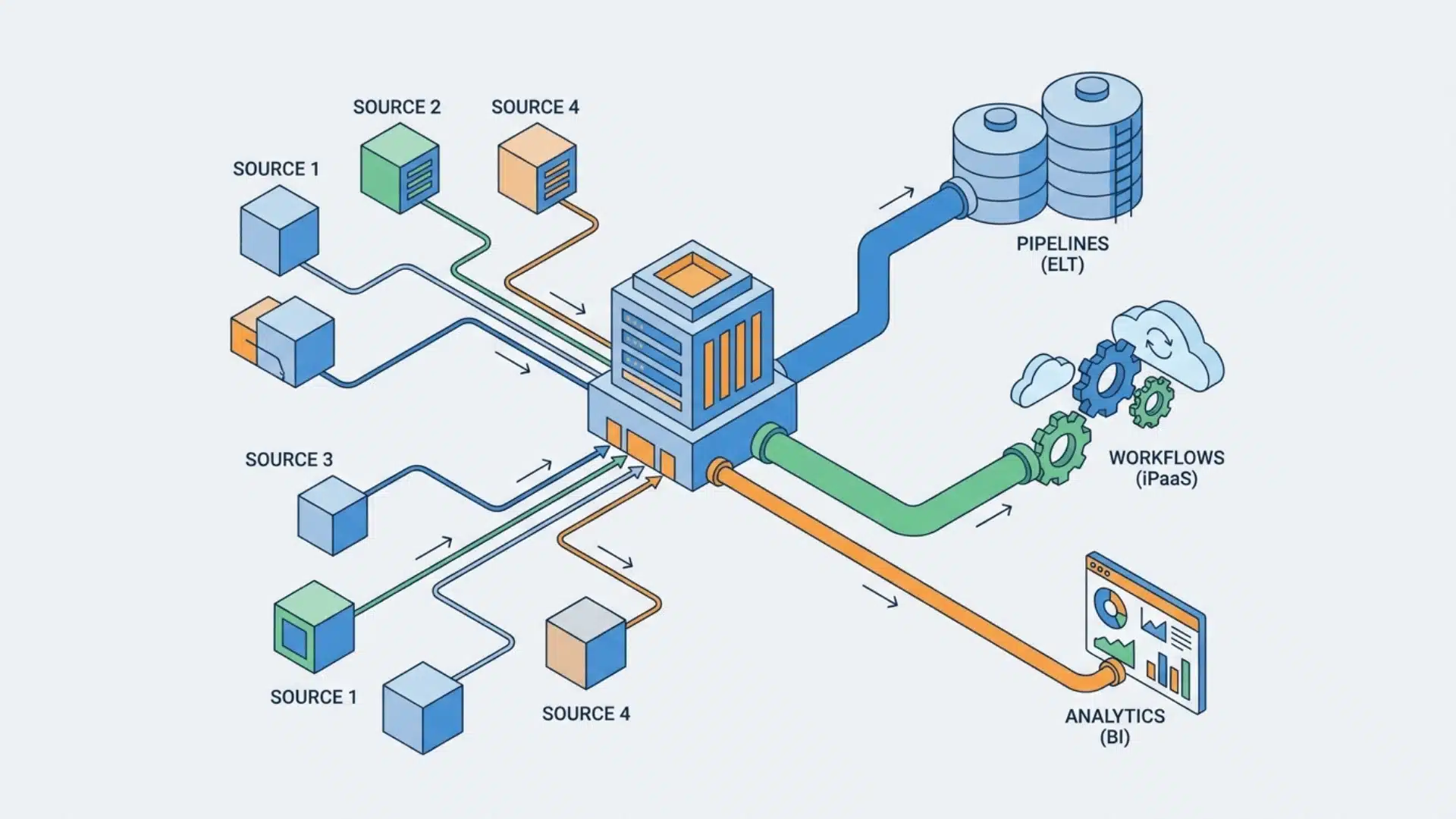
Ever feel like your team spends more time moving data around than actually using it? Copying from tools, fixing spreadsheets, and chasing updates can quickly slow everything down.
That’s where data automation software usually comes into the picture, but it’s not always clear what it actually includes or how it works in real setups.
Data automation is not a single system. It spans different tools built for different types of data movement and use cases.
This blog breaks down those categories so you can understand what each one does and figure out what actually fits your workflow.
What is Data Automation Software?
Data automation software is any system that replaces manual steps in collecting, moving, transforming, or acting on data. It runs automatically rather than being triggered manually.
The term covers three distinct types of tools, not one category. That distinction matters before comparing tools.
People looking for data automation tools often expect a single solution. Instead, they usually encounter pipeline tools, app automation platforms, and BI systems. Each one is built differently and solves a different problem.
The split comes down to direction and volume of data.
- Pipeline tools move large volumes of structured data between storage systems.
- App automation tools handle smaller, event-based data between business apps.
- BI platforms combine transformation and reporting into a single layer.
These tools are not interchangeable. A tool built for one role rarely fits another cleanly.
Before looking at features or pricing, the key question is simple: which of these three categories actually matches the work that needs to be done?
Categories of Data Automation Tools and Why the Difference Matters
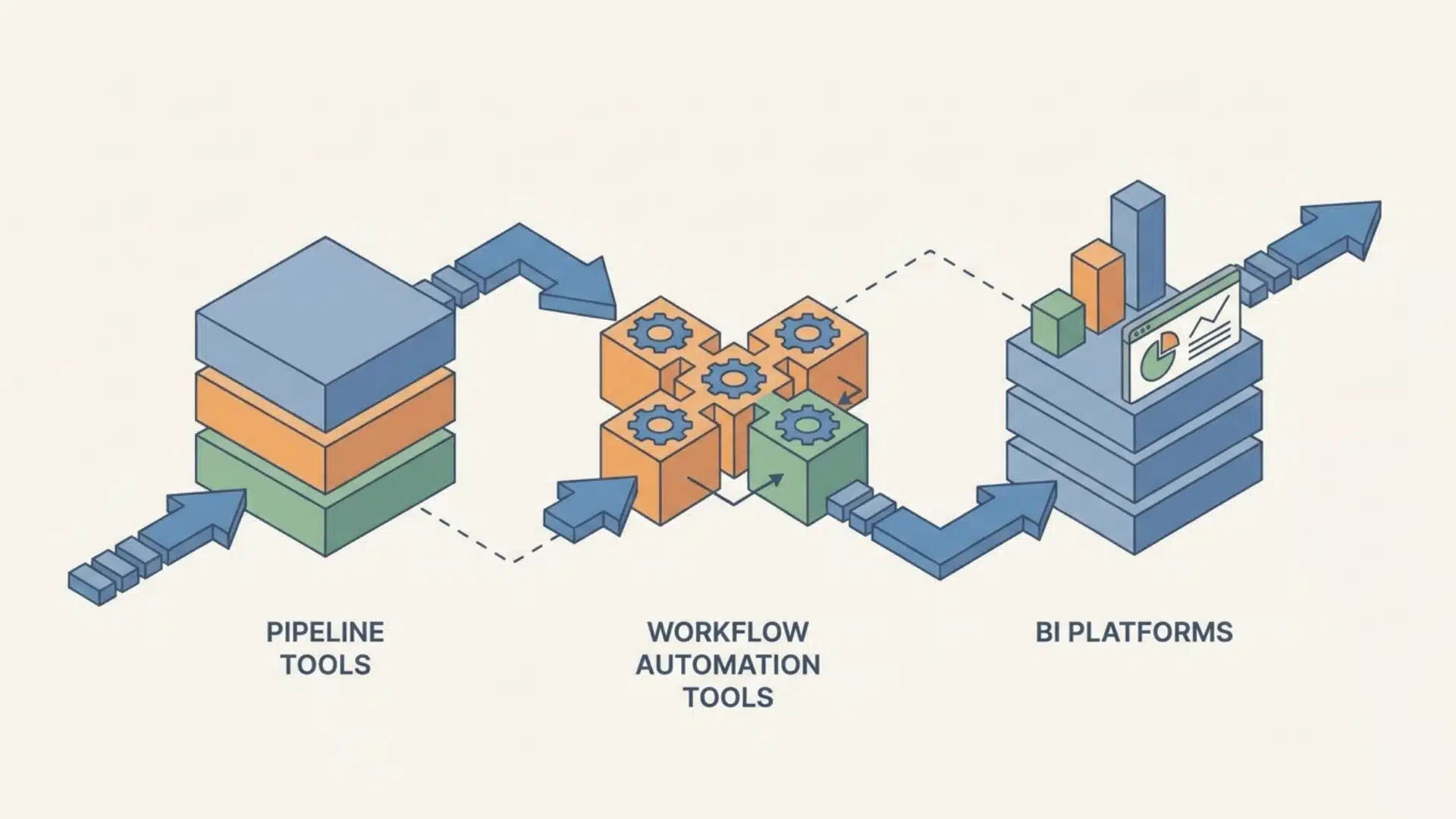
Implementation failures in data automation are rarely tool failures; they’re category mismatches.
A team picks a tool that looks right, hits a wall, and assumes the tool is the problem. Usually, the category was wrong from the start.
Data Pipelines & ELT
ELT tools, Extract, Load, Transform, move bulk structured data from source systems into a central storage layer, typically a data warehouse.
Fivetran, Hevo Data, and Talend all live here. What separates this category from the others is schema management.
When data moves at volume across systems, the structure of that data shifts: columns are added, field types change, and sources are deprecated. An ELT tool handles that automatically. A workflow tool doesn’t.
Fivetran and Hevo focus on connector depth and automated schema drift. Talend adds data quality enforcement at the pipeline layer itself, not just movement, but validation before the data lands.
This is the category for teams moving data into a warehouse at scale, especially when data integrity across sources matters.
Workflow & App Automation (iPaaS)
iPaaS tools automate the movement of discrete data events between business applications: a form submission triggers a CRM update, a payment triggers a Slack notification.
Zapier, Make, and ClickUp operate here. The “no-code” label gets applied to this whole category, but it obscures a real difference inside it.
Zapier works on a linear trigger-action model. One trigger, one or more sequential actions. That cleanly covers most common business workflows.
Make uses a visual canvas that supports branching, conditional routing, and multi-path logic.
If your workflow needs to behave differently depending on what the data contains, Make can express that. Zapier’s model can’t, at least not without workarounds that become hard to maintain.
ClickUp sits adjacent to this category. It automates workflows within a project management context rather than across arbitrary app stacks.
Business Analytics & BI Automation
Alteryx and Domo belong here, but calling them “visualization tools” undersells what makes this category distinct.
The defining trait is transformation-within-the-platform.
- In a pure ELT setup, transformation happens inside the warehouse, and someone else owns the query layer.
- In a BI automation platform, the analyst transforms, models, and consumes data within a single environment. That changes who owns the data and how quickly it can be acted on.
Alteryx is built for analysts who want to own the transformation logic themselves, without writing SQL.
Domo combines data integration, transformation, and dashboarding into a single governed layer, which suits organizations that want a single platform rather than a stitched-together stack.
What Actually Determines Which Category You Need
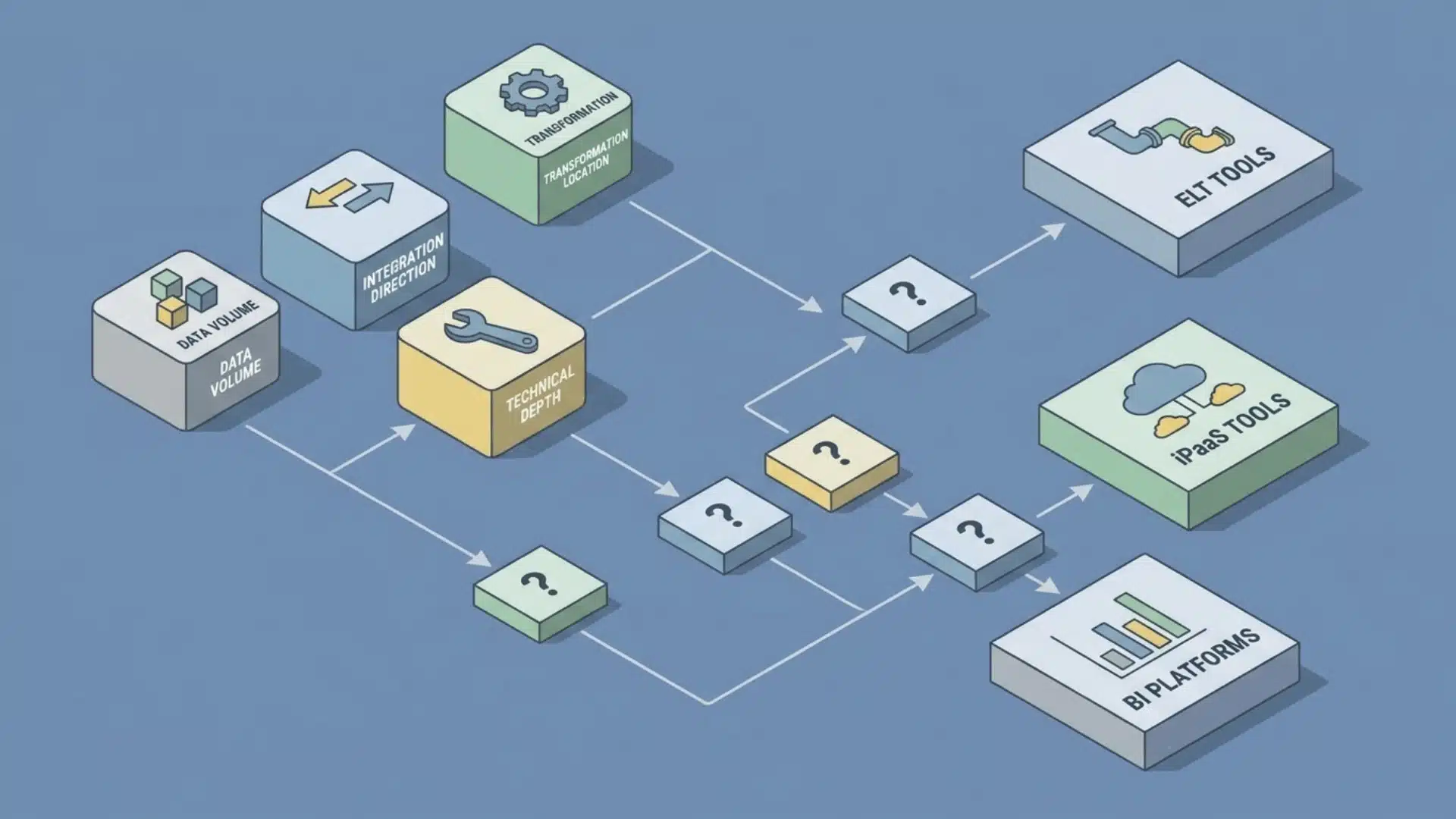
Category selection depends on data direction and volume, not on team size or budget. Those factors matter later, when you’re choosing between tools inside a category. They don’t determine which category fits your situation.
Four conditions change the answer. Work through them in order.
1. Data Volume and Frequency
Are you moving large batches of historical or accumulated data into a central system? Or are you responding to individual events as they happen, a form submitted, a payment processed, a record updated?
Bulk movement points to ELT. Event-driven movement points to iPaaS. If the answer is both, you likely need both, running in parallel, not substituting for each other.
2. Team Technical Depth
ELT tools require someone who can configure connectors, understand schema changes, and maintain pipeline logic when sources change. That doesn’t mean writing code from scratch, but it does mean comfort working at the data layer.
iPaaS tools were built for operators without that background. BI platforms sit in between; Alteryx assumes analytical fluency; Domo assumes less.
If no one on your team can own a pipeline when something breaks, an ELT tool will stall.
3. Integration Direction
Are you centralizing data, pulling from multiple sources into one place for analysis? Or routing it, pushing data between operational apps to trigger actions?
Centralizing is an ELT job. Routing is an iPaaS job. This single question eliminates one category for most teams before they open a comparison page.
4. Where Transformation Needs to Happen
Transformation before loading means ELT. Transformation inside the consumption layer means BI automation.
If your analysts need to own the logic themselves, shaping data after it lands, a BI platform gives them that without depending on an engineering queue.
One pattern worth knowing: teams that start with iPaaS and grow their data volume past event-level triggers eventually need an ELT layer alongside it. Not instead of it, alongside. The categories don’t replace each other as you scale; they stack.
Key Tools by Category: What Each One Is Built For
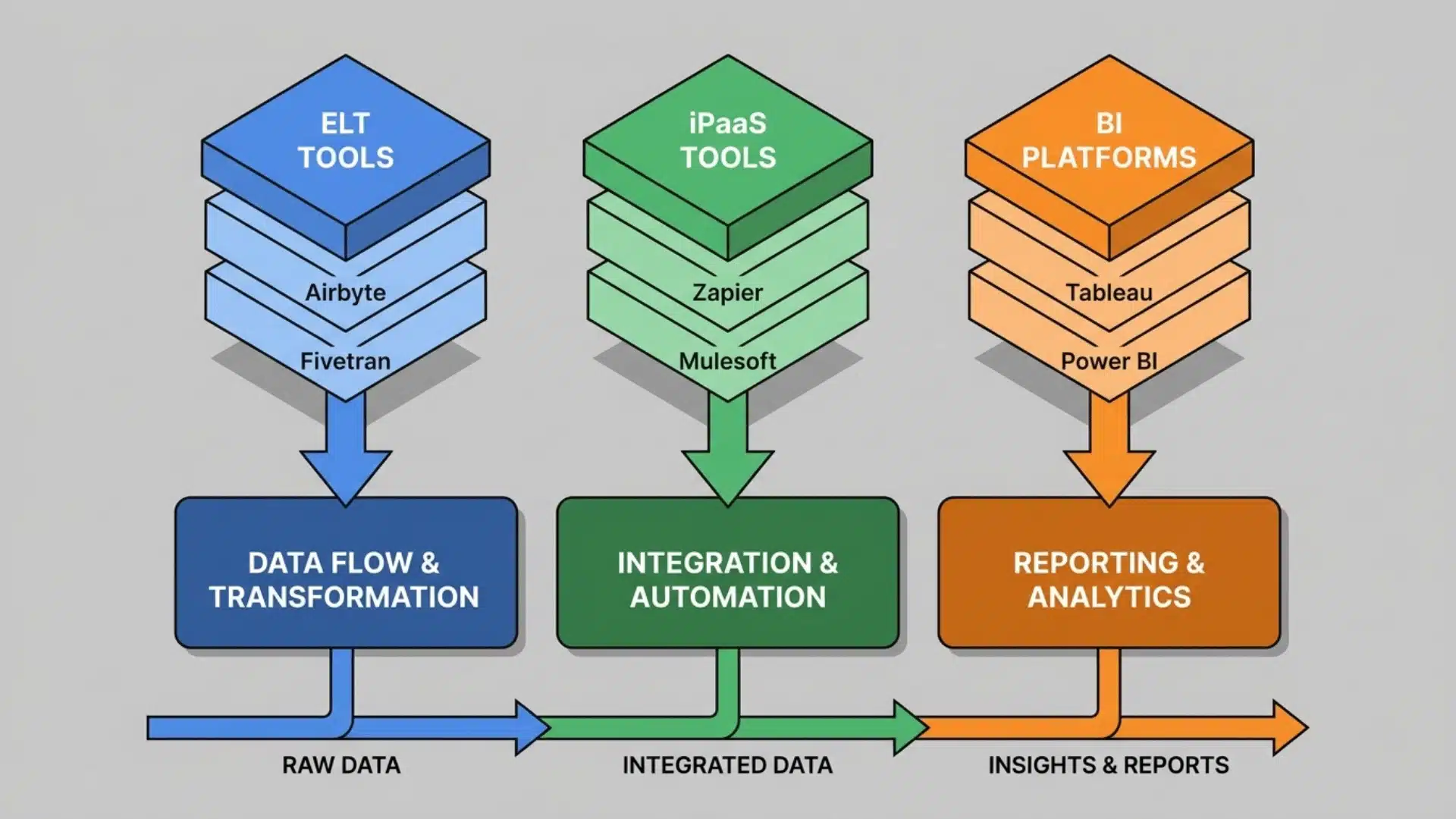
The tools below map directly to the established categories. If you haven’t settled on a category yet, the previous section is the right starting point, not this one.
ELT & Pipeline Tools: Fivetran, Hevo Data, Talend
These three tools all move data into a warehouse, but they’re not interchangeable. The difference is how much they do beyond movement.
Fivetran is built for connector reliability at scale.
Its value is that pipelines run without maintenance, schema changes are handled automatically, and the connector library is extensive. It’s the right choice when the priority is stability and speed to production.
Hevo takes a similar approach but adds a lightweight transformation layer before any data lands.
That makes it useful when you need some shaping done in transit without having to build a separate process.
Talend goes further.
It enforces data quality rules at the pipeline layer itself, flagging or blocking records that don’t meet defined standards before they reach the warehouse. That’s not a feature Fivetran or Hevo prioritizes.
For teams where data governance is a hard requirement, that distinction decides the choice.
iPaaS & App Automation: Zapier, Make, ClickUp
All three automate workflows between applications. The ceiling of what each can express is where they diverge.
Zapier handles linear workflows cleanly.
One trigger, sequential actions, minimal configuration. For straightforward automations, it’s fast to set up and easy to maintain.
Make is the right tool when logic branches.
Its visual canvas lets you build workflows that behave differently depending on what the data contains. That multi-path capability is structurally absent from Zapier’s model, not a missing feature, but a different architecture.
ClickUp automates within its own ecosystem.
If your workflows live within a project management context rather than across an arbitrary app stack, they fit. If they don’t, it doesn’t.
Analytics & BI Automation: Alteryx, Domo
Alteryx is built for analysts who want to own transformation themselves.
It’s a hands-on tool; the user shapes the data, builds the logic, and controls the output without writing SQL or waiting on engineering.
Domo combines integration, transformation, and visualization into a single governed layer.
The tradeoff is flexibility for consolidation, one platform your whole organization operates from, rather than a stack you assemble yourself.
Wrapping Up
The biggest mistake in evaluating data automation software isn’t choosing the wrong vendor. It’s skipping the category decision entirely and letting a sales page make it for you.
The tools covered here aren’t competing for the same job. They act at different layers: movement, routing, transformation, and the right starting point depends on what your data is doing, not what a feature list promises.
Get the category right first. The tool selection gets significantly easier from there.
Frequently Asked Questions
What is an example of data automation?
A customer placing an order triggers an automated sequence: the order data is extracted from the e-commerce platform, loaded into a data warehouse via an ELT tool, and simultaneously routed to a fulfillment system via an iPaaS connector, with no manual export or re-entry required. The trigger, movement, and transformation all happen without human intervention.
What is the difference between data automation and RPA?
RPA (Robotic Process Automation) mimics human UI interactions to move data through systems that lack APIs; it works at the interface layer. Data automation operates directly at the data layer, using APIs and native connectors. RPA is a workaround for legacy systems; data automation is the native architecture for modern connected stacks.
What is the 80/20 rule for automation?
The principle holds that 80% of the value of automation comes from automating 20% of workflows, typically the highest-volume, most repetitive data movements. In practice, this means identifying which manual data transfers happen most frequently and carry the highest error cost, and automating those first before expanding scope.
Can a business use more than one category of data automation tool at the same time?
Yes, and most mature data stacks do. An ELT tool like Fivetran handles bulk pipeline movement into a warehouse, while Zapier manages real-time app-to-app routing for operational workflows, and Domo or Alteryx handles transformation and visualization. The categories are complementary, not competing; they act at different layers of the same data infrastructure.





