


Most teams evaluating SaaS integration platforms compare features first, without identifying the type of integration problem they actually need to solve.
That mistake leads to costly mismatches, long onboarding cycles, and platforms built for entirely different technical requirements or operational teams.
Integration platforms serve different purposes. Some handle workflow automation. Others support embedded integrations, API orchestration, enterprise connectivity, or developer-first infrastructure.
Best SaaS Integration Platforms by Category
Not all integration platforms solve the same problem. Some are built for simple SaaS automations. Others handle enterprise infrastructure, embedded product integrations, or unified access to entire software categories.
The platforms below are grouped by the type of integration challenge they solve best.
Workflow Automation and iPaaS Platforms
Workflow automation and iPaaS platforms let internal teams connect cloud apps through visual workflows, no code required. They work well for SaaS-to-SaaS connections but struggle with legacy systems and large-scale data environments.
Most of these platforms move data in one direction. A trigger fires, an action runs, and that’s it. If you need changes in one app to automatically reflect in another in real time, you’re looking at two-way sync which lives further up the stack in enterprise platforms.
1. Zapier
Zapier connects thousands of apps through simple trigger-and-action workflows. You can build something useful in minutes, and no technical knowledge is required.
It’s the right starting point for straightforward automations between popular SaaS tools. The free tier caps at 100 tasks per month. Paid plans start to strain when workflows exceed a few hundred steps or require looping, batching, or data transformation; tasks Make or Workato handle without workarounds.
Complex branching logic or high-volume data flows will quickly expose those limits.
2. Make (Formerly Integromat)
Make uses a visual canvas where you build multi-step scenarios as a flowchart. Same buyer profile as Zapier, but with a higher ceiling.
If your workflows have conditional logic, multiple branches, or need precise data mapping, Make handles that without forcing you to write code.
3. Workato
Workato sits at the edge of this category and the next. It’s workflow automation, but with AI-assisted recipe building and stronger governance features.
Operations teams use it. So do IT teams at mid-market companies. If your automations touch sensitive data or cross departments, Workato is worth evaluating before jumping to a full enterprise platform.
4. Tray.ai
Tray.ai runs more technical than Zapier or Make. It’s still workflow automation, but it assumes your ops team has some technical support available.
You get more flexibility in how you structure integrations, and it handles more complex logic where lighter tools fall short.
5. Celigo
Celigo is built around ERP and e-commerce workflows, think NetSuite, Shopify, and Amazon. If your integrations live in that world, Celigo’s pre-built connectors and templates will save you significant setup time.
Outside that vertical focus, it’s a capable iPaaS. But its specificity is exactly what earns it a place on this list.
Enterprise API and Legacy Integration Platforms
Enterprise integration platforms support technical teams connecting legacy systems, on-premises infrastructure, and high-volume pipelines with built-in governance, monitoring, and error handling.
Unlike workflow automation tools, many of these platforms support two-way sync: changes on either side of the connection stay in sync automatically. That really helps when you’re moving data between systems of record where inconsistency creates real operational risk.
6. MuleSoft Anypoint Platform
MuleSoft connects SaaS, legacy systems, and on-premises infrastructure through a hybrid architecture. It includes full API management, so you’re not just connecting systems; you’re governing how they communicate.
A standard MuleSoft deployment involves building APIs in Anypoint Studio, configuring DataWeave transformations for data mapping, and deploying to CloudHub or on-premises runtimes. That’s typically a months-long project requiring dedicated integration developers or a systems integrator.
Salesforce owns it, which matters if your stack is Salesforce-centric. Not the right tool if you need something running in days.
7. Boomi
Boomi is a unified platform covering integration, master data management, and B2B/EDI in one place. It overlaps with Workato at the enterprise boundary, but the distinction is meaningful.
Workato leans on automation and AI-assisted workflows. Boomi leans on data integrity and B2B data exchange. If your priority is clean, governed data moving between complex systems, Boomi is the stronger fit.
8. Jitterbit
Jitterbit sits between workflow iPaaS and full enterprise platforms. It’s ERP-focused, with AI-assisted data mapping that reduces the manual work of connecting complex systems.
Easier to implement than MuleSoft, and the ceiling on capability is lower to match. For midmarket companies running NetSuite or Salesforce who need more than Celigo but less than a full enterprise deployment, Jitterbit is worth serious consideration.
Embedded iPaaS Platforms
Embedded iPaaS lets SaaS companies build integrations directly into their product — handling authentication, scaling, and API changes so engineering teams stay focused on core development.
The distinction from other categories is who experiences the integration. With workflow automation, your internal team uses it. With embedded iPaaS, your customers use it inside your product, under your branding.
9. Paragon
Paragon gives SaaS companies a library of prebuilt integrations they can embed directly into their product UI. It’s white-labeled, so your customers see your branding, not Paragon’s.
Your engineering team owns the setup and configuration. Your customers get native integrations without your team building each one from scratch.
10. Prismatic
Prismatic is an embedded integration platform with a low-code builder designed for B2B SaaS teams. It lets you build, deploy, and manage integrations inside your product without a dedicated integrations team.
Verify current product availability before committing. The embedded iPaaS space is consolidating — confirm Prismatic’s independent status at the time of publication.
11. Alloy Automation
Alloy targets e-commerce and SaaS companies that need embedded automation, not just data sync.
If your product lives in the e-commerce stack and your customers need workflow automation between their tools, Alloy’s vertical focus gives it an edge over more general embedded platforms. Outside that vertical, Paragon or Prismatic is likely the stronger fit.
Unified API Platforms
Unified APIs let developers integrate an entire software category through one interface, normalizing vendor differences so teams stop rebuilding the same integration for every new customer tool.
Where embedded iPaaS gives you a builder to connect individual apps, unified APIs give you a single normalized schema for an entire category. Connect once to the unified API, and you get access to every vendor in that category: past, present, and future.
12. Merge
Merge offers unified APIs across HR, payroll, ATS, accounting, and CRM categories. As of mid-2025, it also covered ticketing and file storage; verify current category coverage before publishing, as the list continues to expand.
You connect to Merge once per category and get access to dozens of vendors through a single normalized data model. The core value isn’t the connection itself, it’s that Merge absorbs the differences between vendors so your team doesn’t have to.
13. Finch
Finch does one thing: HR and payroll. If your product needs to read or write employment data like headcounts, compensation, or payroll runs, you’d otherwise need separate API connections to Workday, ADP, Gusto, Rippling, and every other system your customers use.
Finch replaces that with a single normalized API. The trade-off against Merge is breadth: Finch covers fewer categories but goes meaningfully deeper in the ones it does.
14. Codat
Codat covers accounting, banking, commerce, and lending platforms. It’s built for fintech and SMB software companies that need reliable access to financial data across multiple vendors.
If your product sits in the financial data layer and your customers use different accounting or banking tools, Codat removes the vendor-by-vendor integration work.
15. Apideck
Apideck spans CRM, HRIS, accounting, and ticketing categories through a single unified API layer. It handles authentication, data normalization, and connector management across vendors.
For SaaS teams that need broad category coverage without building and maintaining individual connectors, it’s a practical alternative to Merge.
What “SaaS Integration Platform” Actually Covers
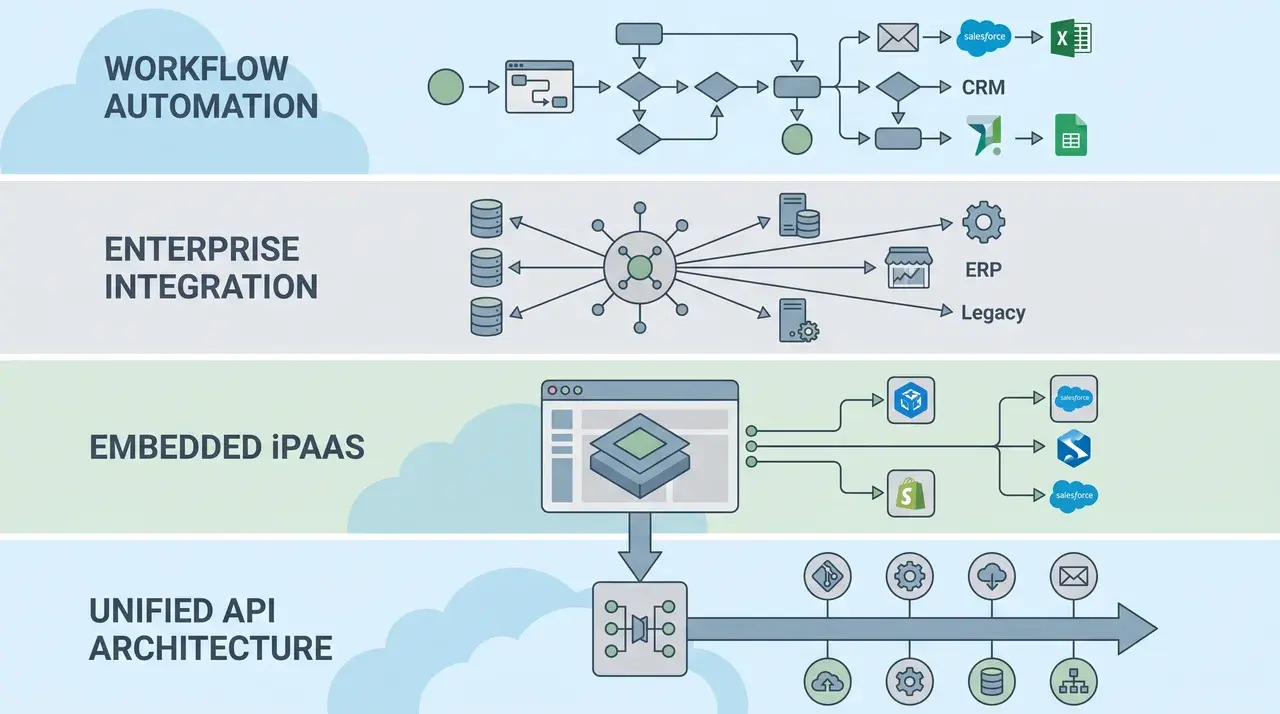
The platforms above look like they’re competing with each other. Most of them aren’t. They’re solving integration at completely different layers of the stack, for different users, against different systems.
The term “integration” covers a lot of ground. The right platform depends on who manages the connection and where it lives.
One thing that often gets missed: whether the platform moves data one way or both ways.
One-way automation tools watch for a trigger and push data when it fires. Two-way sync platforms keep both sides updated automatically, and changes in either app reflect in the other. Most workflow automation tools operate one-way. Two-way sync is more common in enterprise and embedded platforms where data needs to stay current on both sides.
The four platform categories break down like this:
- Workflow automation and iPaaS: for internal ops teams connecting the cloud tools they already use
- Enterprise API and legacy integration: for IT teams and developers handling large-scale or on-premises systems
- Embedded iPaaS: for B2B SaaS companies building integrations directly into their own product
- Unified API: for developers who need one interface to connect an entire category of software at once
These aren’t competing options. They solve integration at entirely different layers. Picking one when you need another doesn’t give you a worse result, it gives you the wrong result entirely.
How to Choose the Right Category for Your Situation
Choosing the right integration platform depends less on connector count and more on who will build, manage, and maintain the integrations over time. Start with your situation, not the feature list.
| Situation | Best Integration Category | Why It Fits |
|---|---|---|
| Automating workflows between modern cloud applications | Workflow iPaaS | Best for internal SaaS-based automations with low-code workflow building and faster deployment |
| Connecting legacy systems, ERPs, on-premise infrastructure, or custom data formats | Enterprise Integration Platform | Designed for complex enterprise environments that require deeper infrastructure control and data transformation |
| Adding native integrations directly inside a SaaS product | Embedded iPaaS | Allows software companies to offer customer-facing integrations without building everything internally |
| Supporting many integrations across an entire software category | Unified API Platform | Simplifies development by providing one standardized API for multiple third-party applications |
| Enabling non-technical teams to monitor and manage integrations | Workflow iPaaS or Low-Code Platforms | Visual interfaces reduce operational complexity and simplify troubleshooting |
| Handling developer-controlled integrations with custom logic and infrastructure oversight | Enterprise Integration Platform | Gives engineering teams greater flexibility, scalability, and control over failures and orchestration |
Once you’ve identified the right category, four criteria separate strong platforms from weak ones within it.
Connector coverage is how many of the specific tools you need are natively supported. A platform with 7,000 connectors is only useful if your systems are on that list, verify before you commit.
Ease of use relative to your team matters because a powerful platform your ops team can’t run without engineering will create a bottleneck. Match the builder interface to whoever maintains the integrations day-to-day.
Governance and error handling become critical at scale. Platforms without visibility into failed runs, retry logic, or audit trails become liabilities when integrations break in production.
Scalability covers both data volume and team growth. A platform that handles 500 automations cleanly may degrade under 50,000. Check published limits and customer references at the scale you’re planning for, not the scale you’re at today.
The best platform matches your operational complexity, technical resources, and long-term maintenance requirements, not simply the one with the largest integration marketplace.
Conclusion
Choosing a SaaS integration platform gets easier the moment you stop treating it as a product decision and start treating it as an architecture decision.
The category you need depends on who owns the integration, what systems are involved, and where the connection needs to live. Get that right, and the shortlist writes itself.
The right starting point is the category that fits your situation; not the name that appears most often on other lists.
Frequently Asked Questions
What is the difference between iPaaS and a SaaS integration platform?
iPaaS is one category within the broader SaaS integration platform market, which also includes enterprise integration, embedded iPaaS, workflow automation, and unified API solutions.
Which SaaS integration platform is best for small businesses?
Small businesses usually benefit most from workflow automation platforms like Zapier or Make because they support cloud app integrations without requiring technical expertise or developers.
What is embedded iPaaS, and do I need it?
Embedded iPaaS lets a SaaS company ship integrations as a native feature inside its own product. Instead of customers leaving your UI to configure connections elsewhere, the integration lives in your product under your branding. If you’re a B2B SaaS company fielding customer requests for integrations with tools like Salesforce, HubSpot, or NetSuite, embedded iPaaS is almost certainly the right category.
Can I use more than one type of integration platform?
Many organizations use multiple integration platform categories simultaneously because workflow automation, enterprise integration, embedded iPaaS, and unified APIs address distinct integration requirements.





