
Strong decisions begin with understanding the software category before comparing products. The right business software can improve efficiency, reduce manual work, and support steady business growth.
Many software purchasing decisions focus too quickly on pricing, features, or recommendations. Another company’s setup may not match your processes, goals, or operational structure.
A better approach is to understand the core components of business software and why integration between tools matters as much as the tools themselves.
What is a Business Management Software?
Business software is any digital tool an organization uses to perform, automate, or manage an operational function at any scale across any industry.
It covers the invoicing app a freelancer opens on Monday morning and the integrated system a logistics company runs across five countries.
The category is defined by purpose, not by size or complexity.
A tool built to help a company track sales, manage payroll, or coordinate projects is business software. A word processor or browser isn’t; not because it’s simpler, but because it wasn’t built to manage an operational function. What it was designed to do is what places it in the category.
What Does Business Software Include?
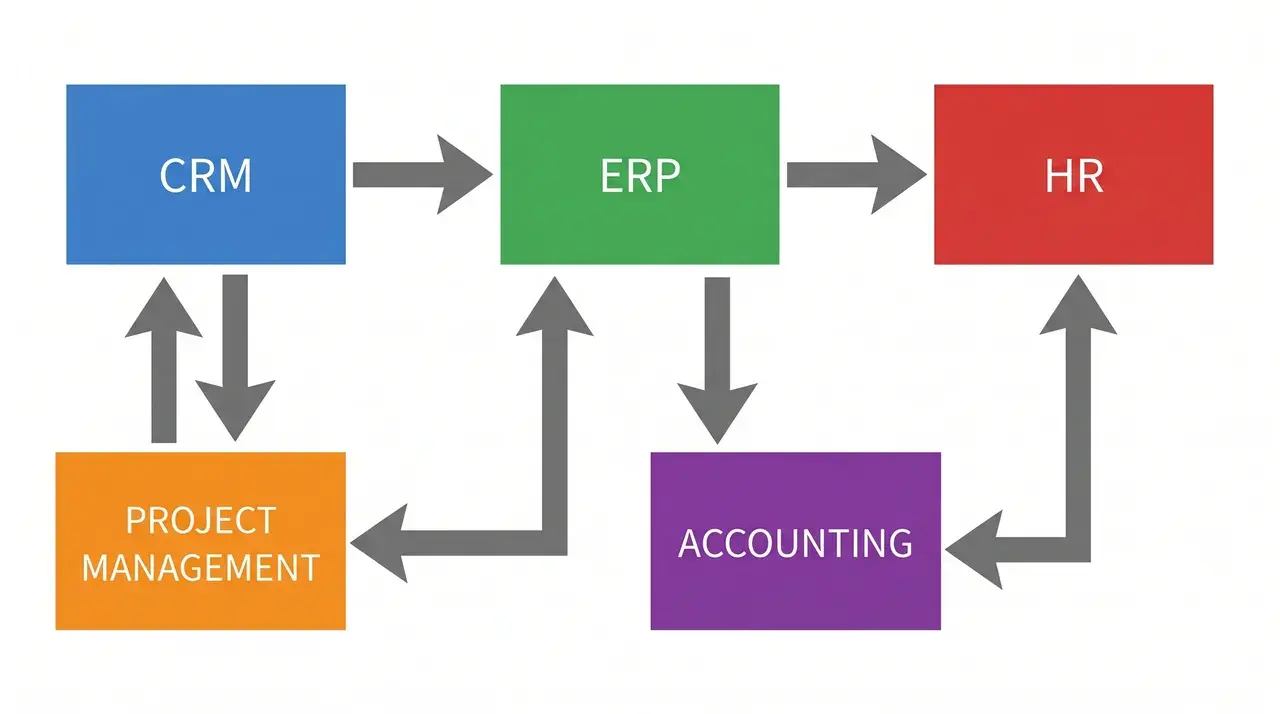
Business software breaks down into five core categories: CRM, ERP, project management, accounting, and HR. Each one targets a different operational problem.
The categories don’t operate in isolation, and that’s what matters more than any individual label.
The data flowing through one system directly affects how useful another becomes. Understanding that relationship changes how you think about software, not just what you pick.
Customer Relationship Management (CRM)
A CRM solves one problem: you’re losing track of your customers.
Who did you speak to, when, about what, and what happens next? Without a dedicated system, that information lives in inboxes, spreadsheets, and people’s heads.
A CRM brings it into one place. Sales teams use it to manage pipelines. Support teams use it to track history. The common thread is visibility into every customer interaction.
Examples: Salesforce and HubSpot for larger sales teams; Zoho CRM and Pipedrive for smaller operations.
Enterprise Resource Planning (ERP)
An ERP solves a different problem: your back office is running on disconnected systems.
When finance, inventory, supply chain, and HR each keep their own records, reporting becomes a manual exercise and errors compound.
An ERP integrates those functions into a single system. What gets entered in one place updates everywhere else. For larger organizations managing significant operational complexity, that integration is the point.
Examples: SAP and Oracle for enterprise-scale deployments; NetSuite for mid-market organizations.
Project Management Software
Project management software solves the coordination problem.
Who owns what, by when, and how does it connect to everything else? Without a shared system, the answer lives in someone’s inbox or comes up in a meeting. That’s functional, but it’s slow, and it doesn’t scale.
These tools give teams a shared view of tasks, timelines, and dependencies.
A deadline that shifts in one part of a project surfaces immediately across everything connected to it, rather than surfacing when someone misses it. For remote or cross-functional teams, that kind of shared visibility matters more than any individual feature.
Examples: Asana and Jira for structured task tracking; Trello and Monday.com for lighter workflow management.
Accounting and Finance Software
Accounting software solves the numbers problem.
Invoicing, payroll, expense tracking, and financial reporting are functions every business has to get right. Manual handling is where costly mistakes happen.
Accounting tools automate the routine work and produce the records you need for tax compliance, cash flow management, and business decisions.
Small businesses often start here before adding anything else.
Examples: QuickBooks and Xero for small to mid-sized businesses; Sage and FreshBooks for freelancers and small teams.
HR Software
HR software solves the people operations problem.
It covers a wider range than most people expect: job posting, applicant tracking, onboarding, benefits administration, attendance, and performance reviews.
Without it, HR teams are managing all of that across spreadsheets and email threads.
The risk isn’t just inefficiency.
- A performance review cycle that runs on manual reminders gets missed when someone is out.
- Benefits enrollment deadlines managed in a shared spreadsheet create audit exposure.
These aren’t edge cases, they’re the normal failure modes of HR operations that haven’t been systematized.
Common examples: BambooHR and Workday for mid-to-large organizations; Gusto for small businesses managing payroll and benefits.
Why the Category Boundaries Matter Less Than They First Appear
The categories above describe what each system does on its own. What they don’t describe is what happens at the handoffs, and that’s where most operational problems actually live.
- A CRM tracking a closed deal needs to pass that information to finance.
- Finance needs payroll data from HR.
- Inventory levels in an ERP affect what the sales team can promise in the CRM.
These systems share data, or they should. When they don’t, someone is manually moving information between them, and that manual step is where errors enter.
Some businesses solve this with an all-in-one platform that bundles several categories together. Others build a stack of separate, specialized tools connected by integrations.
Neither approach is wrong. But the choice is really about how your data needs to move, not which software has the best feature list.
What Business Software Is Not

Business software is not exclusively for large companies, and it is not the only digital tool used at work. Both assumptions are common. Both lead people to either over-invest or overlook what they actually need.
A word processor or web browser isn’t business software just because someone opens it in an office.
General productivity tools are built for broad personal use. They cross into business software territory only when deployed specifically to automate or manage an operational function.
The boundary is functional, not formal. The same tool can sit on either side of it, depending on how it’s being used.
Why Does Business Software Matter?
Business software reduces errors, speeds up decisions, and removes the manual work that slows teams down; not as a promise, but as a direct result of how it works.
Take errors first.
Most mistakes in business operations don’t come from carelessness. They come from re-entering the same data across multiple systems. When software handles that transfer automatically, the error rate drops because the human step is removed.
Decisions work the same way.
Without integrated software, producing a report means pulling data from several places, reconciling it manually, and hoping nothing has changed while you’re doing it.
That process is always looking backward. When your systems share data in real time, the picture you’re working from reflects what is actually happening, not what someone had time to enter last Thursday.
That said, none of this is automatic.
Software that sees inconsistent adoption produces incomplete data, and incomplete data undermines everything it was meant to solve.
A CRM where half the sales team logs activity and half doesn’t gives you a pipeline view that can’t be trusted.
An accounting system where expenses get entered weeks late creates cash flow reports that are structurally unreliable.
The tool delivers on its purpose only when the team uses it consistently, which makes rollout planning and clear process ownership as important as the software selection itself.
How to Choose Business Software
Start with the problem, not the product. The most common mistake in software selection is evaluating tools before clearly defining what needs to change in the current operation.
Before comparing options, answer three questions:
- What manual process or coordination failure is costing the most time or producing the most errors?
- Which department owns that problem?
- And does a fix there require other systems to change with it?
From there, the shortlist becomes easier to build. A business managing customer relationships across a sales team needs a CRM before anything else. A business running disconnected finance and inventory functions probably needs an ERP, or at minimum, an integration between its accounting and stock management tools.
The practical criteria to weigh when comparing options:
- Fit to your process: Does the software support how your operation actually runs, or would you need to change your processes to match the software?
- Integration capability: Can it connect cleanly to the other tools already in place, or does it create a new data silo?
- Total cost: Licensing or subscription fees are only part of the picture. Implementation, training, and ongoing support all add up.
- Scalability: Will the tool still work if headcount doubles or transaction volume grows significantly?
The goal is not to find the most feature-rich option. It’s to find the tool that solves the right problem without creating new ones.
Wrapping Up
Business software isn’t a single thing you buy. It’s a set of connected tools, each solving a distinct problem and working best when those solutions talk to each other.
The category is broader than most people assume and more interconnected than most guides explain. Size doesn’t determine what you need. Your operations do.
If there’s one thing worth taking from this: don’t evaluate tools in isolation. Understand the problem first, then look at how a potential solution fits into the wider picture.
The category labels are useful shorthand, but they describe functions, not answers. The answer comes from understanding which function is breaking down in your operation and what it needs to connect to in order to work properly.
Frequently Asked Questions
What is an example of business software?
Salesforce, QuickBooks, and Asana are common examples of business software that help companies efficiently manage customer relationships, financial reporting, and project coordination across operational needs.
Is Microsoft Office considered business software?
It depends on how it is used. Office applications are general productivity tools by design, but when deployed to manage operational workflows, such as using Excel for financial reporting or Outlook for customer communication, they function as business software.
What is the difference between business software and enterprise software?
Enterprise software supports large organizations with complex operations, while business software also includes simpler tools used by small businesses and sole traders for daily management.
Do small businesses need business software?
Yes. Small businesses use accounting software, scheduling apps, and CRM tools to manage daily operations efficiently, often using simpler, more affordable systems than those used by larger companies.